Diagnose garbled text after a website host move
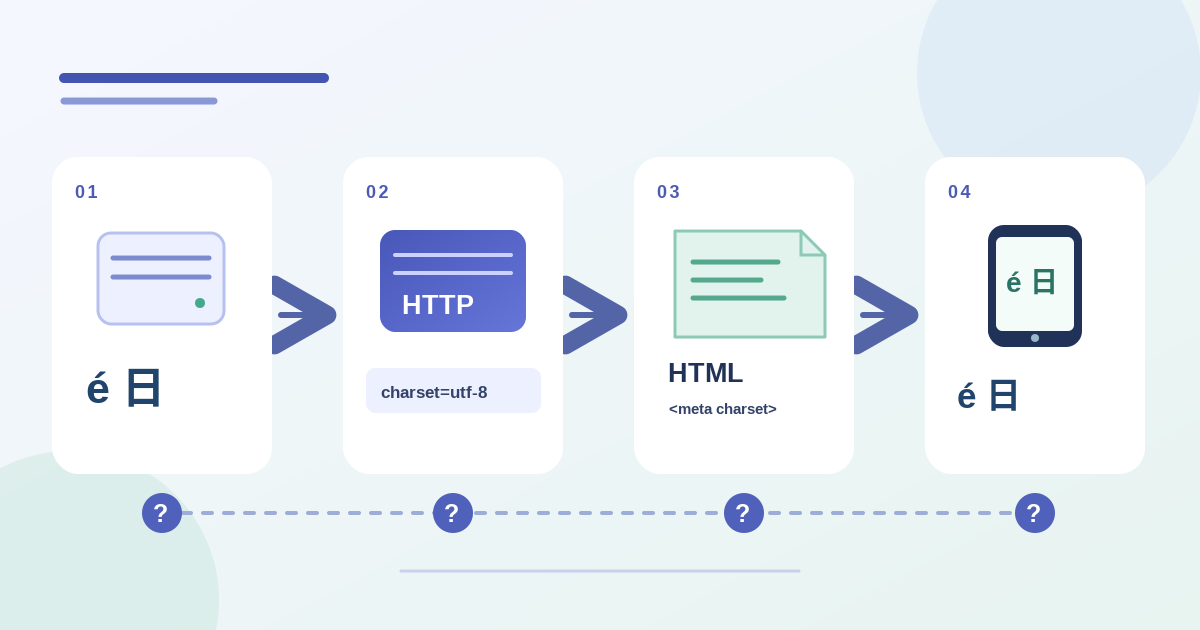
After a host move, an event title that used to read “Café del Lago” may appear as “Café del Lago,” or as letters with replacement marks. Changing every charset setting at once can hide where the text was damaged. Follow one approved sample from its source to the visitor page, and change only the layer that first diverges.
Boletolibre editorial team
Published
Choose one safe sample and locate the first change
Pick a public, non-personal sample with non-ASCII characters, such as an approved venue or event name, and keep the exact expected spelling from the source owner. Record one affected URL, the visible result, the old-host or pre-move reference if available, and the time. Note whether the error appears in the page title, body, navigation, a downloaded file, or content loaded later. A single screenshot proves what a visitor saw; it does not tell you whether the server stored the wrong characters or the browser decoded good bytes with a wrong label.[4][1]
Compare the same sample in four places: the authorized content source or export, the response for the specific HTML or data resource, the browser's parsed text, and the painted page. Use browser Network tools to identify the document and any separate JSON response that supplies the text. A browser's text preview is already decoded, so do not call that a raw-byte capture. If byte evidence is needed, ask an authorized operator to preserve the original response or export in a private workspace; keep personal data and secrets out of the worksheet. The first stage where the sample changes is a stronger lead than the visual symptom alone.[2][3]
Inspect the response and its HTTP charset
In the Network response for the affected resource, record its final URL, status, media type and any `Content-Type` charset parameter. W3C describes `Content-Type: text/html; charset=utf-8` as a way to declare how HTML bytes should be interpreted. After a host move, a new server, proxy or cache configuration can send a different label even when the HTML template is unchanged. Check the actual failing response, not only the homepage or a local preview. A response from a different URL or cached version may have different headers.[2][1]
For an HTML page, an HTTP charset declaration generally takes precedence over an in-document `meta` declaration, while a byte-order mark has still higher priority. Therefore a visible `<meta charset="utf-8">` does not cancel a conflicting HTTP header. Do not change the header to UTF-8 merely because it looks modern: first confirm the bytes of this document are really UTF-8. If the host cannot expose the bytes safely, compare a fresh approved export and request a provider trace. Record the header and in-document value side by side so the owner can correct the inconsistent layer rather than making both declarations wrong in the same way.[2][3]
Compare the HTML declaration with the actual bytes
Inspect the HTML source as delivered for an early `<meta charset="utf-8">` or equivalent declaration. W3C advises that it fit entirely within the first 1,024 bytes of the file, near the start of `head`, and that the document be saved using the declared encoding. A document with no explicit header can use its in-document declaration; a mismatch between the two is a repair candidate only after checking the actual encoding. Do not infer that an HTML meta tag controls a PDF, a separate JSON response, or text already corrupted before HTML generation.[1][3]
If a UTF-8 page is decoded under a legacy label, accented letters may turn into a recognizable sequence such as `é`. The pattern is a clue, not proof: the same characters can already have been saved in that form by an earlier import. A replacement mark such as `�` may indicate that decoding could not recover a character, but it does not identify where the loss happened. Preserve the original bytes or a known-good export before applying any conversion. A second blind conversion can make recovery harder and can damage text that was already correct.[1][3]
Check stored text and import conversions
If the network response declaration and bytes agree but the approved name is already wrong in the content source, the browser cannot repair it with a new meta tag. Compare an unchanged pre-move backup or export with the new CMS value, file or database field, and note the first import, copy or transform step that changed it. Ask the owner of that step to test a small controlled restoration from the known-good copy. Avoid bulk replacements based only on how a browser displays a few words; mixed encodings or text that was converted twice require record-level evidence.[4]
If the source is correct but the server-produced HTML or JSON contains wrong characters, investigate the generation or import boundary. RFC 8259 requires UTF-8 for JSON exchanged outside a closed ecosystem, but that requirement cannot fix a string that was already misread before serialization. Check whether the problem affects only server-rendered copy, only a separately fetched data response, or both. Preserve a short redacted sample from each side; the difference tells the maintainer which pipeline to inspect without assuming that every host move changes the database encoding.[4][5]
| First wrong place | Evidence to preserve | Next owner question |
|---|---|---|
| HTTP response label | Actual response resource, byte evidence, `Content-Type` charset | Does the serving layer label these bytes correctly? |
| HTML declaration | Early `meta charset`, header, known byte encoding | Are document and server declarations consistent? |
| Stored/imported text | Approved original and new stored value | Which copy or conversion first changed the value? |
| Final display | Correct parsed text but wrong painted glyphs | Which font or rendering path differs? |
Separate decoding errors from final display problems
Look at the browser's parsed text value separately from its appearance. If the parsed characters are correct but the screen shows empty boxes or an unexpected typeface, treat this as a display or font issue and compare the relevant font request and fallback; changing a charset is unlikely to help. If the parsed text is already `Café`, the error is upstream of painting. If only one cached visitor copy is wrong while a fresh response is right, investigate that copy's response and cache path, including its header, rather than editing the source text repeatedly.[4][6]
Use the table as a stop-and-route guide. It distinguishes an incorrect response label, an absent or conflicting HTML declaration, a damaged stored value, and a final display issue. These are not four fixes to apply together. A site can have more than one problem, especially after an import and a host switch, so work on one sample and re-evaluate after each bounded change. When evidence stops at a decoded browser preview, mark the byte-level conclusion as unconfirmed and ask for a safer capture rather than guessing from the familiar shape of mojibake.[1][3][6]
Repair one layer and retest the same route
Give the responsible operator one proposed correction, a rollback point and a test that could disprove the hypothesis. For example, if authorized byte evidence shows UTF-8 HTML served with a conflicting legacy HTTP charset, correct that response declaration in the serving layer; do not rewrite the stored title. If the stored value is already wrong, restore only affected records from a verified source after approval and keep the original for comparison. Do not run broad find-and-replace or database recoding during a live launch without a recoverable copy and a record owner.[1][4]
Retest the exact public URL in a fresh response, the affected non-ASCII sample, a plain ASCII control, and one second language or script used by the site. Check both header and rendered text after the change, plus any separate data response that supplies the page. Record who approved the change, when it was applied, the before/after spelling, and whether a cache still serves an older copy. If the text is correct in the source and network response but wrong only when painted, hand the case to the display/font owner; if the first divergence remains unknown, hand over the evidence without claiming the host move itself was the cause.[2][3][5]
Download the editable character-encoding evidence card (Markdown)
Sources and further reading
- Declaring character encodings in HTMLW3C Internationalization · Accessed
- Checking HTTP HeadersW3C Internationalization · Accessed
- HTML Standard: determining the character encodingWHATWG · Accessed
- Encoding StandardWHATWG · Accessed
- RFC 8259 section 8.1: Character EncodingRFC Editor · Accessed
- CSS Fonts Module Level 4: font matching and fallbackW3C CSS Working Group · Accessed