HTTP 405 on a Website Form: Find the Method Mismatch
A form page can load normally and still fail the moment someone presses Submit. HTTP 405 is a clue about the request method used for that target, not a generic sign that the whole website is down. Capture the failing request once, compare it with the route’s intended contract, then fix the mismatch at the layer that returned the response.
Boletolibre editorial team
Published
Read 405 precisely before changing settings
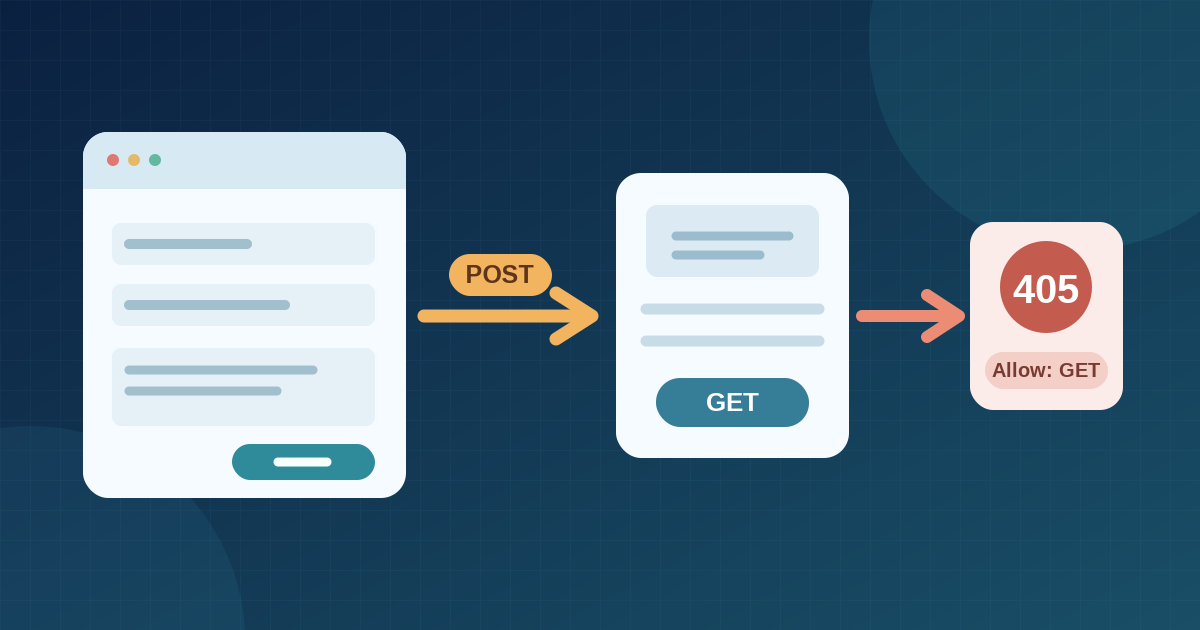
HTTP 405 means the server recognizes the request method, but the target resource does not support that method. The origin server must include an Allow response header listing methods currently supported by that resource. A 405 for POST on /contact does not prove POST is disabled everywhere. It says something about that exact target as the server currently routes it. If Allow is missing on a response labeled 405, note the discrepancy and identify which layer generated the response.[1][2]
A form can submit with GET or POST. In HTML, a missing or invalid method defaults to GET; a submit button can override the form method with formmethod. JavaScript can instead send a fetch request, so the browser’s actual Network entry is more reliable than reading markup alone. Do not change a data-creating form from POST to GET merely to make 405 disappear: submitted values could end up in the URL, and the intended write handler may not receive them.[3]
Capture one failing submission without duplicate actions
Open the browser’s Network panel and enable Preserve log before submitting, so navigation does not erase the redirect chain. Use a safe test account and non-production test data where possible. Submit once, then record the failing request’s method, final URL, status, response Allow header, initiator and any request ID. Preserve the redirect chain if the request navigated. If this is a ticket purchase, donation, registration or other action that may have succeeded upstream, check the resulting order or record before retrying; a visible error does not prove the action did not happen.[4][1]
Keep a sanitized record. Form bodies, query strings, cookies, authorization headers and HAR exports can contain names, contact details or tokens. A useful support note needs the redacted path, method, status, Allow value, time with zone, request ID, and the first layer whose logs contain the rejection—not the full submission payload.[6][4]
Compare the actual method with the intended endpoint
Check the form action URL and method, any submit-button formmethod, and the JavaScript request code. Then compare them with the application route or API contract. A static page path may respond to GET but have no POST handler. A deployment can also publish the page while omitting the form endpoint, or a changed base path can send POST to the page route rather than the intended API route. The remedy is to point the form to a real handler that accepts the intended method, not to loosen unrelated routes.[3][1]
| What the failing entry shows | What to inspect next |
|---|---|
| POST to a page that advertises Allow: GET, HEAD | Form action, base URL, deployed POST handler and any path rewrite. |
| GET when a POST handler was intended | Missing method attribute, submit-button override and JavaScript interception. |
| OPTIONS returns 405 before a cross-origin POST | Preflight handling and CORS policy at the API or gateway; the POST may never have been sent. |
| POST changed destination after a redirect | Every Location target and the actual method sent on the next hop. |
Find which layer rejected the method
Compare CDN or edge, reverse proxy, web server and application logs using the same timestamp and request ID. A proxy rule may block POST before the application sees it; an application router may match the path but allow only GET. A 405 in the browser with no application log often points upstream, but logging gaps are possible. Verify with the edge logs rather than assuming. Review recent routing, deployment, rewrite, firewall or CMS plug-in changes that affect the failing path specifically.[1]
When JavaScript calls another origin, the browser can first send an OPTIONS preflight. If OPTIONS receives 405, fix the destination’s preflight/CORS handling for the intended request. Do not label every 405 as a CORS problem: a same-origin HTML form POST normally has no such preflight. Also do not disable a firewall or allow all methods across the site to repair one route. The HTTP Allow header on a 405 is not the CORS Access-Control-Allow-Methods header; inspect the preflight response separately.[5]
Repair the route contract, then test through the public path
If the form points to the wrong path, update its action or fetch URL. If the correct path lacks a handler, deploy the intended method handler and verify the route is published. If an edge or proxy rejects the method, adjust the rule for that exact route and method after checking its security purpose. If a redirect moves the request to a GET-only destination, fix the redirect or target design and inspect the actual method at each hop. Avoid relying on a browser retry to explain what happened.[1][4]
Keep method restrictions for routes that do not need writes. A successful GET of the form page is not a test of POST submission. Test the public URL through the normal CDN or gateway, not only an internal application URL. The response Allow header should agree with the route’s supported methods when a deliberate 405 remains.[2]
Copy a compact 405 investigation worksheet
Make one copy of this worksheet per failing request. Compare observed behavior with the intended route before changing configuration. Leave out names, message text, payment details, tokens and raw cookies.
| Field | Safe record |
|---|---|
| User action and time | Submit action; UTC time; no form contents |
| Request | Method; redacted final path and host; status; request ID |
| Response | Allow value; redirect chain; first rejecting layer |
| Expected contract | Documented method and handler path for this action |
| Likely mismatch | Markup, button override, JS, rewrite, proxy or missing handler |
| Fix and proof | Exact change; one safe test; expected result or notification checked; public path verified |
Prove the form works end to end
After the fix, make one safe valid test submission through the normal browser flow. If the form validates input, make a separate intentionally invalid test. Confirm that the valid request uses the intended method and endpoint and produces the expected result. For invalid input, check the expected browser-side or server-side validation without an unintended record or notification. Check whether the route still rejects methods it should not accept; a broad “allow everything” change is a regression, not success.[1]
Monitor 405 responses on the corrected route after release and compare them with normal traffic. If visitors still see a 405, collect the new request’s method, path, Allow header, timestamp and request ID: the remaining failure may be at a different hop or limited to one browser flow.
Sources and further reading
- RFC 9110 §15.5.6: 405 Method Not AllowedIETF / RFC Editor · Accessed
- RFC 9110 §10.2.1: AllowIETF / RFC Editor · Accessed
- HTML Standard: form submission methodWHATWG · Accessed
- Network features referenceChrome for Developers · Accessed
- Fetch Standard: CORS-preflight requests and responsesWHATWG · Accessed
- Logging Cheat Sheet: data to excludeOWASP · Accessed