HTTP 429 during an event on-sale: find the limit before changing it
A 429 during an on-sale is a rate-limit signal, not proof that the website host is out of capacity. The limit may be at the edge, in the application, on an API, or at the external ticket provider. Your first job is to find the exact failing request and the system that issued the response. Changing a rule without that evidence can expose a login or checkout to abuse while buyers still fail.
Boletolibre editorial team
Published
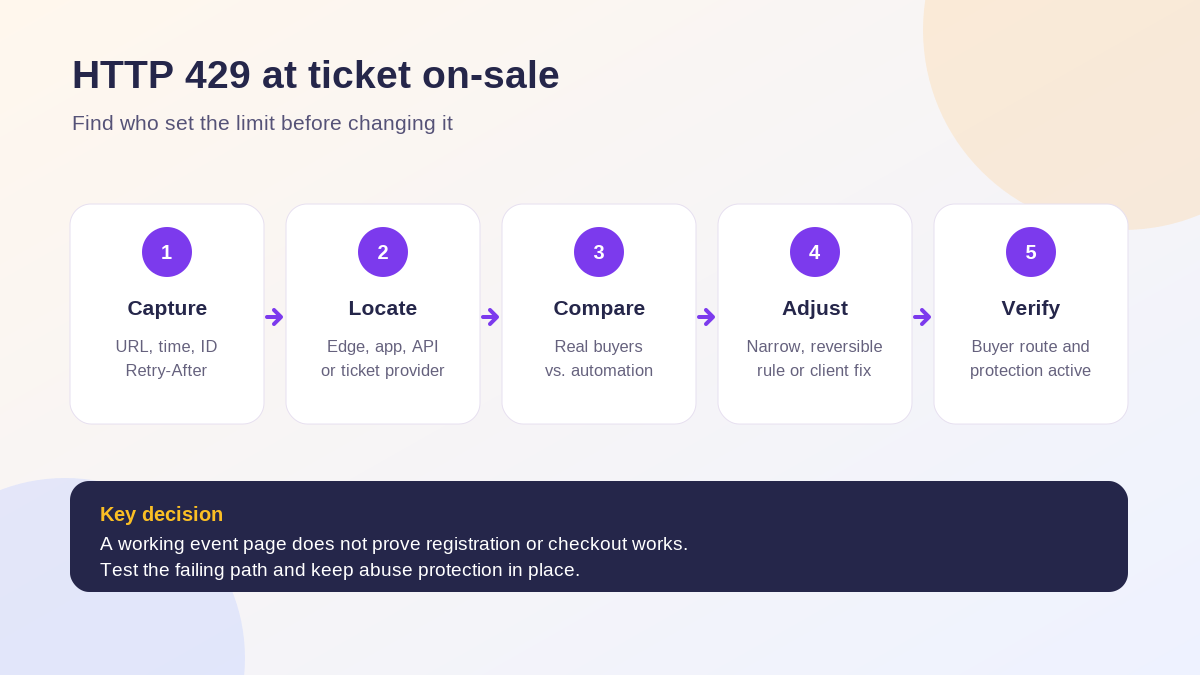
Capture one failing request safely
Download the editable 429 incident worksheet (Markdown, English)
Record the public URL, request method, time with zone, status code, response headers and any request or correlation ID. Note whether the error appears on the event page, a background API call, registration form or checkout destination. Test from a second network and a logged-out browser; a single office network or mobile carrier can put many people behind one public IP. Do not keep refreshing a purchase or submitting a form to investigate.[1][2]
Check whether the response includes Retry-After. It can give a delay in seconds or an HTTP date; it may also be absent. If present, clients should respect it instead of starting a tight retry loop. HTTP 429 means a client exceeded a request rate, but the standard does not prescribe how that client is identified or how requests are counted.[3][1]
Build an evidence chain instead of guessing from one header
In the browser Network panel, identify the exact request whose status is 429. Write down the hostname, path, method, start time, response status, Retry-After if supplied, and a request ID if one exists. A page can display an error message after a hidden API request fails, while its document request remains 200. Save the minimum necessary response details in a restricted incident record; avoid exporting session cookies, authorization headers, personal details, or payment data. The status line tells you what happened to that request, not which intermediary made the decision. RFC 6585 does not prescribe a universal identity or counter for a 429.[1]
Make a timeline across the components: browser, edge, origin, application or API gateway, and external provider. Normalize timestamps to one time zone and compare the same method and path. A matching rule ID and event for that request is positive evidence of an edge decision. An origin access-log entry with 429 and a matching request ID is positive evidence that the request reached origin. A provider-domain 429 belongs in the provider's incident path. A missing event or log line is weaker evidence: logging can be disabled, delayed, sampled, or split across services, and a request blocked at the edge never reaches the origin.[4][5]
Cloudflare users should distinguish Security Analytics from Security Events. Analytics uses sampled request logs by default; Events can also show sampled event lists, and one request may generate more than one security event. Reduce the time range, check filters and available complete records, and compare independent origin evidence before concluding that a missing edge event means the edge did nothing. A `Server` header or the look of an error page can help route an investigation, but do not treat branding alone as proof of the enforcing layer.[4][5]
| Evidence | What it supports | What it does not prove |
|---|---|---|
| Matching edge rule event and request ID | The edge acted on that request | That all 429s share the same cause |
| Matching origin 429 entry | The request reached an origin component | Which application rule or dependency chose 429 |
| 429 on provider hostname | The provider path failed | That the event site's host is faulty |
| No result in sampled dashboard | No matching item was displayed | That the edge or provider never acted |
| Landing document returns 200 | The information page loaded | That registration or checkout succeeded |
Locate the service that issued the 429
Compare the timestamp and request ID in each layer you control: CDN or WAF security events, web-server access logs, application logs, API gateway and ticket-provider status or support. A 429 with a matching edge rule event points to the edge; a matching 429 in the origin log points to the origin or application. A working landing page does not prove registration works. If the 429 comes from the ticket provider's domain, your host cannot repair its rate rule. Cloudflare Security Analytics samples requests by default, so a missing edge event alone cannot rule out an edge limit; check the available full logs or rule records as well.[4][5]
Ask the owner of the enforcing layer for the matched rule, scope, threshold, counting key and mitigation action. Edge products can count by IP, user, cookie or other characteristics and may include cached requests. The same public IP can represent many real buyers. Record the evidence before changing a threshold or making an exception.[6][2]
| Observed evidence | Likely enforcing layer | Ask next |
|---|---|---|
| Edge security event matches 429 and rule ID | CDN or WAF | Which rule, count key, threshold and path? |
| Origin access log records 429 | Web server or application | Which endpoint and client pattern triggered it? |
| Public page works, API request returns 429 | Application or API gateway | Are retries or polling amplifying requests? |
| 429 on official ticket-provider domain | External provider | Is there a queue, incident or support case? |
Worked example: a broad edge action blocks a real buyer
Imagine an on-sale starting at 10:00. The public event page returns 200, but at 10:03 a buyer on venue Wi-Fi sees 429 when pressing Reserve. The browser Network panel shows `POST /api/reservations/hold` on the event site's hostname and a request ID; the response includes `Retry-After: 60`. The buyer's mobile connection can reach that step. This is a hypothetical diagnostic example, not a recommended threshold or a claim about any named ticketing system. The first conclusion is narrow: one checkout-stage request failed, and the two networks produced different results.[1][3]
The incident owner finds a matching edge rate-limit event with the same request ID and rule ID. That positive match points to the edge. The origin has no matching request, which is consistent with an edge action but would not prove it on its own. The rule's counting expression increments for repeated `GET /api/availability` requests, grouped by public IP over its configured window. Its mitigation expression is broader and also covers `/api/reservations/hold`. Several independent visitors behind the venue's shared IP can contribute to one counter; once the threshold is exceeded, the broad action can affect a legitimate reservation request. Cloudflare documents that counting and action criteria can differ, and its available counting characteristics include IP, cookie, header, host and path, depending on plan.[6][7]
Before changing anything, compare the rule's actual threshold, window and action with traffic before and after 10:00, and check whether the GET burst came from normal page behavior or abusive automation. Confirm who owns the rule and whether the reservation POST has separate protection. If the evidence supports the hypothesis, a security-reviewed temporary change can make the action apply only to the intended availability request while leaving the count and other checkout controls intact. The exact expression must be checked in the deployed product; copying a rule from this example would be unsafe. Record the old configuration, approver, change time and rollback time.[6][7]
Retest from the affected Wi-Fi and an unrelated network after the rule propagates. Verify that the hold request no longer receives an unintended 429, that the availability endpoint remains protected, and that other routes still work. Use only an approved test or non-production path for payment and confirmation. If the provider offers no safe test, mark those steps unverified and request its confirmation. The example is resolved only when the buyer path and the protection objective both have evidence, not when a single homepage refresh looks healthy.
Compare legitimate demand with unwanted requests
Sample the affected path, request rate, distinct clients, geography, user agents, referral source and success versus failure patterns over the launch interval. Separate an announced traffic surge from a looping client, aggressive polling, credential attack or scraping. Raw request volume alone cannot establish intent. If one page makes repeated API calls per visitor, fix that client behavior before increasing a limit.
Use the source matrix to keep diagnosis anchored to the observed layer. A rate limit protecting login is a different decision from a limit on an event-information page or a checkout API. Preserve sensitive logs in the appropriate restricted system and share only necessary request IDs and aggregates.
Choose a narrow, reversible response
If real buyers are being limited, prefer a scoped rule change: only the affected path and method, a justified threshold or counting window, a verified partner exception, or a temporary challenge instead of a site-wide disable. Have the security owner review the effect on abuse protection. If bots are driving the count, narrow protection to the abusive pattern. Cloudflare's rate-limit examples show that counting criteria and mitigation criteria can differ, so inspect both before editing a rule.[7]
If an application or API client is retrying, stop the loop and honor Retry-After. For a ticket provider's 429, send its support team the URL, time, request ID and observed scope; do not route buyers around an official queue or bypass the provider's controls. Record the exact temporary change, owner and rollback time.[3]
Define the smallest change and its stop conditions
Write a one-sentence hypothesis before editing: ‘Rule R counts these requests using key K and applies action A to route P; legitimate visitors are included because of condition C.’ Then write the observation that would disprove it. If the rule ID, match scope, or counted traffic is still unknown, hold the rule change and keep isolating layers. If the provider owns the 429, escalate there. If a client is generating duplicate calls, fix or pause that behavior first. If the limit protects login, verification, or a payment step, involve its security owner before relaxing anything. The goal is to reduce false positives without removing the defense that the limit was built for.
For a proposed edit, specify the affected hostname, path, method, counting key, threshold, window, action and duration. State exactly what remains protected. Take a configuration snapshot and choose one reversible change, an owner, an implementation time, and an automatic or scheduled rollback point. Compare a baseline interval with a same-length post-change interval; raw 429 counts without traffic volume can mislead when the on-sale spike changes size. Set acceptable buyer error rate and abuse indicators from real baseline and risk tolerance rather than borrowing arbitrary numbers from an example. Cloudflare's documentation shows why counting criteria and mitigation criteria deserve separate review.[6][7]
Do not proceed if no one can tell whether an action will affect checkout, if a safety-critical rule has no owner, or if the only evidence is a sampled dashboard gap. Roll back if previously working routes regress, legitimate 429s do not improve, or abusive requests, server errors, or resource pressure rise beyond the agreed guardrails. Record the actual rollback decision and time. A temporary bypass that nobody revisits is a new exposure, not an incident resolution.[4][5]
Tell attendees what is known and verify recovery
Publish only confirmed impact and a safe next step through a channel that still works. Tell attendees which path is affected and when the next update will appear; do not claim tickets are sold out or that a purchase failed until the provider confirms it. Ask people not to resubmit payment repeatedly. Keep the official ticket link and event facts visible if the information page still works.
After a change, test the event page, registration, checkout handoff and safe confirmation route from multiple networks and an ordinary buyer session. Check that 429 volume falls for legitimate traffic while abuse protection remains active, and that other paths have not regressed. Monitor the actual failing endpoint through the next burst, not only the homepage. Use only an approved test or non-production path for checkout and confirmation; if none exists, mark that step unverified and ask the provider how to check it safely.
Retest the failing route through the next demand burst
Use the original request as the primary retest target. From the affected network, repeat the same safe navigation and compare status, request ID, and any Retry-After; then repeat from a second network and an ordinary buyer session. Check the information page, registration, sign-in or verification if used, checkout handoff, and provider page as separate steps. A successful 200 on the public page is not evidence that the failed API call recovered. Do not create repeated reservations or payments merely to manufacture a success signal. Use an approved test or non-production path for checkout and confirmation, or leave that step explicitly unverified.
Keep the monitoring window open through at least the next meaningful traffic burst, not just the quiet minute after a change. Compare requests and 429s per affected route, the share of legitimate sessions that reach the next step, security actions on the abusive pattern, and unrelated errors such as 5xx. Use the same time zone, interval length, and filters as the baseline. If log coverage is sampled or delayed, say so; absence in that view is not a clean bill of health. Ask the provider to confirm its portion of the path when your logs end at a handoff.[4][5]
Close the incident in stages: ‘mitigated’ when the immediate buyer block is reduced, ‘recovered’ when the full approved buyer path works and guardrails hold through a burst, and ‘root cause confirmed’ only when the triggering counter and scope are evidenced. Keep unknown steps marked unknown. Save the decision, observed before-and-after measures, rollback or permanent-fix owner, and attendee update time in the worksheet. This prevents a temporary threshold change from becoming the unexplained default at the next announcement.
Prepare limits for the next launch
Before the next announcement, map each rate-limited path to its owner, normal request level, expected on-sale peak, counting key and escalation contact. Run a controlled load or launch rehearsal with the host and ticket provider where permitted. Prepare a rollback for each rule and a separate information channel for attendees.
Avoid prolonged accidental 429s on public content: Google treats 429 as a server-overload signal and may slow crawling. This is secondary to restoring the buyer path, but it is another reason to verify the correct response on public URLs after the incident.[8]
Sources and further reading
- RFC 6585, section 4: 429 Too Many RequestsIETF / RFC Editor · Accessed
- 429 Too Many RequestsMDN Web Docs · Accessed
- Retry-After headerMDN Web Docs · Accessed
- Security AnalyticsCloudflare Developers · Accessed
- Security EventsCloudflare Developers · Accessed
- Rate limiting parametersCloudflare Developers · Accessed
- Rate limiting best practicesCloudflare Developers · Accessed
- How HTTP status codes affect Google's crawlersGoogle Search Central · Accessed