Diagnose regional event website latency before changing hosting
A registration page can feel fast to an organizer near the server and slow to an attendee abroad. The leading Google result recommends multi-location checks, but its fixed latency bands and one-size-fits-all fixes are not a diagnosis. This event-specific workflow compares the same journey from relevant regions, separates network phases from page rendering, and assigns the next investigation to the right system owner.
Boletolibre editorial team
Published
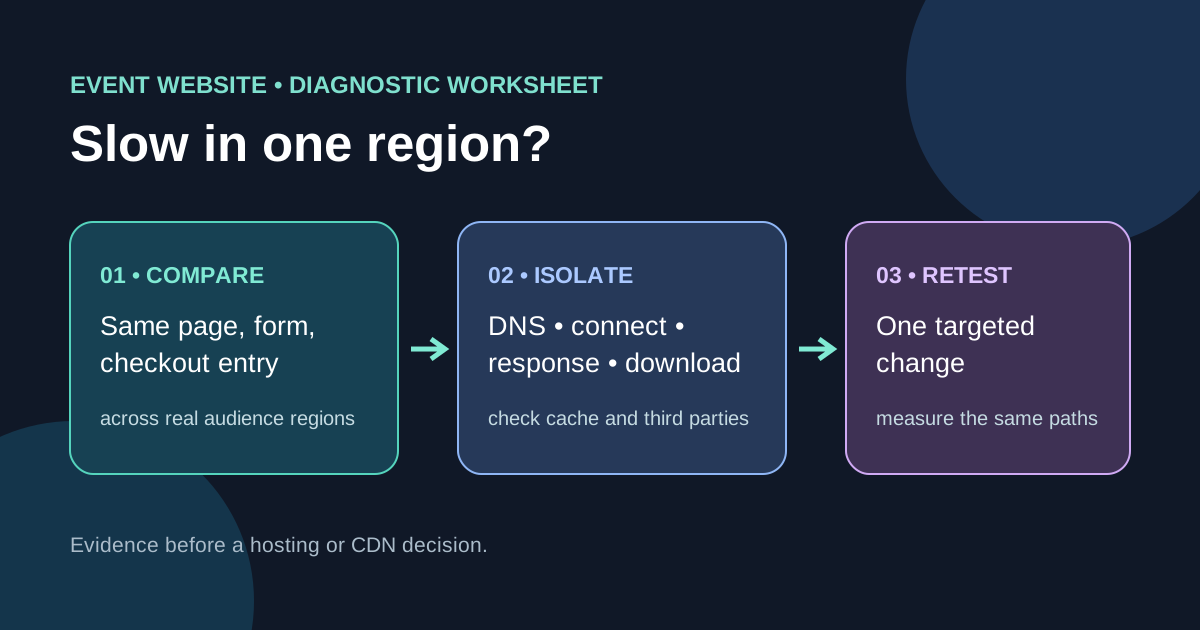
Compare the same attendee journey
Download the regional latency comparison worksheet (Markdown, English)
Start with the audience regions that matter for this event, not a map of every country. Choose identical public event page, registration form and official hosted-checkout entry URL in each location. Record event edition, timestamp and time zone, device/browser, connection, cache state, test location and URL. A third-party checkout may have different infrastructure and ownership; a slow checkout is not automatically a slow event-site origin. Keep one baseline near the main audience and at least one affected location so the comparison is meaningful.[1][2][3][4][5]
Use field and controlled measurements for different questions
If you have consented and properly configured real-user analytics, examine performance by geography and device over a comparable period. Cloudflare Web Analytics supports country filters, but country-level aggregates can hide city, carrier and device differences. Controlled multi-location tests can reproduce a route, yet each lab run represents one configured device and network. Do not treat a single remote probe or ping as proof of a visitor’s full page experience. Note traffic/sample limitations and keep individual IP addresses or attendee data out of the worksheet.[1][2][3][4][5]
Locate the slow stage before selecting a fix
In a browser network waterfall inspect the document and its critical requests: DNS lookup, initial connection/TLS, waiting for first byte, and content download. Chrome defines waiting/TTFB as including a network round trip plus server preparation, so a high value alone does not identify the server as the cause. Compare redirects, response status, asset sizes, cache hit/miss where available, and third-party requests. CloudFront logs expose edge location, result type and time-to-first-byte if enabled, but an edge code identifies the serving edge, not the visitor’s actual city. Separate public cached assets from registration and checkout requests that may not be cacheable.[1][2][3][4][5]
Assign the smallest justified next action
When only one region is affected, confirm whether the symptom is DNS, route/connection, origin response, large assets, or third-party service before changing infrastructure. If global page weight is the problem, optimize page resources first; if repeatable edge misses affect public static content, inspect cache configuration; if the backend is slow across regions, investigate application and origin. Do not move hosting or buy a CDN merely because distance appears on a map. Write a hypothesis, owner, reversible change, expected signal and retest window.[1][2][3][4][5]
Retest the same paths and record the result
After a change, repeat the same URLs and conditions and compare both the affected region and baseline. Verify event facts, registration submission behavior and the official checkout handoff, not just a fast homepage. Record before/after observations, sample count and unresolved differences. If the issue is intermittent or user reports conflict with a lab result, gather more field evidence instead of declaring the region fixed. The worksheet is a triage record, not an uptime or SEO ranking guarantee.[1][2][3][4][5]
Sources and further reading
- How to Test Website Latency: A Beginner's Guide to Diagnosing and Optimizing Network DelaysChahu · Accessed
- Network features referenceChrome for Developers · Accessed
- Why lab and field data can be differentweb.dev · Accessed
- Filters for Web AnalyticsCloudflare Docs · Accessed
- Standard logging referenceAmazon CloudFront Developer Guide · Accessed