Website 502 vs 504 errors: find the failing connection
A 502 or 504 page says that a server acting as a gateway could not complete its conversation with another server. The number narrows the failure mode, but it does not name the broken machine. Use the failing request and each layer’s evidence to find the owner before changing settings.
Boletolibre editorial team
Published
1. Read the status without overdiagnosing
HTTP 502 means a gateway or proxy received an invalid response from an upstream server. HTTP 504 means it did not receive a timely upstream response. Both describe what the reporting gateway observed, not necessarily the original defect. A timeout could begin with a blocked connection or a slow application; a 502 could occur before the application receives the request.[1][2][4][5]
| Observed result | Useful first question |
|---|---|
| 502 Bad Gateway | Which upstream response or connection failed at the reporting gateway? |
| 504 Gateway Timeout | Which upstream hop failed to answer within the gateway’s deadline? |
| A page loads but an action fails | Which individual document, API or file request returned the status? |
Do not treat the two codes as a reason to increase all timeouts. A longer deadline may hide a slow dependency while leaving visitors waiting. First learn where the request stopped.
2. Capture one reproducible failing request
Copy the full URL, method, status, timestamp with timezone and whether the failure is constant or intermittent. Note a request ID or trace ID if the response provides one. For a page that partly loads, identify the failed request in the browser network panel rather than recording only the address bar. Record a safe example without passwords, session cookies, payment details or personal data.
- Compare the homepage, the affected path and one simple static asset.
- Repeat once from a second network or device if practical; note the location and time.
- Write down any deployment, DNS, firewall or hosting change just before the first failure.
Preserve an example response and log time before retrying many times. Provider logs can show whether the error came from an edge network, a load balancer or the origin. Cloudflare explicitly separates origin-generated 502/504 responses from Cloudflare-generated ones.[3]
3. Find the layer that returned the error
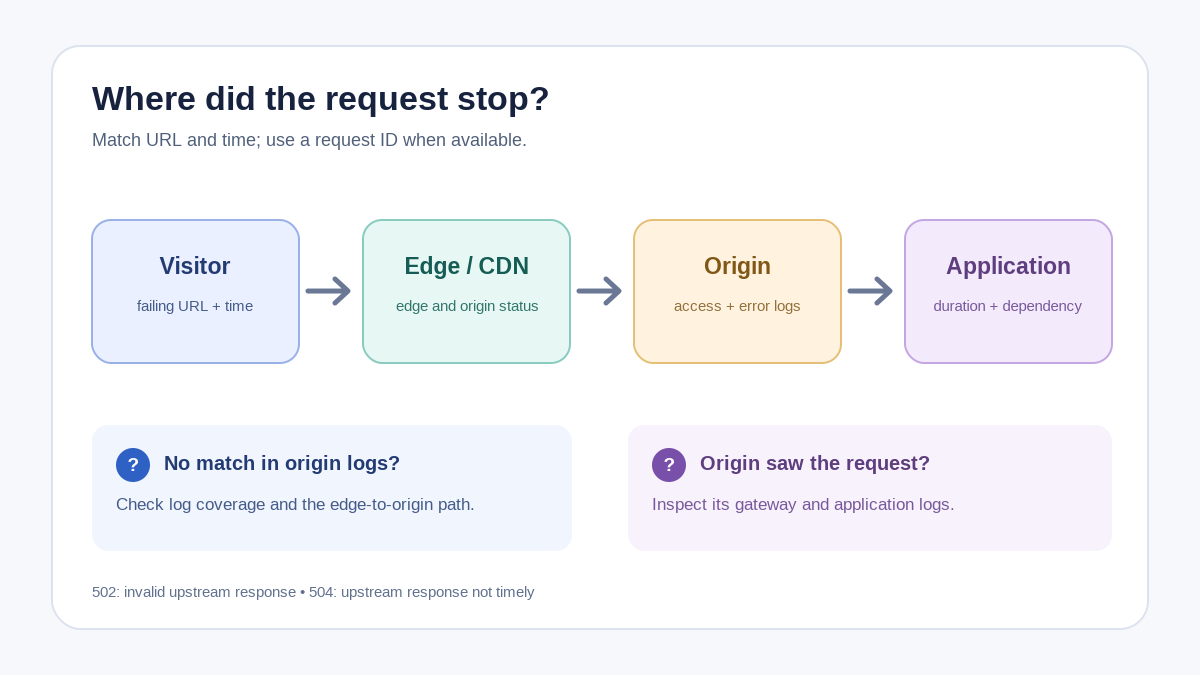
Ask the CDN or proxy for its edge status, origin status and request ID when available. Compare those with the origin access log at the same timestamp. An origin log showing 502/504 points you toward the origin’s own upstream, such as an app process. No matching origin log entry prompts a check of the edge-to-origin route, DNS, connection, TLS, firewall or an intermediate proxy. Log absence is a clue, not proof; verify log coverage and time synchronization.[3][4][5]
Provider details matter. Cloudflare documents branded versus unbranded error pages as one clue in its own network. CloudFront documents different 502 causes, including origin DNS and TLS connection problems, and 504 causes including unreachable origins and delayed responses. Use your provider’s diagnostic fields rather than assuming every CDN assigns the same status to the same cause.[3][4][5]
| Evidence pair | Likely next owner |
|---|---|
| Edge error; no matching origin log entry | CDN, DNS, network or host connection team |
| Origin request; origin gateway error | Host, reverse proxy or application team |
| Origin request; long application duration | Application or dependency owner |
| Only one path or method fails | Owner of that route or its dependency |
4. Investigate the smallest failing hop
For a 502, check the gateway error log for a rejected, reset or malformed upstream connection; then compare the configured origin hostname, port, protocol and TLS expectations with the live origin. If a recent deployment preceded it, inspect the application process and health signal. CloudFront’s 502 guidance includes DNS and TLS examples, so a 502 is not always an application crash.[1][4]
For a 504, check whether the gateway could connect to the origin at all. If it could, compare upstream duration with application and dependency logs for the same request. Look for resource saturation, a blocked downstream service, or a query that became slow. CloudFront notes that its 504 can reflect a 504 returned by the origin or an expired wait for the origin, and recommends checking reachability before application delays.[2][5]
Change one verified cause at a time. A firewall exception should be scoped to documented traffic; a timeout increase should have an understood workload and a measured target. Preserve the before/after timestamp and request ID so another owner can validate the change.
5. Verify recovery and prepare the handoff
Test the exact failing URL and action again, then a nearby path and a fresh request from another network if the issue was intermittent. Confirm both the user-visible result and the relevant edge/origin error rate for a meaningful period. A single successful refresh does not establish that an intermittent 504 is gone.
If the cause belongs to a host or CDN, send the minimum useful evidence: full URL and method, status, timestamp and timezone, request ID if available, whether a matching origin log entry was found, and the first observed failure. Describe business impact without sending secrets or private visitor data. The editable worksheet below keeps that handoff focused.
Sources and further reading
- RFC 9110 §15.6.3: 502 Bad GatewayIETF / RFC Editor · Accessed
- RFC 9110 §15.6.5: 504 Gateway TimeoutIETF / RFC Editor · Accessed
- Error 502 or 504Cloudflare · Accessed
- HTTP 502 status code (Bad Gateway)Amazon CloudFront · Accessed
- HTTP 504 status code (Gateway Timeout)Amazon CloudFront · Accessed