Event website incident report template: record impact and recovery
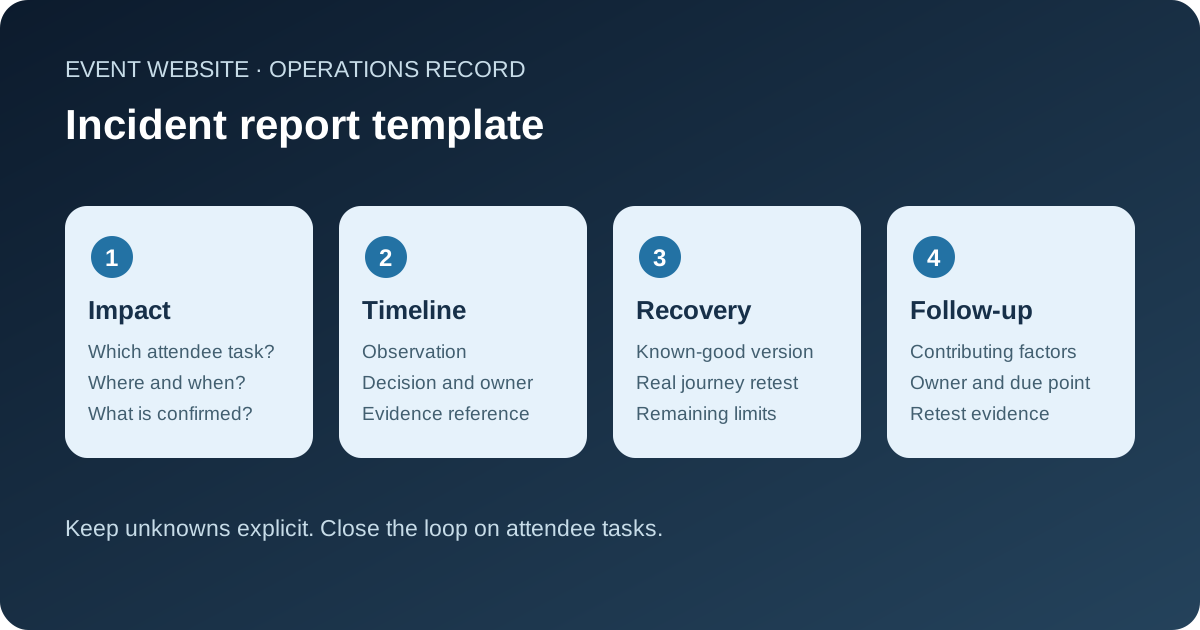
A status page may say “resolved” while the event ticket button still fails. An incident report should show which attendee tasks were affected, what the team knew at each point and how recovery was verified. This original template is for an event website, registration path or ticket handoff. It complements the live incident ownership plan; it is the record and review, not a command to delay response while filling in fields.
Boletolibre editorial team
Published
Download the editable incident report
Download the event website incident report (Markdown)
Save a blank copy with the site operations material before an on-sale or event day. It prompts for affected URLs, regions and languages, observed time bounds, the factual action timeline, provider cases, recovery checks and action owners. Keep restricted screenshots and logs in their approved location and link to them from the record. The report is not a public status update or a legal notification.
Start with attendee impact, not a guessed root cause
Identify the event edition and stage: presale, on-sale, doors or after the event. Record which page or task failed, where it was observed and by whom. A homepage that loads does not prove that registration, a hosted checkout link, ticket confirmation or access information works. If an event is listed on Boletolibre.com, include the public listing and the actual ticket destination in the affected-path review where relevant.
Write the earliest and latest confirmed time for each affected task, and distinguish first known failure from first detection. Name the region, language, browser or device only when evidence supports that scope. A graph gap does not by itself prove that every visitor failed, and a pageview estimate is not a count of lost purchases. Mark uncertainty instead of turning a hypothesis into the incident headline. AWS recommends prioritizing operations events by business impact and assigning accountable response roles.[1]
Preserve a sequence of observations and decisions
Create one timeline with time zone: alert, user report, approved change, provider notice, escalation, mitigation, communication and retest. For each entry, keep the observer or source, evidence reference, decision and owner. Record what the team believed at that time, even if later evidence corrects it. Do not rewrite a preliminary observation as if it was known from the beginning.
- Link a deployment, CMS publication, DNS edit or provider case to its own change record; temporal proximity alone is not proof of cause.
- Store log extracts or screenshots in the access-controlled system and note the retention owner. Do not paste ticket buyer details, payment data or credentials into a shared report.
- Keep the approved attendee message and its posting time, but use the separate communication plan for live updates.
Google SRE emphasizes an incident timeline, impact data and concrete follow-up items in postmortems. The purpose is shared learning and an accurate account, not assigning blame.[3]
Record what was restored and who verified it
Describe the mitigation separately from a final fix. A rollback may restore availability while the underlying defect remains. Capture the approver, known-good version, provider confirmation and any routes still degraded. Ask a verifier to open current event facts, the registration or RSVP route, the official purchase handoff, confirmation and support path from a relevant public client. Record result, time, locale and evidence; avoid calling a green monitor a complete attendee recovery.
If checkout occurs on another provider, note the boundary: you can verify your link and handoff, but the provider must confirm its own processing state. If a safe test purchase or form submission is available, use the approved test process and keep test data out of sales reports. Tell support and venue teams which workaround remains in effect. An incident can remain in follow-up after the public journey recovers.
Analyze contributing conditions after stabilization
Once the urgent response ends, separate confirmed causes, plausible contributing conditions and unknowns. Ask what made the failure possible, why monitoring or a rehearsal missed it, and whether response or communication added delay. AWS guidance calls for customer impact, evidence, root-cause analysis and preventive actions; it also warns against stopping at “human error.”[2]
For an event site, a useful review might discover that a ticket URL changed but the homepage check did not follow it, or that one language page retained an old gate. State what evidence supports each conclusion. Security or possible personal-data exposure needs the appropriate qualified response and privacy assessment; a generic outage report cannot decide whether a breach occurred.
Close with owned actions and a retest
Give each action a responsible owner, due point and evidence of completion. Distinguish a monitoring improvement, a content control, a provider escalation change and a genuine product fix. Do not mark an action done merely because it was assigned. Rehearse or retest the affected attendee task, then record the result. Review open actions before the next on-sale or event edition.
Share a concise version with people who need the lessons, while restricting raw logs and personal data. Keep the original report and dated corrections so later reviewers can understand the sequence. The template creates a disciplined record; it is not an incident-response runbook, a safety plan, a security investigation or proof of contractual service credits.
Sources and further reading
- Responding to eventsAWS Well-Architected Framework · Accessed
- Perform post-incident analysisAWS Well-Architected Framework · Accessed
- Postmortem Culture: Learning from FailureGoogle SRE Workbook · Accessed