Donation-based event admission: choose the right checkout flow
“Donation-based ticket” can describe very different buyer journeys. At one event, everyone may enter free and optionally contribute. At another, any positive payment may be required for a place. Before choosing a platform setting, decide what grants admission and tell attendees plainly. The worksheet below compares these flows without promising a fundraising result.
Boletolibre editorial team
Published
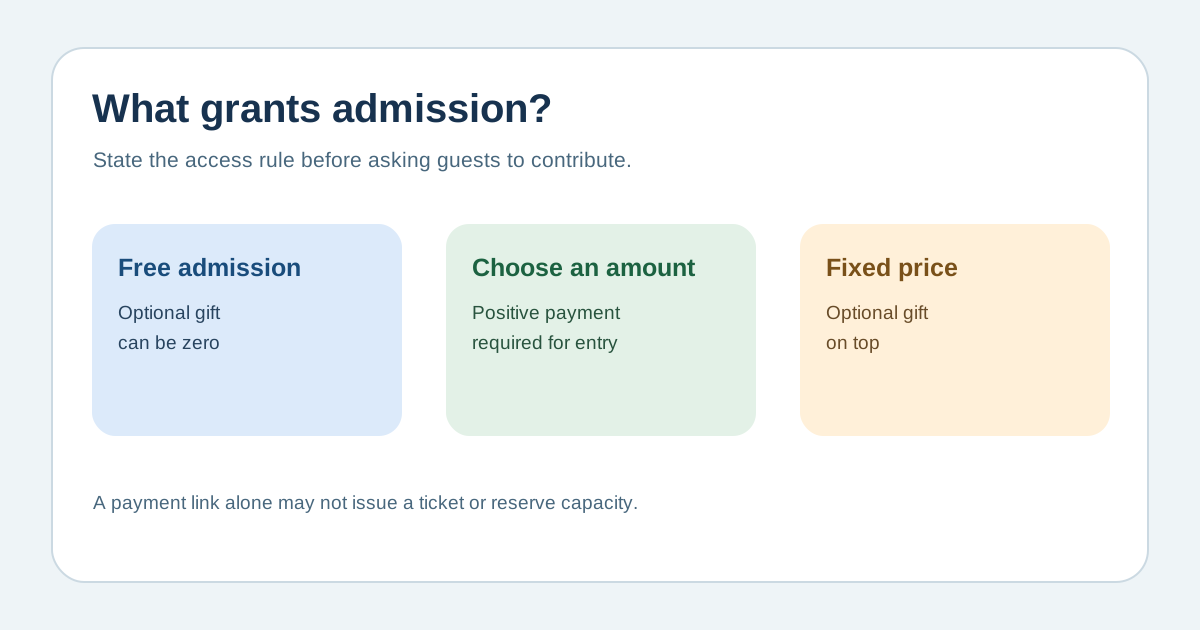
Define admission before asking for money
Download the editable donation-admission flow worksheet (Markdown, English)
Choose one rule per ticket pool: free registration with a separate optional contribution; pay-what-you-can with a positive amount required; or a fixed-price ticket plus optional donation. State whether a zero contribution still reserves a place and whether every contributor receives admission. Keep the approved capacity and attendee entitlement separate from the fundraising target. A standalone donation link can collect money without creating a ticket, so pair it with a registration flow only when that is your intended design.[1][2][3]
Check platform behavior and fees
Test zero, a small positive amount, the suggested amount and a failed payment. Eventbrite’s donation ticket lets the buyer choose an amount but does not permit a free registration; it also has limits for reserved seating and quantities per order. A separate free ticket plus an optional contribution may better express truly free admission, but verify the exact provider’s form and confirmation behavior. Stripe Payment Links can accept a buyer-chosen amount, but they do not on their own create a place in an event guest list. Record fees, payout timing, refunds and reporting with the current provider terms.[1][2][3]
Explain what the buyer receives
On the event page and checkout, say whether payment is optional, required to reserve a place, or separate from admission. Show the suggested amount as a suggestion if buyers can give less or zero. State who receives the funds and what the admission includes. Confirm that the ticket or RSVP, payment receipt and door list refer to the same person and event. Avoid calling the whole ticket price tax-deductible: the treatment of a payment that includes admission depends on the organization, benefit and jurisdiction, and needs qualified local review.[2][4]
Reconcile after checkout and after the event
Track three numbers separately: confirmed admissions, contributions received and net funds after fees/refunds. A payment without a valid ticket should trigger a support review, not an automatic assumption of entry. A free RSVP should not be hidden because the guest declined to contribute if the published rule makes payment optional. Give the door team only the information needed to verify admission, not donor amounts. After the event, reconcile orders and contributions and follow the applicable records and tax advice before issuing any charitable receipt.[1][2]
Sources and further reading
- How to Offer Donation-Based Ticketing for Charity EventsRSVPify · Accessed
- Collecting donations with EventbriteEventbrite Help Centre · Accessed
- How to accept donations through StripeStripe Support · Accessed
- Publication 526: Charitable ContributionsInternal Revenue Service · Accessed