Event check-in workflow: from arrival to exception support
Good check-in is an agreed handoff, not a scanner alone. An attendee must find the right line, present a valid entitlement, receive the correct access and have the entry recorded. Someone whose record cannot be validated needs a safe, respectful route to a person authorized to resolve it without blocking everyone else.
Boletolibre editorial team
Published
Prepare the handoff before doors open
Name the check-in lead, ticket-status source, entrance and support desk. Share the latest event date, session rights, transfer policy, registration cutoff and changes with both scanner and support teams. Walk the route from public arrival to the entry point, including accessible access. Confirm devices, power, connectivity if required, badge or wristband stock and a contact route for the lead. Executivevents’ broad pre-event checklist likewise includes onsite area diagrams, signage, registration policies, badges, staff training and a quick-reference FAQ; select what your event actually needs.[1]
- Walk the attendee route and confirm signs, equipment and support desk.
- Verify an actual valid, invalid and changed record in the approved workflow.
- Give each exception a named owner and a policy-based decision path.
- Record shift totals and unresolved differences without editing history to force a match.
Make the normal arrival path unmistakable
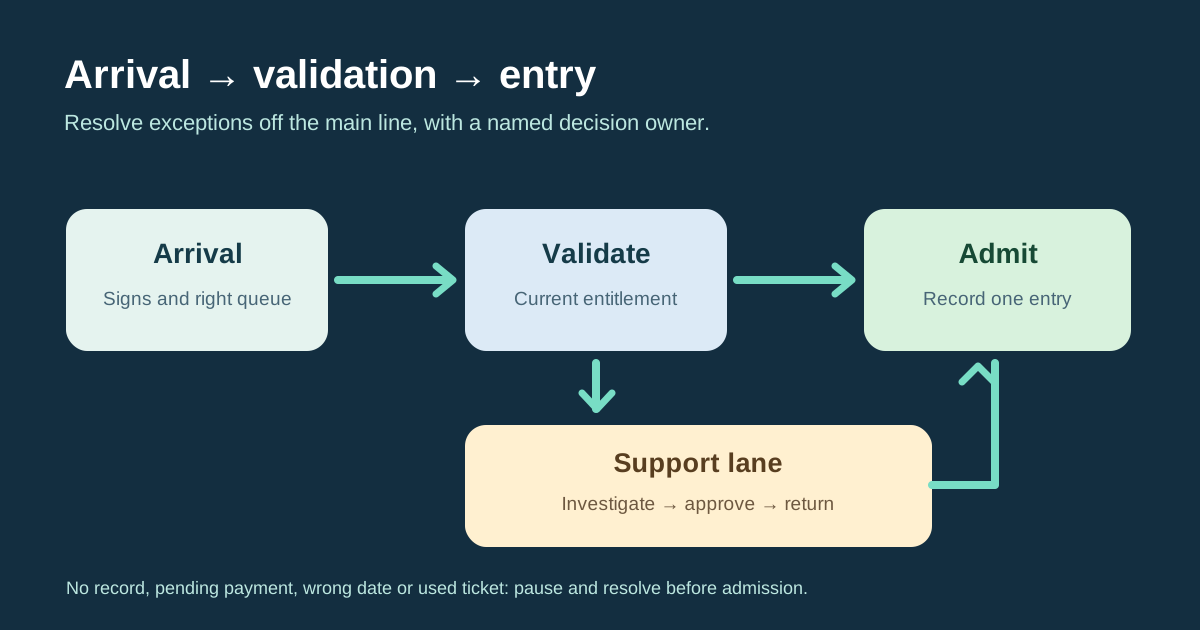
Place a clear sign before each queue so attendees know where to go and what to have ready. At the first station, look up the current ticket or approved registration record and verify that it grants entry to this date, session and zone. Check the system’s response before recording one admission. A QR code is an identifier or lookup carrier, not proof by itself that an entitlement is current or unused. Give a person with a valid record the agreed badge or direction, then record the check-in in the authoritative system.
| Station | Normal work | Exception route |
|---|---|---|
| Arrival | Wayfinding and correct queue | Route/access need goes to host |
| Validation | Check current entitlement and record entry | Unresolved status goes to support |
| Support | Investigate and log decision | Only approved case returns to validation |
| Close | Reconcile records and hand over exceptions | Escalate unexplained differences |
Give unresolved records a support lane
Move “not found,” wrong date, payment pending, transfer mismatch, already used and lost-ticket cases to a nearby staffed support point rather than deciding ad hoc at the gate. The support lead checks order and ticket history, confirms the applicable policy, records the decision and tells the scanner whether the person may return to validation. Do not admit someone just to clear the queue, and do not accuse a guest of fraud because a screen reports a conflict. Keep personal details out of public conversation.
Close the shift against one source of truth
At shift change or doors close, hand over the current device and data state, outstanding cases and any approved manual admissions. Reconcile accepted scans or check-ins with the authoritative ticket record, logging duplicates and unresolved differences. Ticket sales, issued tickets, recorded entries and people currently inside are different measures. If a device was disconnected or a paper fallback was used, resolve that separate process before treating its counts as synchronized.
Sources and further reading
- Pre-Event Registration ChecklistExecutivevents · Accessed