Event ticketing and payment processing fees explained
A ticketing quote may say ‘free for organizers’ while the buyer sees a fee at checkout. Another quote may show a low per-ticket charge while payment processing is billed separately. The useful comparison is a fee map for your own event: what triggers each charge, what amount it applies to, who pays it and what remains after settlement. This guide separates the components without assuming that one vendor's fee labels or rates apply to another.
Boletolibre editorial team
Published
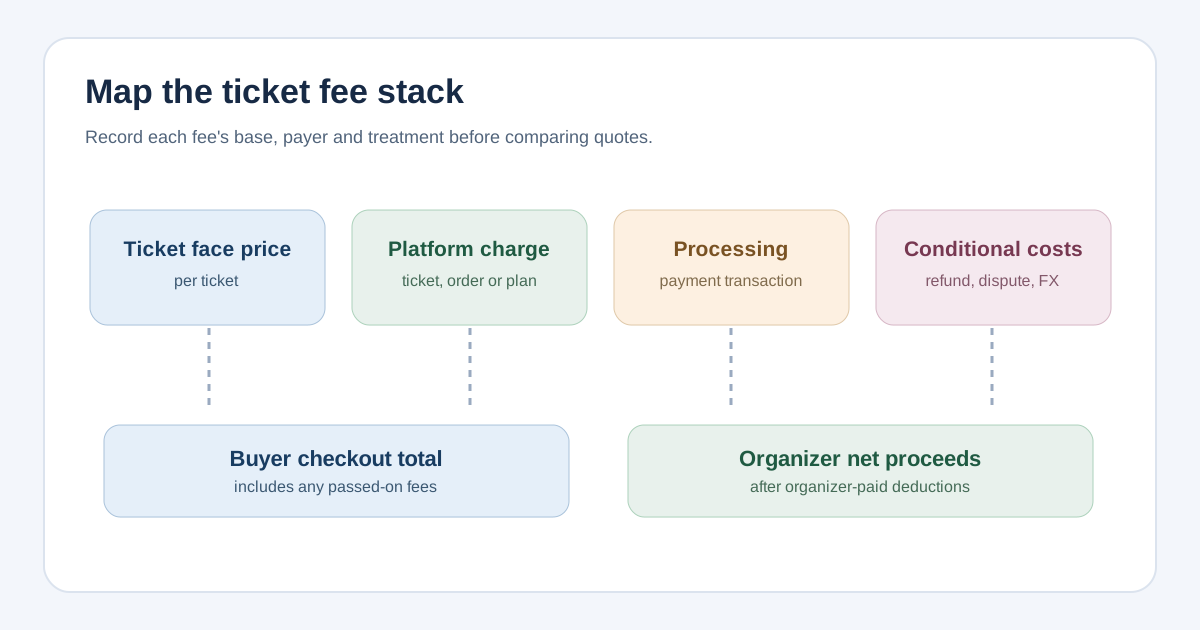
Separate the four kinds of cost
Ticketing software can charge a subscription, a per-ticket service fee, a per-order booking fee or some combination. Payment processing is the charge for taking a payment and may be bundled into the platform's ticketing fee or itemized separately. A percentage and a fixed charge can have different bases: ticket face value, full buyer checkout, one ticket, one order or one successful transaction. Ask for the actual basis in writing before multiplying a headline rate. Eventbrite's own help describes Ticketing Fees on paid tickets and add-ons, varying by country and currency, with attendees paying by default unless the organizer elects to absorb them. Stripe publishes processing terms by market and payment method; its price page is not a quote for a ticketing platform using Stripe.[2][3]
| Component | Trigger to confirm | Question for the quote |
|---|---|---|
| Platform plan | Month, year or event | How many billing periods and seats are needed? |
| Ticket or order fee | Each ticket, add-on or order | What is the unit and does it apply to free tickets? |
| Payment processing | Successful payment transaction | Is it included, and what amount is the percentage applied to? |
| Conditional charges | Refund, dispute, foreign card, currency exchange or fast payout | Which conditions and parties trigger an extra cost? |
Identify who pays and what the buyer sees
A passed-on fee increases the buyer's checkout total; an organizer-absorbed fee reduces the organizer's proceeds. The fee itself does not vanish when its payer changes. Check whether the processor calculates its percentage on the ticket face price or on a larger checkout amount that includes a passed-on fee. If a platform offers a fee-pass-through option, preview a real two-ticket order, an add-on order and a free registration. Record the displayed ticket price, each line of fees, tax if applicable and final amount before payment. Eventbrite says its Ticketing Fees are paid by attendees by default and can instead be covered by the organizer, but the exact checkout and payout treatment must be checked for the selected configuration.[2]
Do not compare only the organizer's fee expense. A higher checkout total can affect whether a price fits the intended audience, while a lower organizer payout changes the event budget. Keep both measures beside each other. The first organic result for this search compares per-ticket, flat and hybrid models, but its example rates and provider conclusions are promotional examples rather than prices guaranteed for your event; use your written quotes instead.[1]
Use one event scenario to compare quotes
Give each provider the same ticket mix, expected orders and payment mix. For example, two tickets in one order can incur two per-ticket charges but only one per-order charge; two separate orders can change a per-transaction fixed processing charge. Ask each provider to show the buyer total and expected organizer payout for both cases. Also ask whether card type, buyer country, payment method or settlement currency changes the rate. Do not mix currencies without a documented conversion basis.
- Write down the face price, ticket count, order count and any add-ons used in the comparison.
- List each subscription, ticket, order, payment and conditional fee with its payer and calculation base.
- Request a sample checkout and sample payout/settlement statement for the same scenario.
- Compare buyer total, organizer net and cash timing separately; a payout delay is not itself a fee.
Check refunds, disputes and currency before choosing
Refunds do not necessarily reverse all original charges. Stripe's current pricing page says its standard-pricing treatment can retain original processing and currency-conversion fees, while custom agreements may differ. Dispute and currency-conversion costs are conditional, and the relevant rate depends on the account, country and method. Ask whether a refunded ticket returns the platform fee to the buyer, the organizer, neither or both, and inspect the provider's current terms. Do not build a budget from a generic ‘typical’ percentage. Retain dated pricing evidence because fee schedules can change.[3][2]
When reviewing an actual event after sales begin, use the provider's payout report to reconcile fees and adjustments rather than treating the original quote as a settlement statement. The comparison here helps choose and price a workflow; it does not replace the event budget or payout reconciliation.
Sources and further reading
- Event Ticketing Fees Explained: Models and What You KeepEventCloud · Accessed
- Eventbrite's pricing and plansEventbrite Help Center · Accessed
- Pricing & FeesStripe · Accessed