Event accessibility request form wording and private response workflow
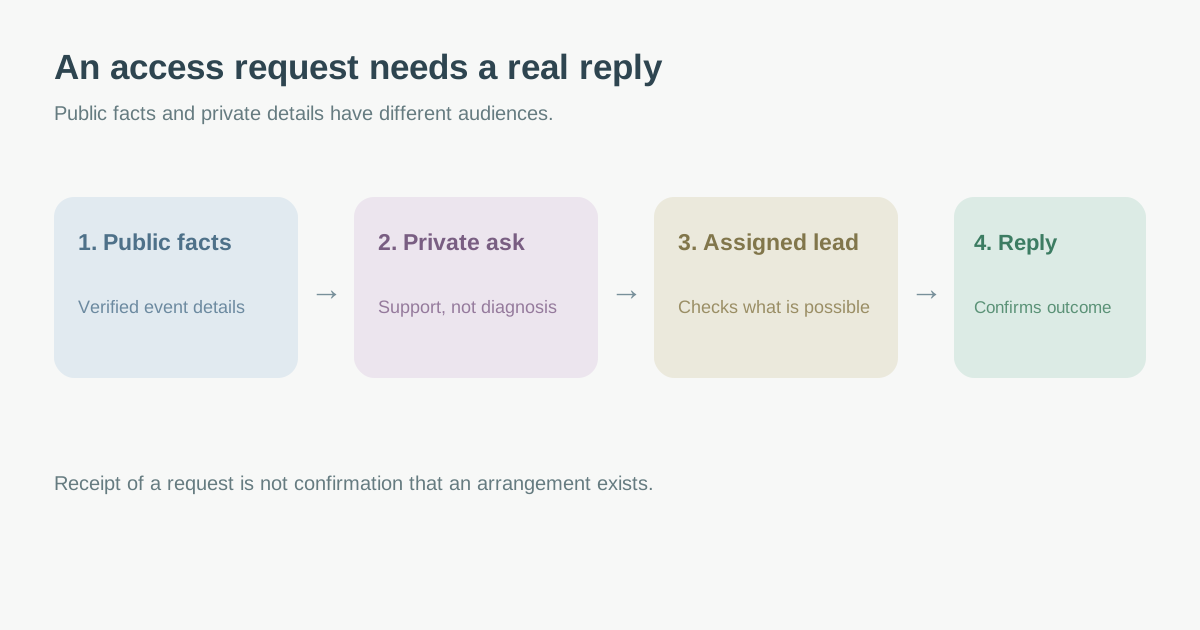
A public accessibility statement tells guests what an event already offers. A request route is the private handoff that lets a guest explain what would make participation possible and receive an answer. The direct Google result for accommodation-request wording is a template from Disability & Philanthropy Forum. This guide turns that intent into original registration copy plus a response workflow, distinct from a general registration accessibility audit or a public access statement.
Boletolibre editorial team
Published
Put the invitation and event facts before the question
Describe the actual format, venue or streaming platform, arrival route, known access features and contact options before asking for a request. People need this context to know whether they need help. Use a short invitation on the event page and registration form, with an email or phone option if the form itself is inaccessible or too public. The leading template recommends visible accommodation language in outreach and registration; Cornell similarly gives example public and registration statements with a named contact. Copy the structure, not an unverified claim that every feature is available.[1][2][3]
Example original wording: “We want you to be able to participate in [event]. Confirmed access features are listed at [link]. If you need a change or support to participate, use the private request link or contact [monitored email/phone]. Tell us what would help and how to reach you. We will reply through [channel]. You do not need to describe a diagnosis here.” Replace every bracket with a real, tested value before publication.
Ask about participation barriers, not a diagnosis
A request field can ask “What support or change would help you participate in this event?” with the event session, preferred contact method and optional follow-up details. Avoid making a diagnosis, medical history or proof upload the default input. Cornell explicitly says to focus on the access issue and needed accommodation rather than the person’s disability, and to respond quickly; it also notes that some requests need several exchanges. An attendee may choose to disclose more, but the organizer should not demand unnecessary detail in a broadly accessible ticketing system.[2]
| Ask for | Avoid by default | Reason |
|---|---|---|
| Event/session and request | Whole medical history | Routes request to the right team |
| Preferred reply channel | Public comment thread | Allows a private conversation |
| Useful timing information | Universal hard cut-off | Supports provider coordination |
| Consent/notice appropriate to your setting | Unrestricted sharing with every contractor | Limits unnecessary disclosure |
In its own UK event privacy notice, the ICO treats access requirements as special-category information and explains its processing. That is a useful example of transparent handling, not a legal basis to copy for every organizer or country. Have the relevant privacy owner review the actual form, access and retention rules.[4]
Assign a response owner and close the loop
Route submissions to a named access lead, not a general inbox nobody monitors. Record the request reference, event/date, owner, date received, clarification needed, provider or venue check, proposed arrangement and guest response. Restrict the detailed log to the people needed to arrange support. Give the guest an acknowledgment that the request was received, then a separate substantive response; a form auto-reply is not confirmation that an arrangement exists. University of Michigan says event teams should be prepared to respond and follow through after an accommodation request.[3]
When an arrangement depends on a venue, interpreter, captioning provider or other supplier, verify the booking and delivery details before telling the guest it is confirmed. If the initial option cannot be delivered, discuss workable alternatives with the guest and the competent local accessibility lead. Keep a contact route open for late questions, even if some services require advance coordination. Do not put a requestee’s private details in the public event page or general volunteer briefing.[2][3]
Test the route and update it when the event changes
Submit a dummy request through the actual page and any third-party registration step. Verify keyboard access, receipt, restricted delivery, owner alert, reply channel and a completed closure record. Repeat for each language offered. If venue, schedule, format or access features change, update the public statement and review open requests for impact. The editable worksheet below separates public copy from the private response log and includes a close-out check; use it with your event’s approved privacy process, not as a substitute for qualified accessibility review.[3][2]
Download the request-copy and restricted response worksheet (Markdown, English)
Sources and further reading
- Sample Accommodations Request TemplatesDisability & Philanthropy Forum · Accessed
- Event Publicity and Pre-registrationCornell University Accessibility Information · Accessed
- Meetings & Events Best PracticesUniversity of Michigan Accessibility · Accessed
- Attend an event, seminar or workshop: privacy noticeUK Information Commissioner’s Office · Accessed