What is QR code ticketing?
QR code ticketing uses a scannable two-dimensional code as part of an event’s admission process. The code carries data, such as a ticket identifier or a link to a ticket-specific validation page. Reading that data is only one step. The admission system must decide whether the presented ticket permits this entry and record what happened.
Boletolibre editorial team
Published
A code is a container, not a decision
DENSO WAVE describes QR codes as symbols capable of encoding data. Those properties do not establish who issued a ticket or what it allows. A code that opens an event homepage may be useful for information, but it does not identify an individual admission entitlement.[1]
The QR Code Generator describes linking each ticket’s code to a distinct validation URL in a separate ticketing system. This illustrates the separation between creating a readable code and operating the system that checks the ticket. It is not a guarantee that any QR image provides secure entry.[2]
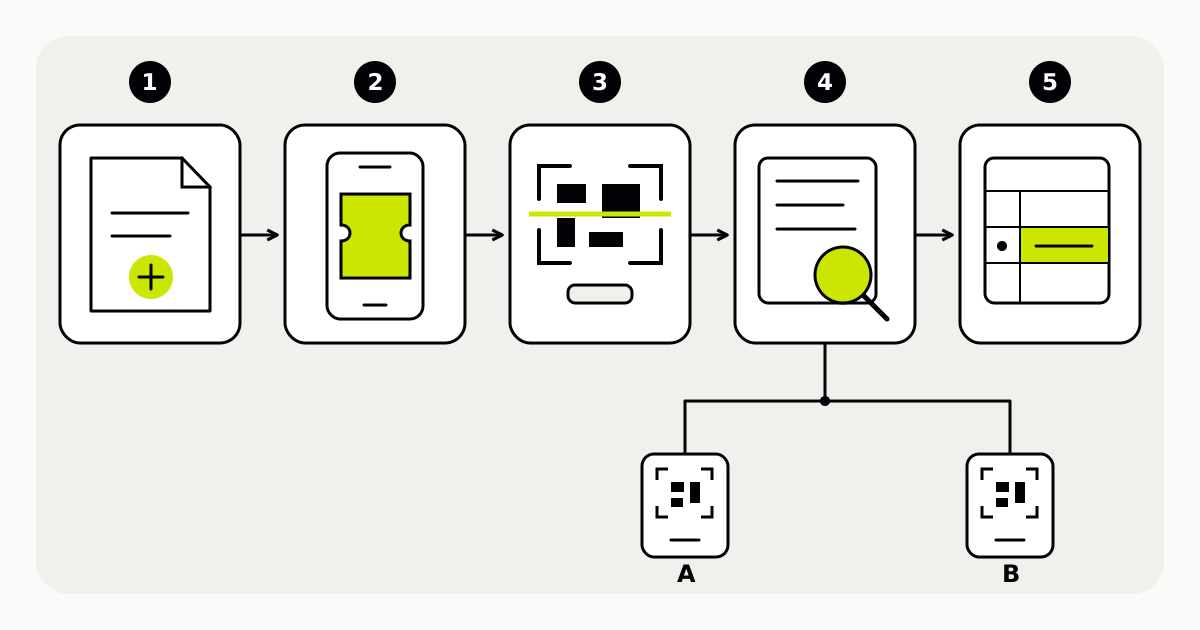
Follow the ticket through five stages
- Issue: create a ticket record with its event, entitlement and identifier in the admission system.
- Deliver: provide the holder with a code representing that identifier or an appropriate validation link.
- Scan: use an authorized entry workflow to read the code, rather than treating any camera response as approval.
- Validate: check that the ticket was genuinely issued, is valid for this event and access type, and has not exceeded its permitted uses.
- Record: save the admission result so subsequent checks can apply the event’s rules, including any permitted re-entry.
Why two entrances need a shared answer
Imagine a fictional exhibition with entrances A and B. The same ticket image is presented at both. Giving the image a unique identifier helps locate its record; it does not stop the image being copied. Duplicate-use protection depends on how the system checks and updates the record across entry points.
If a scanner operates without a connection, ask what information it holds locally and how it learns about admissions at another entrance. Without timely coordination, it may not know that a ticket was just used elsewhere. Offline support is therefore a workflow to verify with the provider, not a promise implied by the QR format.
Test outcomes, not just readability
Before opening the doors, rehearse the actual setup with staff and test tickets. Agree which cases can be resolved at the gate and which go to a help desk. A successful scan should not be mistaken for a completed admission check.
- Try a valid ticket, a ticket for another event and a second presentation of the same ticket under the intended single-entry rules.
- Test both entrances and the planned connection-loss procedure. Verify how records are reconciled when connectivity returns.
- Provide a controlled manual lookup route for unreadable codes or unavailable phones. Staff still need to verify the ticket and record any admission.
Sources and further reading
- QR Code features and data encodingDENSO WAVE · Accessed
- Connecting ticket QR codes to a validation systemThe QR Code Generator · Accessed