Event equipment inventory checklist: issue, locate and return every item
A packing list answers what should travel. An inventory movement record answers where each item is now, who accepted it and whether it actually came back. For an event that uses venue, owned and hired gear, keep these answers together without treating a planned booking as proof of physical movement.
Boletolibre editorial team
Published
Make one event inventory baseline
Start with the current event and production brief. Give every returnable item or sealed kit an ID, description, quantity, owner (venue, organizer or supplier), starting location, condition and expected destination after the event. Record accessories that must come back with a kit. Assign a location code for each secure store, case, vehicle and on-site holding area. The event-specific Google result emphasizes location changes rather than a static list; adapt that idea to the size of your operation instead of assuming you need scanning software.[2]
Separate durable equipment from consumables such as tape and batteries. A consumable is issued in a quantity and may be partly used, so the return figure is not necessarily equal to the issue figure. Rentman’s own documentation makes this distinction in its sale-item return flow; your paper log can do the same without claiming to update any platform automatically.[4]
| Record | Minimum useful fields | Why it matters |
|---|---|---|
| Baseline item | ID, ownership, quantity, start location, condition | Know what was expected |
| Movement | From, to, date/time, releasing and receiving person | Know the latest confirmed custody |
| Return | Physical count, condition, final store and receiver | Close only after inspection |
| Exception | Missing, damaged or delayed item; owner and next check | Keep unresolved items visible |
Record each handoff, including the secure location
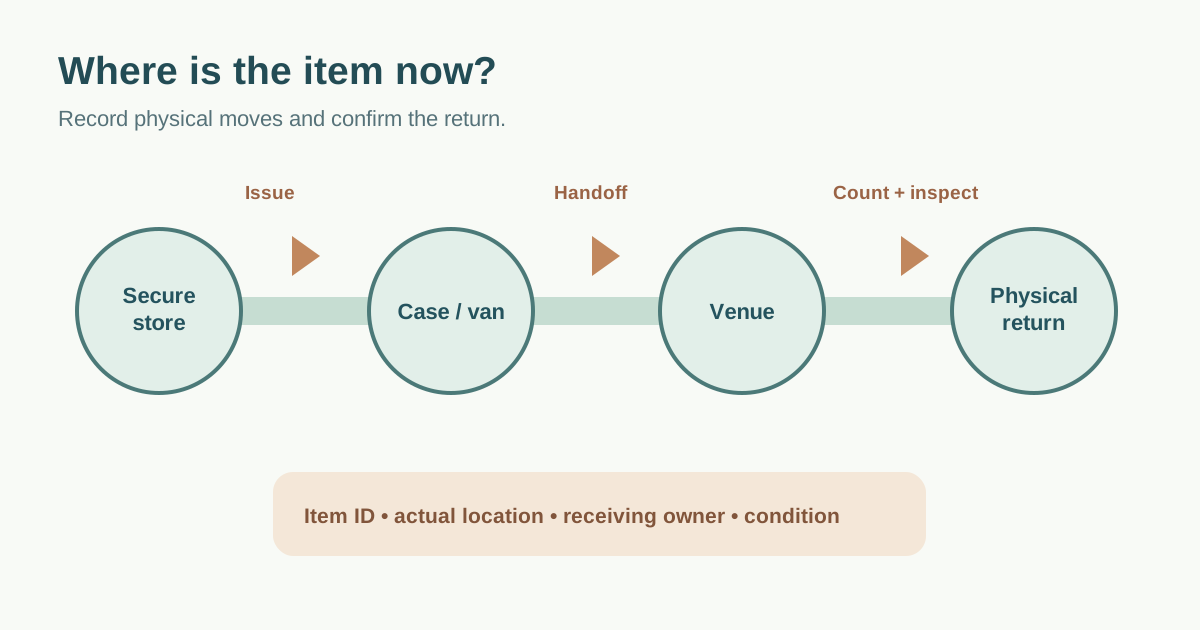
When a kit leaves storage, both sides verify its ID, count and visible condition. Record the releasing person, receiving person, time and destination. Repeat when it moves from store to vehicle, vehicle to venue, or venue to another team. A single “issued to production” entry becomes misleading if several crews share a case. For expensive or easily confused units, track item-level IDs; for a stable sealed kit, a kit ID and accessory manifest may be enough.
Agree which rooms, cupboards or cages are controlled, who holds access, and how temporary storage is locked or supervised. The register records custody; it does not itself secure a room. Do not place a precise storage location or asset serial list in a public event document. If a supplier owns the item, confirm its own checkout and return rules separately.
Inspect physical returns before changing status
Use the issue list as the return baseline. Count each physical item and accessory at load-out, then confirm where it was delivered. If it is still at the venue, in a vehicle or with a repairer, record that actual location. Rentman explicitly separates reporting a defect from booking the item physically back into the warehouse; the same discipline prevents a manual register from declaring stock available too soon.[3]
Log visible condition and unresolved faults without asking an unqualified worker to energize or repair suspect equipment. Quarantine or label damaged items according to your team’s process, give the issue an owner and due time, and notify the supplier if hired gear is involved. The leading Notion template focuses on return inspection, including function, cables, accessories and damage; choose only checks that trained staff are authorized to perform.[1]
Reconcile exceptions and restock
Compare expected versus counted quantities by item and kit. Keep a separate exception line for missing, damaged, delayed and misrouted equipment; include last confirmed handoff, current evidence, follow-up owner and next review. Never erase a missing-item record merely because another team expects it to appear later. Close it only when physically found, compensated or otherwise resolved under the applicable agreement.
For consumables, record issued, used and returned quantity; restock against the next event’s actual needs. At handback, have the venue or supplier confirm any items it owns, and keep the signed or acknowledged final count with the event record. This worksheet complements a load-in schedule and supplier delivery tracker: those plan movements, while this one proves custody and return.
Download the event equipment issue-and-return register (Markdown, English)
Sources and further reading
- Equipment Return & Inspection ChecklistNotion Marketplace · Accessed
- Event equipment tracking: get everything back after load-outTana · Accessed
- How does the new repair workflow work?Rentman Support Center · Accessed
- Workflow for Booking Your Sale EquipmentRentman Support Center · Accessed