Event AV production brief template: describe outcomes and handoffs
A good AV brief tells a supplier what the audience must hear, see and do, and what the event team already knows about the space and schedule. It also labels what is still undecided. The supplier can then propose sound, displays, lighting, recording and crew without guessing at the event’s purpose or quoting against an outdated run of show.
Boletolibre editorial team
Published
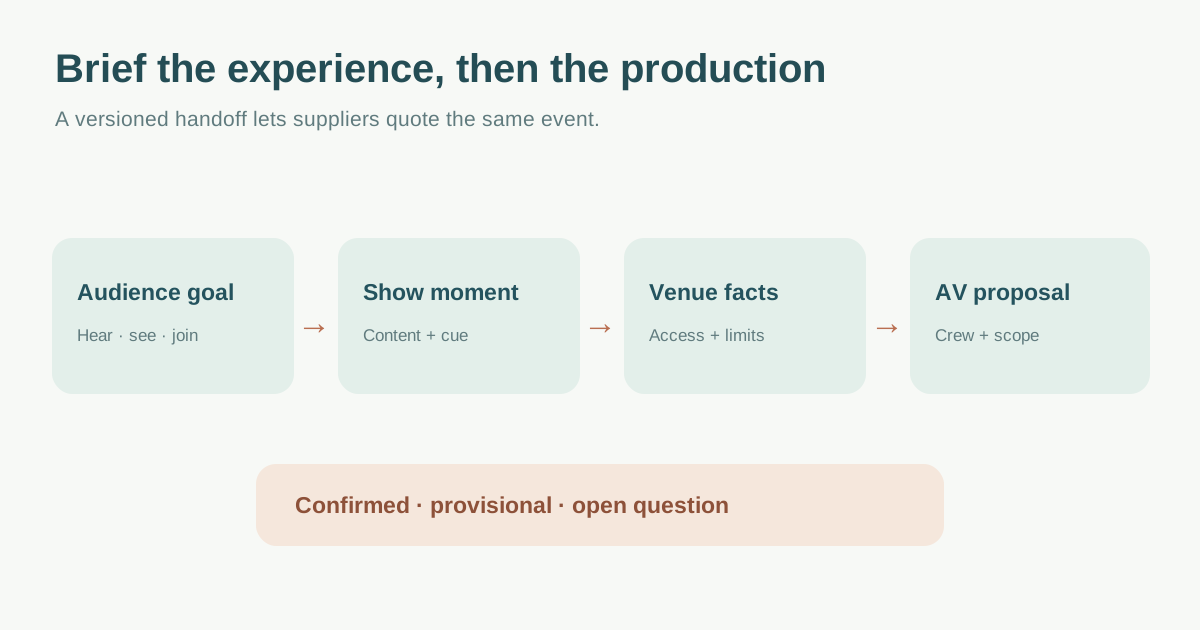
State the audience experience before listing equipment
Open with event purpose, audience size and format: in-person, hybrid or virtual. Name the rooms and important moments. For a keynote, perhaps every seat must hear speech clearly and see detailed slides; for a panel, the audience needs to distinguish each speaker and ask questions; for a hybrid workshop, remote participants need a real route to contribute. The leading AV result starts from these outcomes rather than a shopping list. That makes a better basis for a technical proposal, but describe your own event, not the vendor’s stock examples.[1]
Mark priorities and tradeoffs. If a sponsor wants a dramatic reveal but legibility and interpretation are essential, record both requirements. Ask the supplier to flag where the venue layout, budget or available rehearsal time affects those outcomes. Do not specify an equipment model just to look prepared; if a model is already mandated by the venue or content producer, label that constraint and its source.
Turn the programme into cue-level requirements
Attach the latest run of show with a version and owner. For each key moment record time, presenter, microphone or playback need, display content, camera/recording need, caption or interpretation route, and who calls the cue. MIT’s run-of-show template records roles, contacts and timing; use a comparable shared reference so suppliers can connect content to production handoffs.[2]
| Moment | Audience outcome | Asset or handoff | Open decision |
|---|---|---|---|
| Opening | Speech and title visible to all intended viewers | Host mic, title asset, cue owner | Final intro approved? |
| Panel questions | Each answer and audience question intelligible | Panel mic plan, question route | How will remote questions enter? |
| Video clip | Picture and sound start together | Approved file, playback owner, backup | Final file and rights confirmed? |
| Close/transition | Next room or stream state is clear | Show caller, display and audio cue | Next host ready? |
Ask who receives final slides, videos, scripts, lower thirds and brand assets; which format they accept; the content lock or review date; and who can approve late changes. Keep one current version. A content file arriving after the technical rehearsal is a change requiring a fresh cue check, not just an upload.
Give the supplier venue facts and approval boundaries
Send room plans, seating layout, stage dimensions if confirmed, load-in/out windows, rigging or mounting restrictions, existing house AV, known power and Internet contacts, and where suppliers can store cases. Label information as confirmed, provisional or unanswered and include the person who can resolve it. Avoid copying site-specific Melbourne or Australian certification details from the leading result into an event elsewhere.[1]
If screens, lighting or speaker clusters will be suspended or used outdoors, request a qualified site-specific plan and venue approval. HSE warns that outdoor supporting equipment requires suitable design, installation, maintenance and competent people; a general brief cannot replace engineering or local safety review.[4]
Describe access and inclusion needs early. For streamed or recorded media, W3C planning guidance covers captions and other media accessibility needs; tell the supplier which audiences and delivery channels require them, who provides the service, and how it will be rehearsed. Do not assume automatic captions alone meet every participant need.[3]
Ask for a comparable, reviewable proposal
Request a response that maps each audience outcome to the proposed solution, with equipment, operators, setup, rehearsal, show and strike time, content handling, recording deliverables, support during the event and fallback approach. Ask suppliers to separate included items, assumptions, optional upgrades and exclusions. This makes quote comparison meaningful without turning the brief into a fixed shopping list.
Record questions in one issue log with owner and due date. If venue access changes, a speaker joins remotely or a playback file is replaced, send a dated revision and ask the supplier to identify cost, crew, rehearsal and cue impacts. The general supplier RFQ may handle commercial terms; this brief defines the audiovisual work and its acceptance points.
Download the AV production supplier brief (Markdown, English)
Sources and further reading
- How to Brief an AV Company Effectively for a Seamless EventNextGen AV · Accessed
- Run of Show — Virtual EventsMIT Alumni Association · Accessed
- Planning Audio and Video MediaW3C Web Accessibility Initiative · Accessed
- Outdoor equipment to support speaker clusters, lights etcUK Health and Safety Executive · Accessed