Event landing page CTA examples: write the next step honestly
A call to action on an event page is a promise about the next click. The leading Google result for “event landing page call to action examples” reviews live event pages and shows that strong pages give each audience an appropriate next step, with dates, prices and proof near the decision. This guide focuses on writing that step: a button that says what the destination really does, supported by a free, editable 12-scenario copy matrix.
Boletolibre editorial team
Published
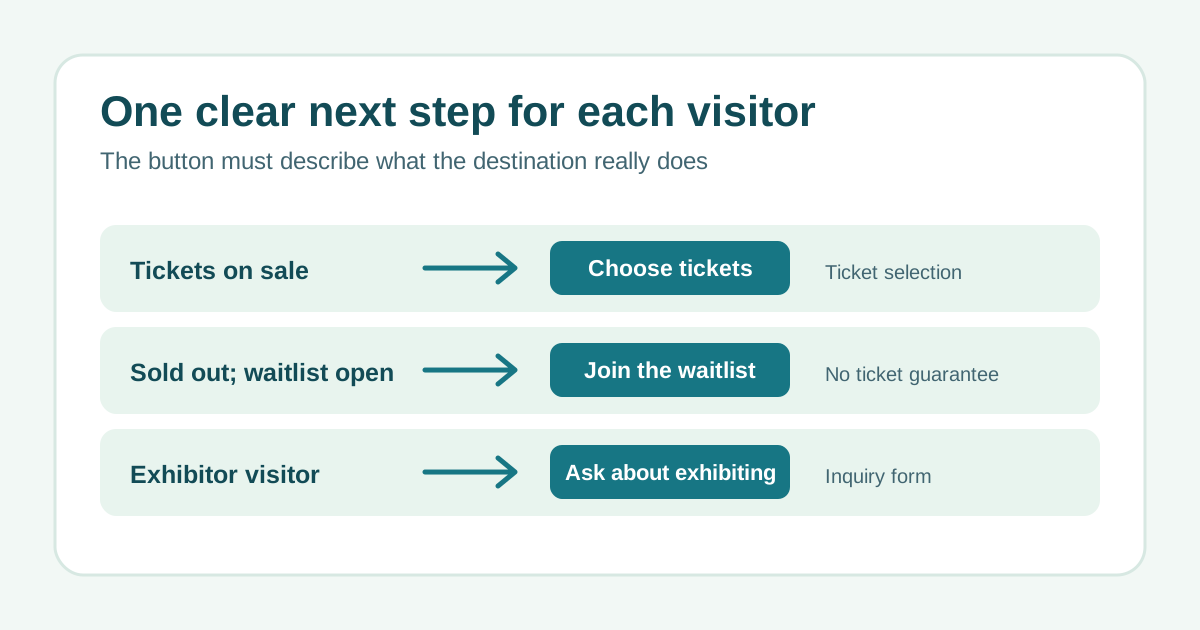
Choose one primary visitor action
Identify the page’s main audience and real conversion path. When tickets are available, “Choose tickets” can lead to ticket selection; for a free workshop with immediate confirmation, “Register for free” can lead to its form. A sponsor inquiry is a different decision and should have its own clearly labeled route. A page can repeat its primary action after relevant details, but competing buttons with similar visual weight make it harder to know what to do. The live examples in the leading result route attendees, exhibitors and other audiences to different destinations rather than pretending they share one checkout.[1]
Match wording to the current event state
Use these as starting copy, then verify the exact ticket and registration behavior before publishing. A button should not promise a reservation if it only joins a list.
- Tickets on sale: “Choose tickets” → available ticket types; show date, venue, price and any fees nearby.
- Free, instantly confirmed event: “Register for free” → form; explain any capacity limit.
- Application or manual review: “Request a place” → application; explain that acceptance is not automatic.
- Sales not open: “Get on the launch list” → permission-based interest form, not a reservation.
- Sold out with a real waitlist: “Join the waitlist” → waitlist form; state that a ticket is not guaranteed.
- Exhibitor or sponsor: “Ask about exhibiting” or “Explore sponsorship” → distinct inquiry routes.
- Registration closed with no list: remove the dead purchase button and offer current event information or an actual alternative date.
Place essential context beside the button
A clear label still needs enough nearby information for a sensible decision. State the date and time zone, venue or online format, current price or free status, key inclusion and any deadline only when real. Put practical access information within easy reach. If the next page collects data or requires payment, say so before the click. Do not invent scarcity, use a stale “last chance” label, or hide a sold-out state behind a live-looking purchase button. W3C explains that link purpose should be understandable from the link text or its programmatic context, with meaningful text preferred where possible.[2]
Use the copy matrix as a publishing check
The CSV lists 12 event states, example labels, actual destinations, supporting context and a truth check. Replace examples with your event’s current facts. Ask a second person to follow every link and describe the next screen in plain language. If the page state changes from on sale to waitlist, update the CTA, destination, nearby copy and any campaign link together.
Download the original event landing page CTA copy matrix (CSV, English)
Improve the path without changing the promise
Measure the entire path, including button click, arrival at the correct form, valid registration or ticket purchase and failures. A higher click count is not a success if visitors reach an unavailable checkout. Test labels with the same audience and event state, then compare completed outcomes, not only clicks. Keep keyboard focus, visible button text and the accessible name aligned so the same next step is understandable to everyone.
Sources and further reading
- 15 Event Landing Page Examples to Learn From in 2027Snöball · Accessed
- Understanding SC 2.4.4 Link Purpose (In Context)W3C Web Accessibility Initiative · Accessed