Event planning timeline template: milestones, owners and dependencies
A list of tasks is not yet a timeline. Your team needs to know which decision unlocks the next task, who owns it and what “done” means. The leading Google result for an event timeline offers an editable Gantt-style schedule with tasks, dates, milestones and dependencies. The original worksheet below keeps those relationships visible even if you do not use project-management software.
Boletolibre editorial team
Published
Anchor the schedule to the event date and immovable gates
Record the event date, doors-open time and any genuine fixed deadlines such as venue confirmation, public ticket launch, supplier lock or permit submission. Plan backward from these gates. Ask each owner how long their work actually takes, including approval and correction time; an example eight-week plan is not a universal rule. A small workshop and a major festival need different lead times. Put uncertainties next to the affected milestone rather than hiding them in a generic buffer.
- Name the final milestone and time zone.
- List approval, contract, publication, rehearsal and go/no-go gates.
- Estimate task duration with the person doing the work.
- Leave a recovery window before irreversible commitments.
Give every task a predecessor and an exit check
A milestone is a verifiable point, such as “checkout tested,” while a task is the work that gets you there. Put an ID on each row so a successor can name its predecessor. If the public event page depends on both verified checkout and approved event facts, record both. This is more useful than drawing a neat bar chart with no dependency logic. GanttPRO’s top-ranked template highlights milestones and linked task dependencies; the worksheet applies that principle with portable columns.[1]
| Row | Predecessor | Exit check |
|---|---|---|
| Approve purpose brief | None | Sponsor signs off on outcome and decision owner |
| Confirm venue capacity | Purpose and budget | Venue terms and safe capacity confirmed |
| Verify checkout | Ticket setup | Controlled purchase and confirmation observed |
| Publish event page | Checkout + approved facts | Public page and ticket link verified |
Assign one accountable owner and a useful status
Each milestone needs one person who can say whether its exit check passed. Contributors can be many, but “marketing team” is not an owner. Use a small status set such as not started, on track, at risk, blocked and done. “90% complete” hides the crucial fact that a venue contract is unsigned. For a blocked row, record the decision needed, decision-maker and latest safe date. Do not mark the next public step complete merely because a draft exists.
- Owner: person accountable for the milestone.
- Planned and actual dates: separate promise from evidence.
- Predecessor: what must be completed first.
- Exit criterion: the observable test for done.
- Buffer or decision: recovery time or escalation needed.
Worked sequence: from checkout to doors open
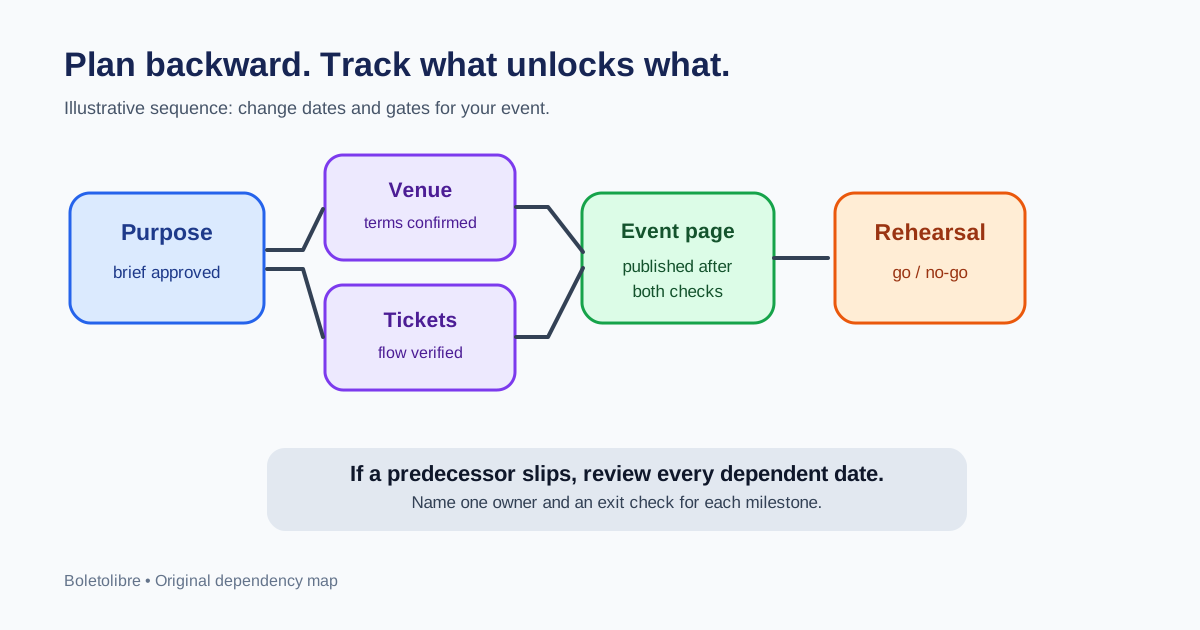
An illustrative small event approves its purpose brief, confirms venue terms and capacity, defines ticket inventory, tests checkout and confirmation, approves access and policy copy, and only then publishes its event page. Promotion begins after the live page and ticket link are checked. Staff and suppliers are confirmed before a gate rehearsal; unresolved blockers go to a named go/no-go review before doors open. The exact dates are deliberately blank in the template. Enter real dates based on venue, supplier and team lead times rather than copying someone else’s calendar.
The page-publication gate has two predecessors: ticket flow and approved facts. If checkout verification slips, the page can remain drafted, but the launch date and campaign start need review. This chain makes the impact visible to marketing and prevents a broken purchase link from being advertised.
When a date slips, replan the dependent chain
At each short status review, compare planned and actual dates. If a predecessor slips, identify successors that cannot safely proceed, update their expected dates and tell their owners. Check whether buffer remains before the next fixed gate. Escalate the decision if the event date cannot move: reduce optional scope, add a resource or change the launch plan with explicit approval. Keep the old baseline and the reason for a major change, so the post-event review can distinguish planning error from new information.
Sources and further reading
- Event timeline templateGanttPRO · Accessed