Event re-entry policy: decide who can leave and return, then test the gate
A valid first admission does not automatically grant a second entry. Before guests arrive, decide which tickets permit leaving and returning, where, when and how the gate verifies it. Then check that the public policy, ticketing setup, wristband or QR process, and staffing all describe the same rule.
Boletolibre editorial team
Published
Specify the re-entry right separately from admission
For each ticket type, state whether re-entry is allowed, on which date, during which hours, through which return gate, and into which zone. Decide whether an attendee must be scanned out, keep an intact wristband, retain the original ticket, or meet another event-specific condition. An all-day or multi-day ticket is not by itself a universal re-entry promise. Publish any no-re-entry boundary and exceptions before purchase and repeat it in the pre-event reminder.
Map the actual exit and return path with the venue and crowd-safety lead. Keep emergency exits available as required by the site plan; do not turn an exit into a re-entry point merely for convenience. UK HSE guidance treats arrivals, departures and onsite movement as separate crowd-control phases.[2]
Align the credential and scanner state
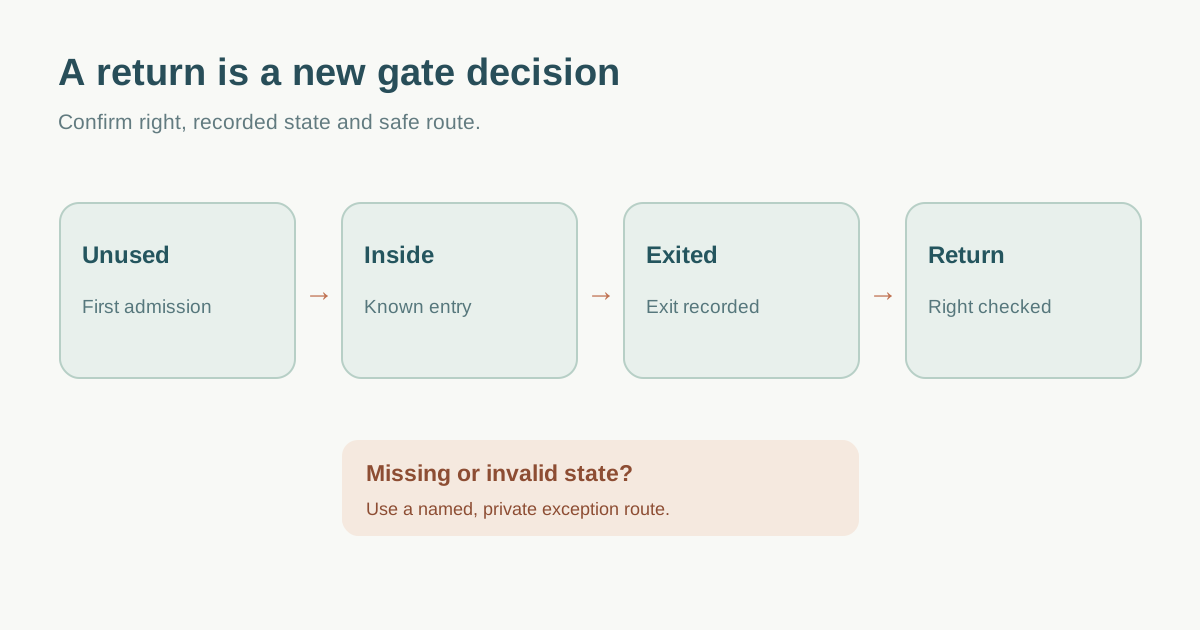
Document the status transitions your chosen provider supports: unused → inside → outside → inside again, or an equivalent process. Eventwave documents an exit scan that checks a ticket out and enables a return; Ticket Falcon describes un-checking a person for re-entry in its own app. These are provider behaviors, not a universal QR or wristband rule. Ask what a duplicate entry scan, missed exit scan, damaged band, canceled ticket and transferred ticket display to the operator.[3][4]
| Observed state | Normal action | Exception route |
|---|---|---|
| Not yet admitted | First-entry scan | Ticket support if invalid |
| Inside | Exit record or approved marker | Supervisor if accidental scan |
| Outside with return right | Return scan at named gate | Supervisor if status missing |
| No return right or invalid | Do not auto-admit | Private decision by named owner |
A wristband can be a visible cue, but color alone is not proof of the current ticket entitlement. Conversely, a scanner warning may represent an accidental double-scan rather than misuse. Train staff to inspect the event-specific record and escalate uncertain cases instead of guessing.
Keep occupancy monitoring separate from ticket validity
If the event needs an inside-now count, define how every normal entry and exit is recorded and how staff reconcile missed scans, offline devices, accessible routes and emergency movements. UK HSE says entry and exit counting systems can help estimate numbers inside. Do not present the scanner dashboard as an infallible live headcount. Use the site’s approved crowd-monitoring process and local competent review.[2]
Assign a gate owner to compare scanner records with observed flows at agreed intervals. Have a documented action when counts disagree or a return queue grows: pause the relevant admission decision, check physical conditions and ask the crowd lead. An additional return should never be assumed safe just because the original ticket was paid for.
Rehearse the return and the awkward cases
Run test credentials through first entry, proper exit, return, duplicate scan, exit without scan, return at a wrong gate, next-day return, invalidated credential and temporary connectivity loss. Record the exact device message and the staff response. Rehearse the public explanation for “no re-entry” and the support path for an urgent exception. The first organic eventcloud guide emphasizes scan records and wristband identity, but its speed figures are vendor marketing rather than a basis for lane or safety planning.[1]
Download the re-entry policy and gate run card (Markdown, English)
Sources and further reading
- How to Issue and Scan Wristbands for a Multi-Day Festivaleventcloud · Accessed
- Monitor the crowdUK Health and Safety Executive · Accessed
- Re-entry scanner operationEventwave Help · Accessed
- Check in attendees from the appTicket Falcon Help Center · Accessed