Event run of show template: build a cue-by-cue production schedule
The attendee agenda says what is on. The production schedule says exactly what the team will do to make each moment happen. Google’s leading result offers many downloadable run-of-show templates and describes cue IDs, start times, duration, technical departments and presenter transitions. This original sheet keeps the live show separate from the supplier load-in/out schedule, and gives the stage manager one place to call each cue.
Boletolibre editorial team
Published
Separate the three schedules before writing cues
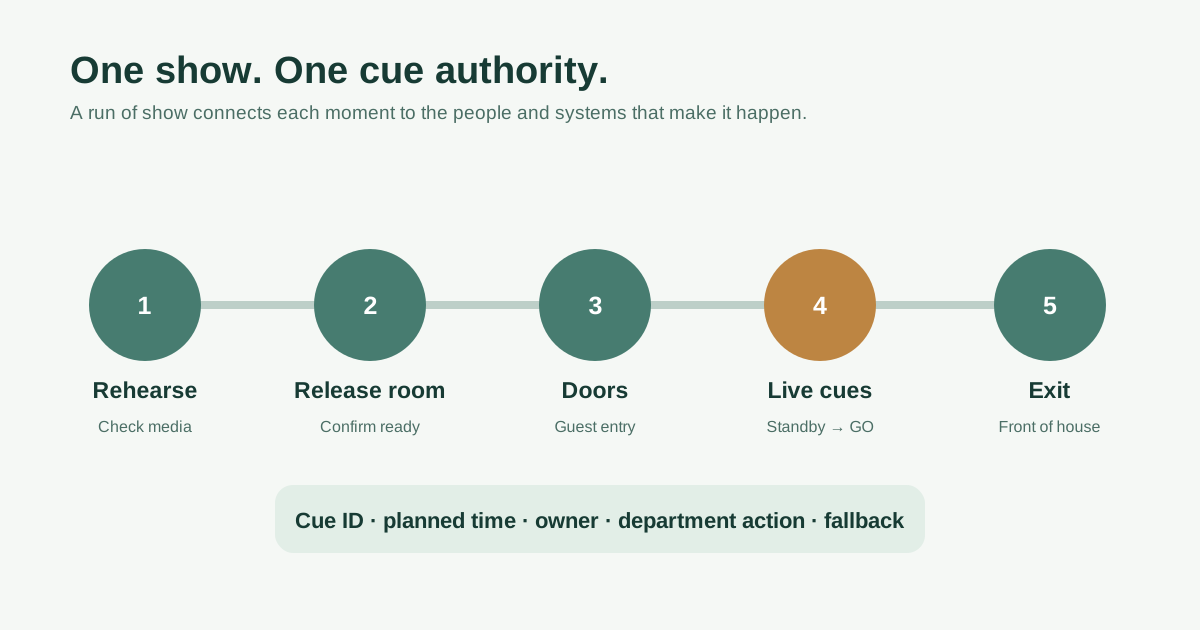
Keep the public agenda brief: doors, session titles and breaks. Keep delivery appointments, dock slots and strike in the load-in/out schedule. The internal run of show begins with rehearsals and room release, then follows doors, every live segment, transitions, audience exit and the handoff to post-show operations. Its audience is the producer, stage manager, front of house, presenters and technical departments. The leading template page explicitly distinguishes the internal cue-by-cue document from a public program; do not copy an audience agenda into a spreadsheet and call it a production plan.[1]
- Public agenda: attendee-facing segments.
- Load-in/out: access, suppliers and handback.
- Run of show: internal cues from rehearsal through guest exit.
Give every moment an ID, time and department action
Create one row per action that someone must execute or confirm. Use a stable cue ID such as SHOW-04, a planned local start, expected duration, location, segment, presenter, owner and status. Add columns for stage, audio, lighting, video/slides and guest services; leave an irrelevant department blank rather than putting vague instructions everywhere. For a speaker transition, specify which mic moves, which deck is next, and who brings the presenter on. The downloadable CSV includes illustrative prompt rows with no fixed times—replace them with your actual event. Keep dates and time zones explicit for overnight or multi-site work.
- Unique cue ID and planned local start.
- One row per executable action.
- Stage, audio, lighting, video and front-of-house columns.
Name who calls standby and GO
Write a single cue authority into the header: usually a designated stage manager or show caller, with a named substitute. Departments can report ready; the caller gives 'standby' before the moment and 'GO' when the agreed trigger occurs. Define what happens if the trigger is missing: hold, use a prepared filler, skip or escalate to the producer. Do not let five people independently announce a change to lights, audio and video. Guest doors should be a separate release decision by the responsible event/venue leads; the show caller should not assume the room is safe or ready merely because the clock says so.
- Named show caller and substitute.
- Standby and GO triggers.
- Explicit hold and escalation rule.
Rehearse transitions and prepare holds
Rehearse the transitions that require coordinated people and media, not only the main performance. Verify final asset versions and file names, presenter arrival, mic assignment, slide order, walk-on path and communication channel. Log the planned duration and note what can compress if a speaker runs late. Give the team an approved fallback for a missing presenter, failed video or delayed room release; write who may authorize each substitution. Technical testing, venue readiness and any required safety checks belong to qualified leads, and unresolved issues should remain visible rather than being marked done to meet a schedule.
- Final media and presenter checks.
- Practice transitions and delayed-start scenarios.
- Fallback approved before doors.
Run from one controlled version
Number and timestamp the run-of-show revision. Distribute one current version to each department and keep previous versions clearly superseded. During the event, record actual starts, holds and deviations in the same cue IDs so the post-event report can distinguish plan from reality. Tell each lead how a change is proposed, approved and announced on comms. If the producer moves a segment, update the downstream cues and tell presenters and front of house. After audience exit, switch to the distinct load-out schedule for dismantling and venue handback; do not bury those appointments among show cues.
- One current revision and distribution list.
- Actual times and deviations recorded.
- Downstream changes communicated to every affected lead.
Sources and further reading
- 40 Free Run of Show Templates (Excel / Word)TemplateArchive · Accessed