Event staff badge and key issue-and-return checklist
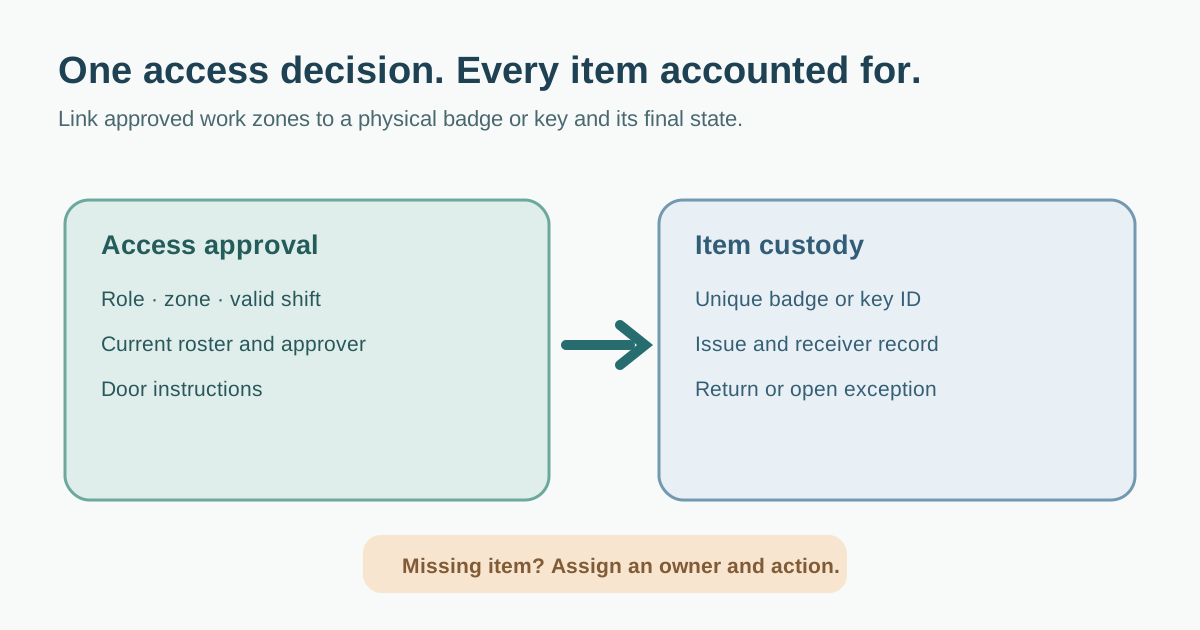
A staff pass solves a real access problem only if the person, permitted area and valid shift are clear to the issuer and the person checking the door. A separate custody record must show which physical badge or key was handed over and whether it came back. Use the editable worksheet to make both decisions visible before check-in opens. Adapt it with the venue security lead and the event’s actual access plan.
Boletolibre editorial team
Published
Give each physical item its own custody line
Create a unique identifier for every reusable badge, electronic card and mechanical key. The issue line records the worker or private staff ID, approved role, item ID, access scope, issue time, issuer and receiver acknowledgment. If one worker gets both a badge and a key, make two item lines: returning one does not close the other. Do not put a home address, ID-document number or personal phone number on the visible credential.[4]
At handoff, compare the approved roster with the credential actually prepared. Brief the worker on the zones, validity and return point. For electronic access, confirm the programmed permissions rather than trusting a printed color alone; NPSA describes automated systems as applying who/where/when rules. For a purely visual badge, door staff must be able to recognize the zone mark and current validity. Neither a spreadsheet nor a lanyard grants technical access by itself.[3]
Treat a lost pass, replacement or zone change as an exception
If a badge or key is missing, record the item ID, last known custodian and location, reported time, zones or doors affected, and decision owner. Notify the relevant access points. An electronic credential can be suspended only if the access system supports it and the authorized operator confirms the change. A visual badge or mechanical key may require a human checkpoint response or a venue lock decision; do not mark it “disabled” just because the log says so.
Before replacing an item, document what happened to the previous one and give the replacement a different ID. Record a changed role or zone with approver, effective time and update confirmation at the door or access system. A supplier substitution gets a new approval and a new custody line; it should not inherit another worker’s pass. Keep unresolved missing items open until the venue owner determines closure.
The leading search result covers the full credential lifecycle and stresses reconciliation. This worksheet narrows the job to an actionable approval matrix, item custody, and exception closeout rather than copying that source’s named operating model.[1]
Plan the return route before the first shift
Tell each worker where to return items after their actual shift, including late load-out. Assign a receiver for every return point. At collection, compare the printed or engraved item ID with the issue line, note time and condition, and put reusable items into a controlled store. A box of badges does not prove which specific items are back. Keys warrant their own count and secure storage.
At shift change and event close, compare approved staff, items issued, items returned, electronic access revoked where applicable, and open exceptions. Have the responsible supervisor resolve missing items rather than silently marking them returned. Record who made a closeout decision and when. If a badge was retained for the next shift, explicitly confirm that the role and time window still apply.
Limit roster fields and access to what the event needs. The ICO’s UK guidance describes personal data as adequate, relevant and limited to the stated purpose; its page is under review, and local privacy rules may differ. Set a retention decision with your organization’s privacy owner, then protect and remove duplicate exports under that rule rather than inventing a universal period.[4]
Download the staff credential issue-and-return worksheet (Markdown, English)
Sources and further reading
- Event Staff Check-In: A Credential-Issue and Return WorkflowWENOTIFT · Accessed
- Control AccessUK National Protective Security Authority · Accessed
- Automatic Access Control SystemsUK National Protective Security Authority · Accessed
- Principle (c): Data minimisationUK Information Commissioner’s Office · Accessed