Event ticket add-ons vs bundles: an entitlement checklist
A VIP ticket, a workshop kit and a parking pass can all be called a bundle, but they do not belong to the same person or consume the same stock. Decide who receives each benefit before configuring checkout. This guide and original worksheet separate admission rights from optional extras, then trace each promise through inventory, confirmation and on-site fulfilment.
Boletolibre editorial team
Published
Download the bundle decision card
Download the editable ticket bundle and add-on decision card (Markdown)
Record every included or optional benefit, its recipient, available quantity, purchase unit, delivery method and decision owner. The worksheet also gives a five-step mixed-order check. It is a planning aid, not proof your ticketing platform supports a given configuration.
Choose the unit of entitlement
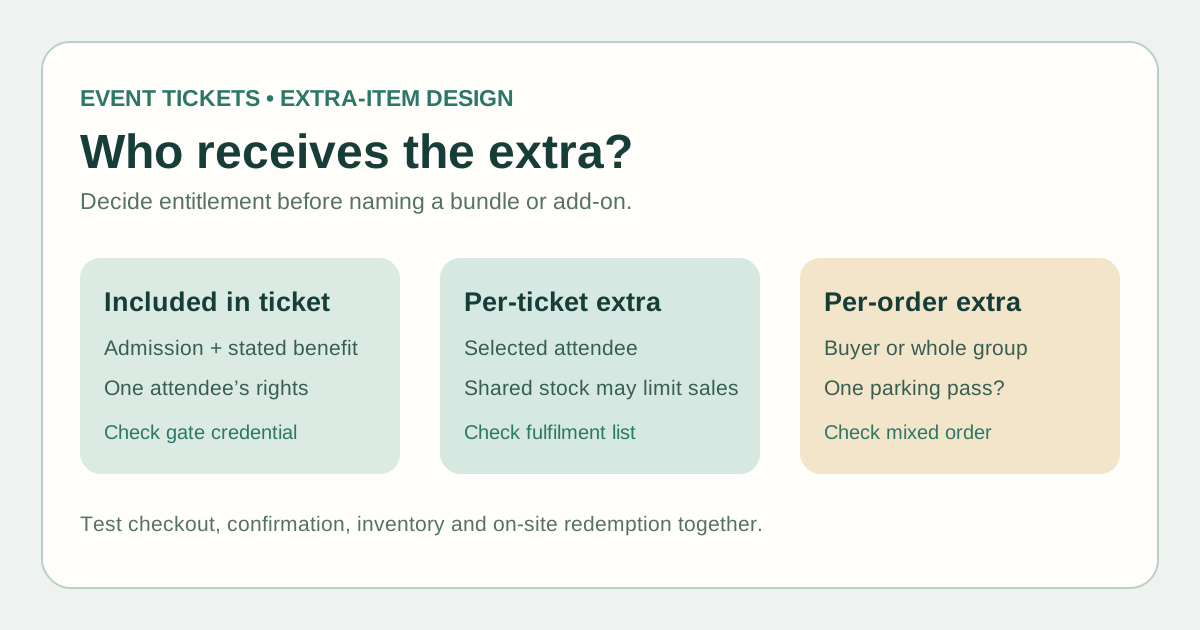
An included benefit belongs to the ticket type: for example, a VIP entrance right may travel with that attendee’s admission credential. A per-ticket extra is selected for an individual attendee, such as a workshop kit or meal choice. A per-order extra may belong to the buyer or group, such as one parking pass. A separately sold extra may not include event admission. These are design choices to confirm in the actual platform, not interchangeable labels.
Ask what happens when one buyer purchases two ticket types and one extra. Which attendee owns the extra? Can someone buy it without a ticket? If the ticket is transferred, does the benefit move? The answer may differ by product and event policy; publish only the rule you have verified.
Keep admission and extra stock separate
Track capacity separately for admission, seats, kits, meals, parking spaces and other scarce items. An item can be available while admission is sold out, or the opposite. Assign one inventory owner and a documented release or stop condition for each stock pool. If two ticket types draw from the same physical stock, confirm that the system enforces a shared limit or use an operational hold that prevents overselling.
A required selection should be required only when every attendee really needs it; optional extras should not be framed as part of admission. For accessibility or dietary needs, avoid collecting more personal information than the service requires and arrange a private support route when needed.
Say exactly what buyers receive
State the ticket’s admission rights and every included item on the offer page and confirmation. Eventbrite’s own add-on documentation shows that its extras can have separate quantity, per-order limits and fulfilment methods, and may be purchased without a ticket; those behaviors are platform-specific. Ticketmaster says VIP-package details appear on the event page and confirmation. Your platform may implement packages differently.[1][2]
Use concrete wording such as “one parking pass per order” or “one kit for each workshop ticket,” only when true. Tell staff whether the item is scanned at the gate, checked from a separate list, collected later or shipped. Do not promise guaranteed margin, automatic stock accuracy, universal transferability or an upgrade path.
Test a mixed order before launch
Place different ticket types and quantities in a test order. Check the total, stock movement, buyer receipt, attendee ticket and redemption record. Repeat with zero and multiple extras, then have gate and fulfilment staff identify exactly which credential or list they will see. Record failures and owners before sales open.
If using Boletolibre.com for the event page, make the public ticket description match the actual checkout and delivery setup. Check current platform capabilities before advertising a bundled product; this worksheet does not add a feature or create entitlements by itself.
Sources and further reading
- Sell merchandise and other extras with add-onsEventbrite Help Centre · Accessed
- What's included in my VIP package?Ticketmaster Help · Accessed