Event ticket fraud prevention plan: connect the sale, transfer and gate
A fake sales page, a disputed payment and a repeated gate scan are different problems. They become harder to resolve when marketing, ticketing, payments and front-of-house each keep a separate version of the facts. Use this plan to assign one source of truth and a decision owner at every handoff. It is an operational worksheet, not a claim that any platform can eliminate fraud.
Boletolibre editorial team
Published
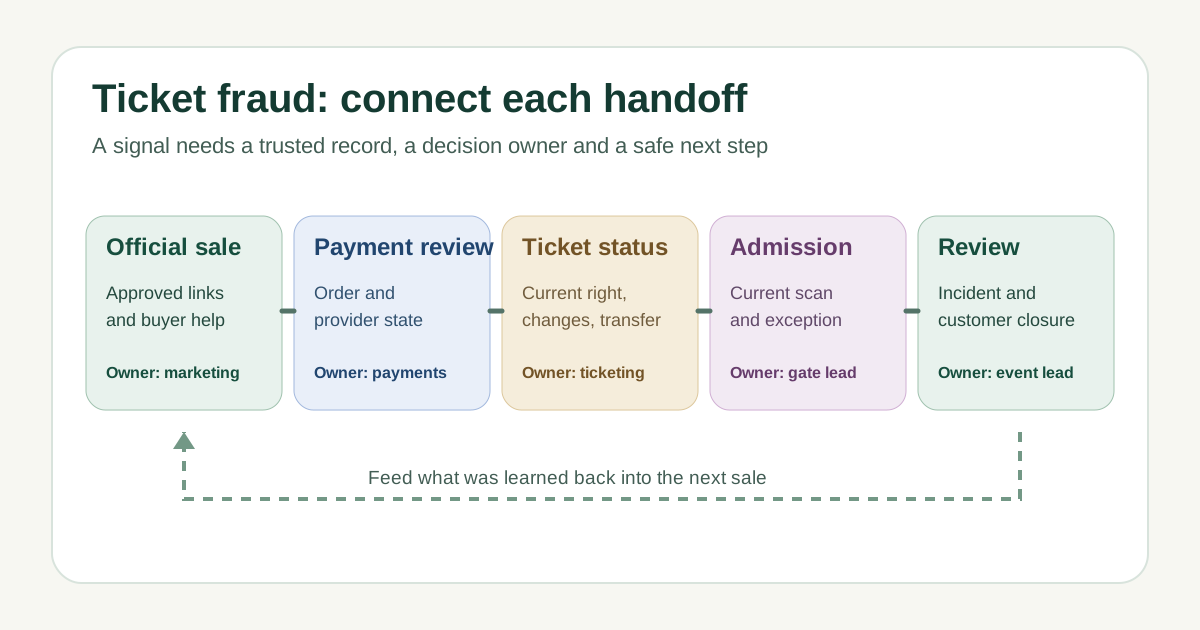
Map the handoffs before choosing controls
List every public route to a ticket: your event page, authorized seller, partner links, box office and any approved transfer or resale path. Name the owner of each link and the team that can correct a wrong destination. Then trace an order through payment review, ticket issue, modification, transfer and entry. A control only helps if staff know who receives its alert and what record they can inspect.[1]
For each stage, write down the signal, authoritative record, permitted action and escalation owner. For example, a suspicious purchase belongs with the payment or ticketing team; a duplicated code at a gate belongs with the admission lead. Do not collapse either signal into a final accusation. Preserve an exception path for genuine buyers whose order or scan state needs correction.
Make the official buying route easy to verify
Publish the approved ticket URL and support route from an event page you control. Keep the same destination in email, social posts, venue information and partner briefs; review links when an on-sale page moves. If your event page is on Boletolibre.com, use that page as the stable place to point attendees toward the currently approved purchase and help links. State whether transfers or resale are allowed, and where buyers can verify a transferred ticket.[2]
Copycat sites can use paid search and social posts, so a familiar logo or a result position is not proof of authorization. Give attendees a simple way to report a suspicious listing and a safe way to reach the organizer directly. When a report arrives, record the URL and evidence, check the actual sales record and send a factual correction through your established channels. Do not promise a refund or validity before that review.[2]
Review purchase and offer controls before on-sale
Ask your ticketing and payment providers which risk signals they expose, which actions they take automatically, and how authorized staff can review or reverse a decision. Document what happens to a paid order while it is under review: whether inventory is held, whether the ticket is issued, and who tells the customer. A payment warning is a reason to investigate, not proof that the cardholder or buyer acted dishonestly.[1]
For limited inventory, set purchase and offer rules that match the event: quantity limits, promo-code audience and validity, complimentary allocation and approval. Confirm whether each rule can actually be enforced across all sales channels. Test a controlled order, a changed order and a declined or reviewed payment using provider-approved methods. Record the observed outcome rather than assuming that a feature name guarantees protection.
Keep one ticket entitlement through changes and entry
Define what a ticket permits: event, date, session, zone, quantity and re-entry. Write down how a refund, cancellation, replacement or authorized transfer changes the old and new entitlement. Before doors open, check that the gate can see current status and that staff have a route for offline or unsynchronized devices. An image of a QR code alone cannot tell staff whether an entitlement is still valid or already used.
At a duplicate or unknown-code alert, pause the second admission and move the guest to a staffed help point. Check the order, status history, prior scan and any approved transfer. The lead records the decision and tells the gate which current entitlement, if any, may be admitted. A screenshot or paper copy is not automatically fraudulent; the event’s ticket rules and authoritative status decide. Use the linked repeated-scan and exception-desk guides for the detailed gate procedure.
Treat unusual patterns as leads, then close the loop
Choose a small set of signals your team can actually review: buyer reports of a copied listing, unusual failed payments, a promo code spreading beyond its audience, repeated scans or clustered disputes. Note the normal explanation to check first, the escalation threshold set for this event, and who may pause a link, code or ticket. Separate a payment dispute from a fake-ticket complaint; they need different records and different customer messages.
Keep an incident reference and a short evidence trail: affected order or listing reference, time, source checked, decision, owner, customer contact and follow-up. Store personal and payment information only in authorized systems. Stripe’s dispute examples show why order details, receipts and communications may matter, but evidence requirements depend on the dispute and payment provider; a record does not guarantee a favorable outcome. After the event, update the control or handoff that failed.[3]
Use one control-and-handoff worksheet
Copy the downloadable worksheet before on-sale and revisit it before doors. Fill one row per risk, not one row per vendor feature. Give every row a named owner, an authoritative record, a safe immediate action and a way to verify the fix. Run one tabletop example across teams: a buyer reports a copycat sales page while a gate sees a duplicate code. See whether the two reports reach the right owners without exposing buyer data in public channels.[1]
Download the ticket fraud control-and-handoff worksheet (Markdown, English)
Sources and further reading
- Cyber security for major eventsUK National Cyber Security Centre · Accessed
- How to make your World Cup experience scam freeUS Federal Trade Commission · Accessed
- Dispute sample evidence packetsStripe Documentation · Accessed