How to reconcile event ticket payouts with the bank
The sales dashboard can show one amount while the bank statement shows another. The useful question is not whether the numbers look similar, but whether the transactions assigned to one payout explain the provider's paid-out amount and whether that payout reached the bank. Start with the provider's report, one payout ID and one currency. Keep this reconciliation separate from website conversion reports and forecasts of future cash.
Boletolibre editorial team
Published
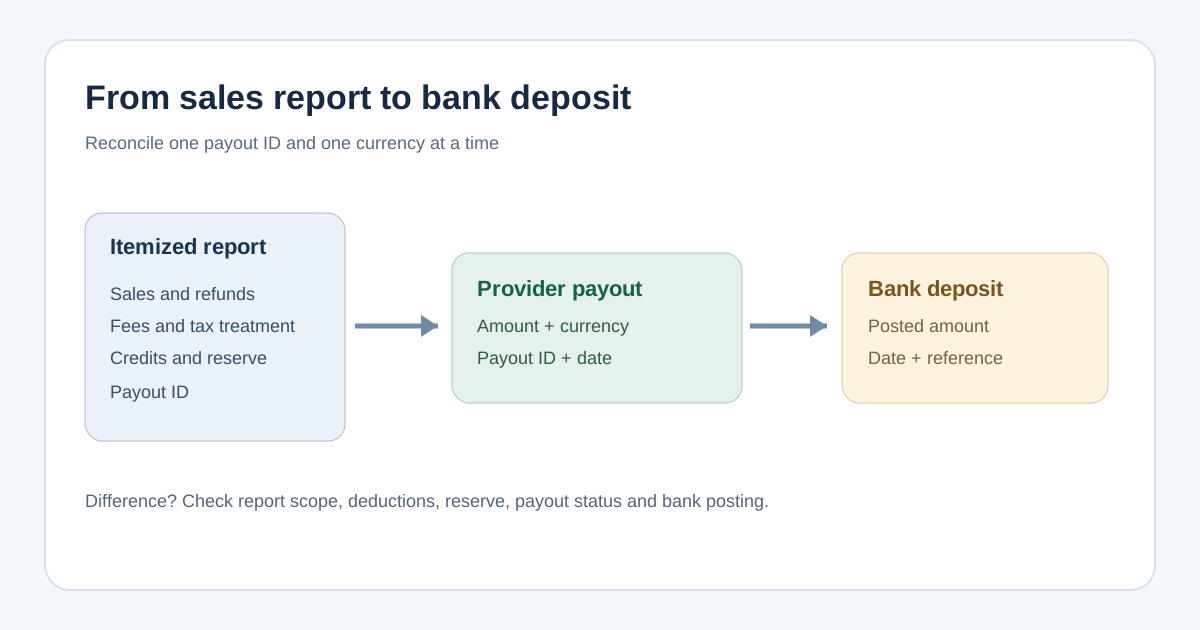
Export the summary and itemized payout report
For Eventbrite Payment Processing, an account owner or an admin with the required report permissions can open Finance → Payouts. Export the summary for the payout you are checking; it includes payout ID, event ID, amount, status, dates and other payout details. For transaction-level investigation, select By event date and export the event's itemized payout CSV. Eventbrite describes fields including gross sales, service fees, taxes, order and adjustment IDs and paid-out amount. Keep the export and its date with your reconciliation. Other providers use different menus and fields, so map their report to the same questions rather than assuming Eventbrite's labels apply everywhere.[1]
- Record the event, payout ID, currency, provider payout amount and provider status.
- Keep the itemized export for the exact event and payout scope; a monthly sales total may include transactions outside it.
- Find the bank credit by amount, posting date and available payout reference. Record the bank statement line or a safe internal reference.
Build a gross-to-net bridge using the provider's signs
Group the itemized transactions assigned to the payout ID. Start from the report's gross sales or charge totals, then identify fees, tax collected or remitted, refunds, disputes, credits, other adjustments and any reserve movement according to that provider's definitions. Check whether each line is already included in a net amount before subtracting it again. Eventbrite advises reconciling a payout from net sales rather than comparing the bank directly with dashboard gross sales. Stripe's payout reconciliation report similarly groups payments and other balance transactions within a payout, but its report is designed for automatic payouts; its documentation points manual-payout users to a different balance report.[2][3]
Write the bridge as provider-reported net sales, plus or minus signed charges, credits and reserve movement, equals the provider's paid-out amount. Do not impose a single tax or fee formula across platforms: who bears a fee and who receives a collected tax can change the bridge. For a small hypothetical payout with no tax, 10,000 in gross sales, 500 in deducted fees, 1,000 in refunds and 500 held in reserve would leave 8,000 paid out. The example is arithmetic only; it is not an Eventbrite or Stripe quote.
Match the provider payout to the bank entry
Compare the provider's paid-out amount and currency with the bank credit, not the original ticket sales total. Record both dates: the provider's initiated or expected-arrival date and the bank's posting date. They may differ. Use payout ID, available trace or reference, and the destination account to support the match. A bank statement can truncate descriptors; a matching label by itself is weaker evidence than amount, currency and payout record together. Stripe says its reconciliation report groups by estimated arrival date, not the bank's actual posting date.[1][3]
Investigate and close the difference
Calculate the residual twice: itemized bridge minus provider paid-out amount, then provider paid-out amount minus bank deposit. A nonzero first residual points to report scope, sign, fee, tax, refund, reserve or adjustment treatment. A nonzero second residual points to payout status, bank posting, an unmatched bank line or a currency/account mismatch. If the payout is pending, mark the bank match pending rather than forcing a zero. If a payout combines several events, use the provider's consolidation or payout-ID detail before assigning the whole bank credit to one event.
Log each open difference with owner, evidence, next action and review date. If the provider reports a failed or returned payout, follow its support workflow and retain the case/reference; do not edit the source export to make it tie. Once both residuals are zero or a documented timing item clears, attach the bank evidence and close the reconciliation. Transfer the confirmed bank amount into the cash-flow record. This article is a matching procedure, not accounting or tax advice.
Sources and further reading
- Export payout reportsEventbrite Help Center · Accessed
- Understanding your event payout amountEventbrite Help Center · Accessed
- Payout reconciliation reportStripe Documentation · Accessed