Why Google Analytics conversions differ from Eventbrite ticket sales
Your event site shows 200 checkout clicks, Google Analytics shows 60 purchase events, and Eventbrite shows 72 tickets sold. Which number is wrong? They may all be measuring different steps. A Google Analytics Community question about Eventbrite tracking shows the common handoff problem: a tag on your own site can observe a click out, but checkout happens on another domain. Start by identifying each report's unit and collection point before changing tags or declaring a campaign successful.
Boletolibre editorial team
Published
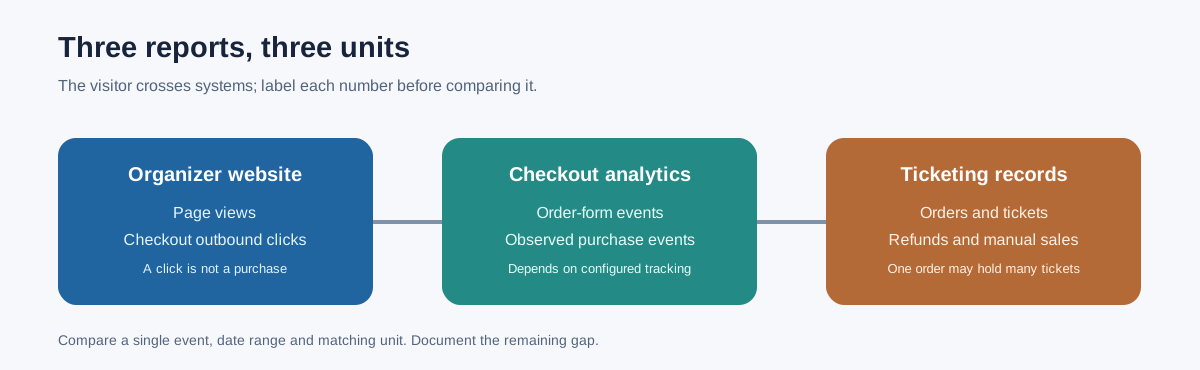
Label the number before comparing it
| Number | What it can mean | Do not call it |
|---|---|---|
| Event-site page view | A measured page load on your own site | A person or a ticket |
| Checkout outbound click | A click toward a ticketing page | A completed registration |
| GA4 checkout purchase event | A purchase event observed by a configured tag or integration | The authoritative net-sales ledger |
| Eventbrite order | An order placed; one order may include multiple tickets | One attendee |
| Eventbrite ticket | A ticket sold or issued under the report's filters | A checked-in person |
Eventbrite's own Traffic and Conversion report separates page visits, orders and tickets. It says orders can include multiple tickets, and embedded checkout sales appear even when embedded page views do not. A difference between those columns is therefore not automatically a broken integration.[3]
Map where your measurement stops
Draw the actual path: campaign link → organizer event page → outbound checkout link or embedded checkout → order form → payment result → ticket issuance. Mark which domain and system owns each step. A tag running only on the organizer website does not observe a later completed purchase on a third-party domain merely because it saw the outbound click. The leading community thread asks about precisely this setup; its answers are diagnostic ideas, not official product instructions.[1]
If using Eventbrite, its current help page describes adding a GA4 measurement ID under Tracking pixels. It says Eventbrite adds the tag to its checkout and can send event_listing, event_register and purchase events. Confirm the integration is configured for the intended event or all events and use the provider's published debug steps. Other ticketing platforms need their own documented method; do not assume they emit the same events.[2]
Reconcile one event, one period and one unit
Choose a single event and a named reporting cutoff. Match date range and timezone, check filters and ticket types, then compare like with like: GA4 purchase events against completed checkout transactions, Eventbrite orders against orders, and tickets against tickets. Export or record each report's definition alongside the number. If a purchaser buys four tickets, one order and four tickets can both be correct. If the event sells at the door, a website attribution report may have no corresponding visit.
Eventbrite cautions that its pixel ecommerce data does not account for refunds, transfers or manual transactions, and privacy settings can prevent the pixel from firing. Its event reports are the better source for actual sales. A missing or duplicated purchase event deserves investigation; a legitimate difference caused by report scope should be documented, not silently adjusted to match.[2]
Investigate the remaining gap in order
- Check whether the organizer site's click event fires once when the checkout link is used. Name it an outbound click, not a purchase.
- Check whether the ticketing provider's supported GA4 integration is installed on the relevant listing and checkout, and whether its purchase event fires once after a completed transaction.
- Check consent or browser restrictions, test versus live orders, canceled/refunded tickets, manual or door sales, and group orders.
- Compare the provider's page-view rules with your own site analytics. Eventbrite excludes embedded checkout-widget visits from its page-visit count while including embedded sales.
- Record each remaining difference with a likely cause, evidence, owner and next action. Do not sum clicks, pixel purchases, orders and tickets as though they were the same unit.
Cross-domain measurement is sometimes proposed as a universal fix. Google's instructions require the Google tag on each participating domain and note that a redirect may strip the linker parameter. It helps preserve a journey when the implementation supports it; it does not give your own website's tag control of a third-party checkout or replace the provider's purchase integration.[4]
Use the right number for the decision
Use website clicks to evaluate a call to action, GA4 events to study observed acquisition paths, provider orders or tickets to assess registrations, and the finance system for settled net receipts. Put the definitions in the event measurement plan and label any pixel gaps in the performance report. Avoid a confident 'conversion rate' unless numerator, denominator, population, window and attribution rule are explicit. A 200-click / 72-ticket ratio is not necessarily 36% conversion: some clicks repeat, one order may include several tickets, and purchases can originate elsewhere.
The practical result is often a reconciliation note rather than identical dashboards: which source is authoritative for each business question, which differences are expected, and which instrumentation issue needs fixing. Test the next campaign link and checkout path with this map before comparing totals again.
Sources and further reading
- Eventbrite Conversion Tracking SetupGoogle Analytics Community · Accessed
- Set up a tracking pixel with Google AnalyticsEventbrite Help Center · Accessed
- Access your Traffic and conversion reportEventbrite Help Center · Accessed
- Set up cross-domain measurementGoogle Analytics Help · Accessed