Should past event pages stay indexed? A practical decision guide
The event is over, but its URL may still have visitors, links and useful program history. Should the page remain eligible for search? Some organizers keep every archive; others remove every expired event. There is no useful one-rule answer. Decide what the old page now does for a visitor, then choose the page and search behavior that matches it.
Boletolibre editorial team
Published
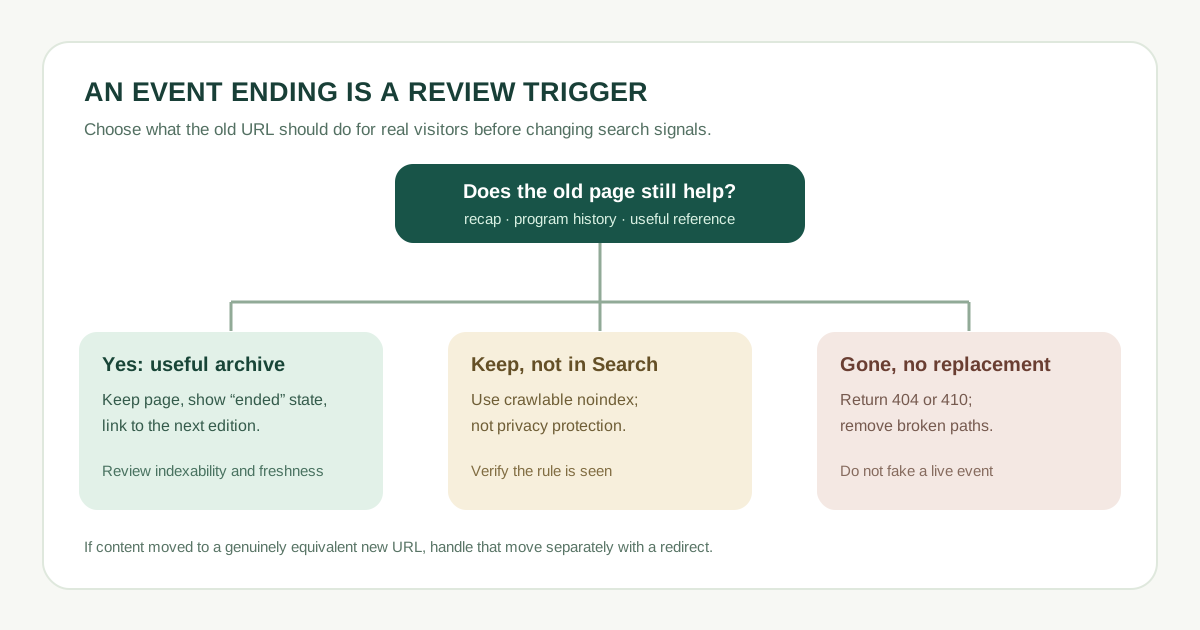
Ask whether the old page still answers a real question
A past event can still be useful as a recap, lineup or session archive, photo collection, proof of a recurring series, or reference for people who attended. If that value is present, keep the page accurate: label it as ended, preserve the original date and venue, remove the live purchase call to action, and link to the next edition only when one exists. A thin page that just says “buy tickets” for an expired show offers a very different experience. Do not silently overwrite last year’s page with this year’s date and call it the same event.
| Old page state | Visitor benefit | Possible path |
|---|---|---|
| Substantial recap or historic program | Useful after the date | Keep public and review for indexing |
| Public reference but no search purpose | Needed for direct links only | Keep public; consider noindex |
| No content and no replacement | None | Remove with 404 or 410 |
| Equivalent content moved | Same answer at a new URL | Redirect to actual replacement |
If you keep an archive, make its status unmistakable
Put “This event has ended” near the top, with the original date and a clear route to upcoming events. Retain a meaningful recap, schedule, venue context or results; a copied ticket-sales pitch is not an archive. If the page is public and you want it considered for search, check that it has no accidental noindex rule, is linked from a sensible archive, and gives a current answer to a past-event query. Being eligible does not guarantee indexing or traffic.
- Separate each annual edition when dates, program or ticket terms differ.
- Avoid a deceptive “Buy now” control leading to an expired checkout.
- Review personal data and media permissions before keeping old attendee material public.
If it remains public but should not appear in Search
A page may need to remain accessible through an old email or QR code yet be too thin or operational to list in search. On a page you control, a noindex meta tag or response header can tell supporting search engines not to index it. Google must be able to crawl the URL to see that rule; blocking the same URL in robots.txt can prevent the crawler from reading it. Noindex is not privacy protection—anyone with the link may still access the page. Restrict access if it contains private information.[1]
Omitting the URL from your sitemap alone does not remove it from search. Keep the sitemap aligned with the public preferred pages you actually want discovered.[3]
If the old URL is gone, return the right response
When the page no longer exists and there is no genuinely similar replacement, Google recommends a 404 or 410 status. If the same useful content moved to a new address, redirect to that real replacement. Sending every past-event URL to a generic home page can mislead visitors and does not recreate the old answer. Keep a helpful navigation route from the error page to current events.[2]
Download the editable past-event page review sheet (CSV)
| Final check | Record |
|---|---|
| Old URL and original event date | ____ |
| Useful content after event | ____ |
| Chosen page/status behavior | ____ |
| Search and sitemap setting | ____ |
| Owner and next review date | ____ |
Check the actual response and search setting after publishing, then revisit the decision when an archive gains new material or an upcoming edition launches.
Sources and further reading
- Block Search indexing with noindexGoogle Search Central · Accessed
- Troubleshoot Google Search crawling errorsGoogle Search Central · Accessed
- Build and submit a sitemapGoogle Search Central · Accessed