Event website broken link audit: checklist and repair log
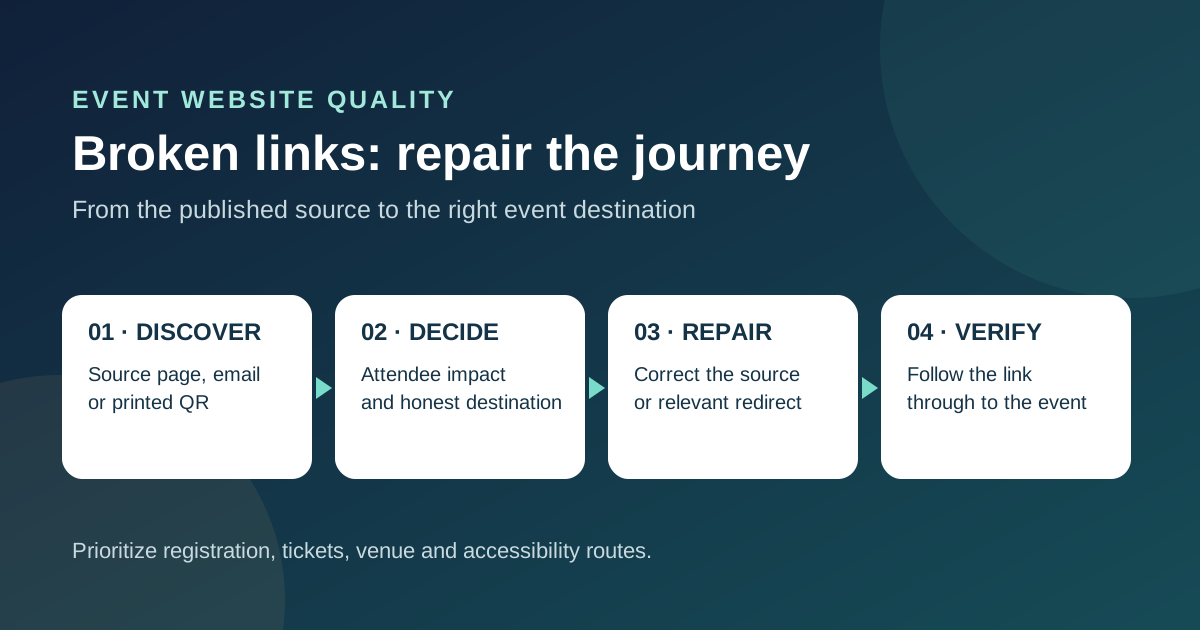
A broken link on an event site is most urgent when it stops someone finding the venue, registering or opening a ticket. The audit below starts with those attendee journeys, then covers older content, images and external references. Download the repair log before changing URLs so the team can trace each decision and retest it.
Boletolibre editorial team
Published
Download the broken-link repair log
Download the editable link audit and repair log (Markdown, English)
Use one row per broken source link, not only per failed destination. The same dead ticket URL might appear in navigation, an email template, a QR code and a partner page, each with a different owner. Record the URL as found, where it appears, the observed result, the intended attendee task, the decision, the fix owner and the retest evidence. A crawler export is evidence to triage, not an approved list of redirects.
Start with the paths attendees actually use
Make a short journey list for discovery, event details, venue and accessibility information, registration, payment handoff, ticket retrieval and support. Open the live pages in the languages your audience uses. Follow the links as a new visitor and, where permitted, through a non-purchasing test flow. Include any Boletolibre.com event URL you share publicly alongside your own domain, email and printed QR destinations. Do not use a real payment to test a link.
- Check the current event landing page, header, footer, FAQ, venue map, schedule and prominent calls to action.
- Include ticket confirmation and reminder templates, social profiles, ads, sponsor and venue pages, QR codes and downloadable PDFs.
- For a hosted checkout, check the handoff URL and the visible event identity there; do not assume your site crawler can inspect the provider’s private flow.
Find errors without treating every 404 as a defect
Use a site crawl or link checker to map source pages to destinations, then review the high-value paths manually. In Search Console, the Page indexing report can show URLs Google encountered as “Not found (404)” or “Soft 404”; it does not replace a complete inventory of links in email, print or third-party pages. A 404 for a deliberately retired page with no replacement is normal. Google says many 404s are safe to ignore; fix the ones caused by wrong links, submitted URLs or moved content. A soft 404 is different: the page may say “not found” while returning HTTP 200.[2]
- Record the actual HTTP status and the visible page; a temporary 5xx server error is not a broken-link decision.
- Inspect missing images and document links as well as HTML page links.
- Check the source page or channel that sent the visitor. A report of a dead destination alone does not show where the bad link is published.
Triage by attendee impact and event timing
Put failed registration, checkout, venue, access and ticket-retrieval paths at the top of the repair queue. A dead source citation in an old recap still deserves correction, but it usually does not block arrival or purchase. Verify whether a URL truly fails for everyone, or only during a short provider incident, login state or regional outage. Record the observed time and location so a transient failure does not become a permanent redirect by mistake.
Assign one owner who can change the source link and another person to check the result when practical. If the link is on a partner or venue site, give that publisher the exact replacement URL and follow up. If a QR code is already printed, the remedy may involve a controlled redirect or replacement signage; write down the physical locations that need attention.
Choose the smallest truthful repair
When the destination still exists at a new address, update links you control directly. Use a permanent redirect from the old address when people may still follow it from email, print or another site, and when the new page genuinely serves the same purpose. If a page is gone with no comparable replacement, let it return a real 404 or 410 and offer useful navigation on the error page. Google recommends a 301 for moved pages with a clear replacement and a 404 or 410 for removed pages without one. A blanket redirect to the homepage can mislead attendees and may be treated as a soft 404.[3]
- Correct typos and outdated paths at the source; do not keep a redirect as the only fix for a link you can edit.
- Replace a dead external resource with an authoritative working source, or remove its link and any claim that depended on it.
- If the event or ticket policy changed, have the content owner approve the destination before redirecting; a current edition is not automatically equivalent to an older one.
Retest the whole journey after the edit
Open the original source page or message and follow the repaired link. Check the destination, event name, date, language, price or access information as relevant, then record the result in the log. Test on a phone if the link is likely to be scanned or tapped there. For redirects, check the final page instead of accepting a status code alone; a redirect chain or wrong event page still fails the attendee. Search Console reports may update later than the live site, so use a direct live retest for the immediate sign-off.
Close the row only when the source, destination and owner are recorded. If a provider-controlled link still fails, keep the row open with a support reference and a temporary attendee-facing fallback. Do not promise that an indexing report or search ranking will change on a fixed schedule.
Three decisions an event team should not confuse
The venue map link in your confirmation email returns 404 because the PDF filename changed. Replace the link in the email template and in any public page that repeats it. If old confirmations have already been sent, keep a relevant route from the old PDF address if the host can support it; then check that the new file actually shows the current venue and accessible entrance. A successful redirect to an outdated map is still a failure.
A last-year ticket page has no equivalent current page. Do not send its old URL to this year’s checkout merely because the event brand is the same. Keep a useful historical page if it serves a real purpose, or return a genuine 404/410 with a link to current events. By contrast, a misspelled current registration link in the navigation should be corrected immediately at the source.
A partner site links to the right event but its checkout URL now requires an expired campaign token. Your crawler may report a normal HTTP 200 while a visitor still cannot complete registration. Follow the journey manually, report the exact failure to the partner or ticketing provider, and give attendees a verified route while it is resolved. The audit records both technical response and task outcome.
Repeat the audit when links change
Run this check before a ticket on-sale or major announcement, after a URL migration, postponement, venue change or checkout switch, and when an external provider changes its links. Choose a maintenance cadence based on how often your team publishes or retires pages; no fixed interval fits every event. Add broken-link review to the same approval step that checks dates and destinations before publication. That prevents the repair log from becoming a recurring list of the same avoidable mistakes.
Sources and further reading
- 404 (Page Not Found) errorsGoogle Search Console Help · Accessed
- Page indexing reportGoogle Search Console Help · Accessed
- Troubleshoot Google Search crawling errorsGoogle Search Central · Accessed