A content approval workflow for event websites
An event website can be correct in the draft and wrong in public. A late ticket-price edit, venue change or checkout-link swap may affect attendees before anyone notices. A small team does not need a complex approval platform to prevent that. It needs a repeatable route from proposed change to checked live page, with one accountable decision maker and a record of the exact version approved. This guide gives that route and an approval-log example you can adapt.
Boletolibre editorial team
Published
Decide which changes require approval
Start with facts that change a visitor's decision or journey: ticket price and fees, sale opening or closing time, event date and time zone, venue and access directions, capacity or availability claims, refund or entry policies, registration questions, and the destination of a ticket button. Routine typo fixes can use a lighter review, but a change that affects a buyer or attendee should be explicitly checked. Write this trigger list down before the team faces a deadline.
| Change | Required check before approval | Public verification after publish |
|---|---|---|
| Ticket price or fee | Compare approved price source, checkout display and currency | Open the live ticket path; confirm the displayed amount |
| Date, time or venue | Check authoritative event schedule, time zone and directions | View mobile event page, ticket page and confirmation details |
| Refund or entry policy | Confirm approved wording and any required specialist review | Open the live policy and its links from checkout |
| Registration field or checkout link | Test form purpose, destination and confirmation behavior | Complete an authorized test journey without creating an unintended charge |
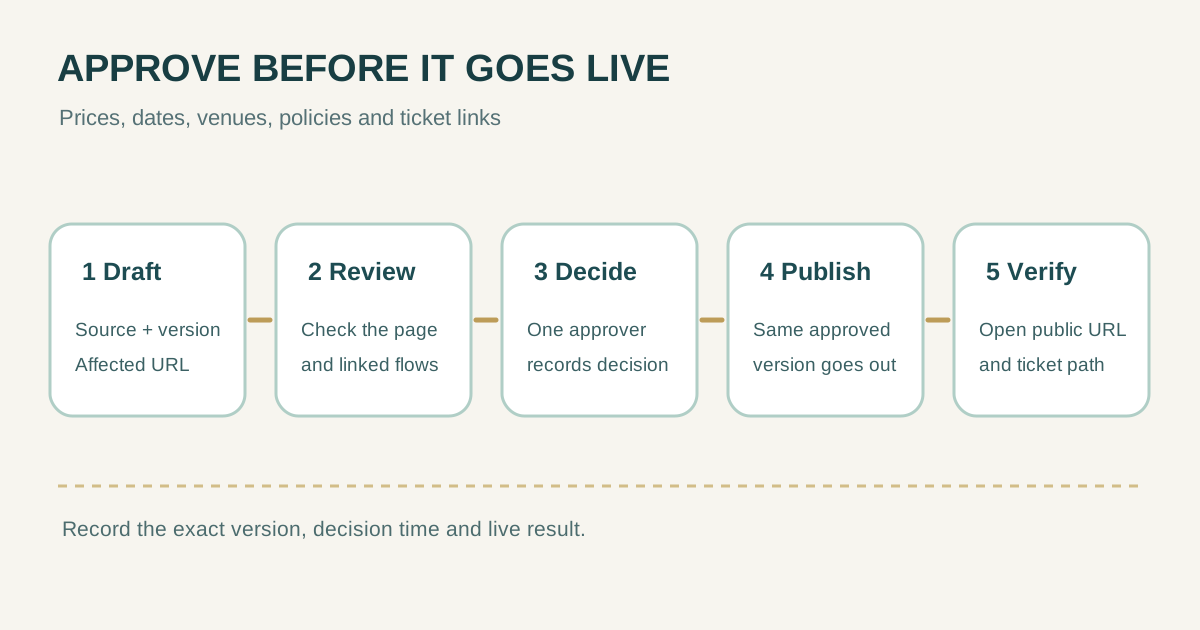
Use five gates from draft to live page
A practical content-approval workflow names roles, stages feedback, defines entry and exit conditions, sets deadlines, and reviews the page in its real web context. For an event site, keep those ideas compact: one change request, one review location, one final approver, and one live check. Separate feedback from the approval decision so suggestions do not silently become permission to publish.[1]
| Gate | Required evidence | Who acts |
|---|---|---|
| 1. Propose | What changes, why, source of truth, affected URL and deadline | Editor or requester |
| 2. Review | Exact draft or staging URL and version; checks for price, schedule, policy or integration as relevant | Relevant specialist or content reviewer |
| 3. Decide | Approve, reject or request revision for that version; decision time recorded | One named final approver |
| 4. Publish | Approved version and planned time; publisher confirms no later edit changed it | Publisher |
| 5. Verify | Public URL, mobile view and affected registration or checkout path checked | Publisher and a second checker for critical changes |
Set a decision deadline and a named backup approver in advance. For a consequential price, schedule, policy or checkout change, silence at the deadline is not approval. Hold the old information or escalate to the authorized backup, and record what was done. If the draft changes after sign-off in a way that affects the approved fact or visitor journey, get a fresh decision on the new version.
Keep a short approval record that can answer what went live
A revision history can help show what changed, but it does not by itself show who approved the change or whether the public page was checked. WordPress, for example, documents revisions for saved drafts and published updates and separate pending/published statuses. Whatever CMS you use, retain the decision and public-check evidence in the team's normal work tracker or a simple register.[2][3]
| Record field | Example for a venue change |
|---|---|
| Change ID and affected URL | EVT-024; /events/autumn-night |
| Source and exact draft | Approved venue email; staging page revision 8 |
| Specialist review | Operations checked address and accessibility route |
| Final decision | Approved revision 8 by event lead, with date and time |
| Publish and public check | Published revision 8; live page and ticket provider checked on mobile |
| Follow-up | Old venue reference in confirmation email assigned for correction |
This is a reusable log pattern, not a claim that a particular CMS stores every field. Keep private attendee data, credentials and internal dispute details out of a broadly shared approval sheet. Link to the approved source where access controls already exist.
Rehearse the workflow before the next announcement
- Choose one real but low-risk page edit and record a change ID, source, draft URL and target time.
- Ask the appropriate reviewer to comment on the rendered page, including mobile presentation and linked buttons.
- Have the designated approver decide on the identified version; do not accept an ambiguous ‘looks good’ without a recorded decision.
- Publish that same version, then open the public URL and follow any affected registration or checkout link.
- Record the public result, issues found and the person responsible for each correction.
The ownership register answers who maintains a page over time. This approval record answers who checked and authorized a particular change. Keep both small enough that the team will actually use them. If a wrong fact is already public, prioritize a controlled correction and attendee communication as appropriate, then preserve the record of the mistaken and corrected versions.
Sources and further reading
- Content approval workflow: a practical guide for creative and web teamsYbug · Accessed
- RevisionsWordPress.org Documentation · Accessed
- Post StatusWordPress.org Documentation · Accessed