Secure file uploads on an event website: policy and review checklist
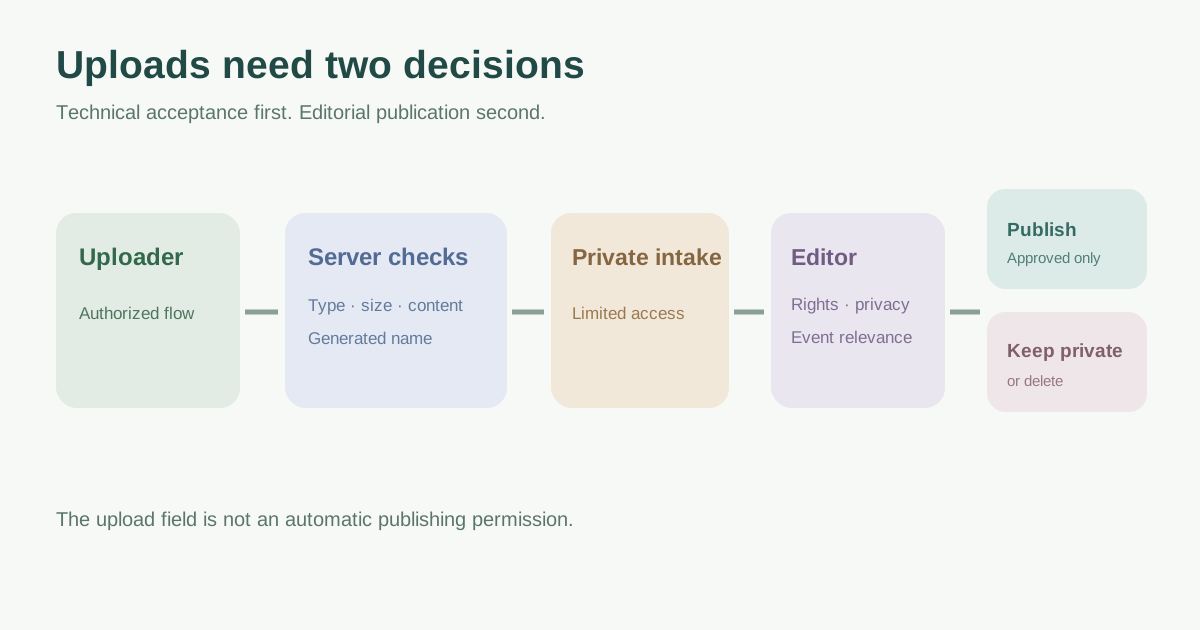
An event site may accept speaker headshots, sponsor logos, press assets or attendee documents. Each upload creates two separate decisions: can the application safely receive and store the file, and should the team publish or retain its contents? Use this checklist to specify both decisions before adding another upload field. It is a planning and acceptance aid for the technical owner, not a substitute for secure implementation.
Boletolibre editorial team
Published
Inventory the upload flows before choosing controls
List every form or admin screen that accepts files, who can use it, what the file is for, and whether anyone can later download it. Do not treat a sponsor logo and an attendee identity document as the same data class. A public speaker image may eventually belong on a page; a private attendee document should not be placed in a public media library by default. If a vendor hosts a form, record which provider receives the files and who controls retention and access.
| Upload flow | Decision to document |
|---|---|
| Speaker headshot | Who may submit, who approves publication, approved image formats |
| Sponsor logo | Source and publication permission, transparent/image format policy |
| Attendee document | Necessity, private access, retention and deletion owner |
| Staff media | Authorized editor, copyright/consent review, public destination |
Restrict and verify what the application accepts
Define the minimum required extensions and maximum size for each flow. Validate on the server after decoding the filename; a browser accept attribute or client-side warning is only a convenience. OWASP warns that the submitted Content-Type can be spoofed. Compare the extension, expected type and file signature as complementary checks, and decode or inspect content with maintained libraries appropriate to the format. No single check proves a file safe.[1]
Generate the stored filename rather than using the visitor-supplied name as a filesystem path. Set request and processing limits so a large or compressed file cannot exhaust resources. Restrict uploads to authenticated or otherwise identifiable, authorized users where the workflow allows. If public contributions are necessary, add a review queue and abuse controls rather than assuming the open form is trusted.[1]
Separate private intake from public delivery
Keep intake files away from executable web content. OWASP prefers segregated storage or storage outside the webroot, with access mediated by the application when retrieval is needed. For object storage, the equivalent design is a private intake area and explicit publication to a public destination after review. Record who can read, replace and delete each class of file. A random filename alone does not make a public bucket private.[1]
Consider malware scanning, image re-encoding or content disarm for formats and risk levels where those controls are appropriate. A scanner result is one layer, not a guarantee. Avoid sending private attendee files to an external scanning service without a reviewed data-sharing basis. Preserve only the source information needed for operations, and set a retention owner and deletion point for private uploads.[1]
Review content and prove the workflow
An editor should confirm that a logo or photo matches the intended event, has a permitted use, contains no unnecessary personal information or metadata, and is ready for public display. This editorial decision is separate from the technical acceptance checks. Keep rejected files private and handle reports of harmful or mistaken publication. Assign an owner for takedown and replacement.
Before launch, use safe sample files to confirm allowed and rejected types, oversize handling, uploader permissions, private retrieval and public publication. Check that a rejected or pending file has no public URL. Record evidence in the worksheet. Revisit the policy when a new sponsor portal, speaker form or ticketing integration adds a file path.[1]
Download the event website file upload policy and acceptance worksheet (Markdown, English)
Sources and further reading
- File Upload Cheat SheetOWASP Cheat Sheet Series · Accessed