Event website load test plan template: permission, traffic and stop rules
A ticket on-sale can bring a sharp traffic change, but an uncontrolled “test” can disrupt real attendees, generate charges or hit a supplier service you do not own. Google’s leading website load-testing guide explains frontend versus backend testing, script approaches and scenario choice. This event-specific worksheet turns those ideas into an authorization and stop plan before any traffic is sent. It does not run a test or prescribe a universal user count.
Boletolibre editorial team
Published
Start with one capacity question
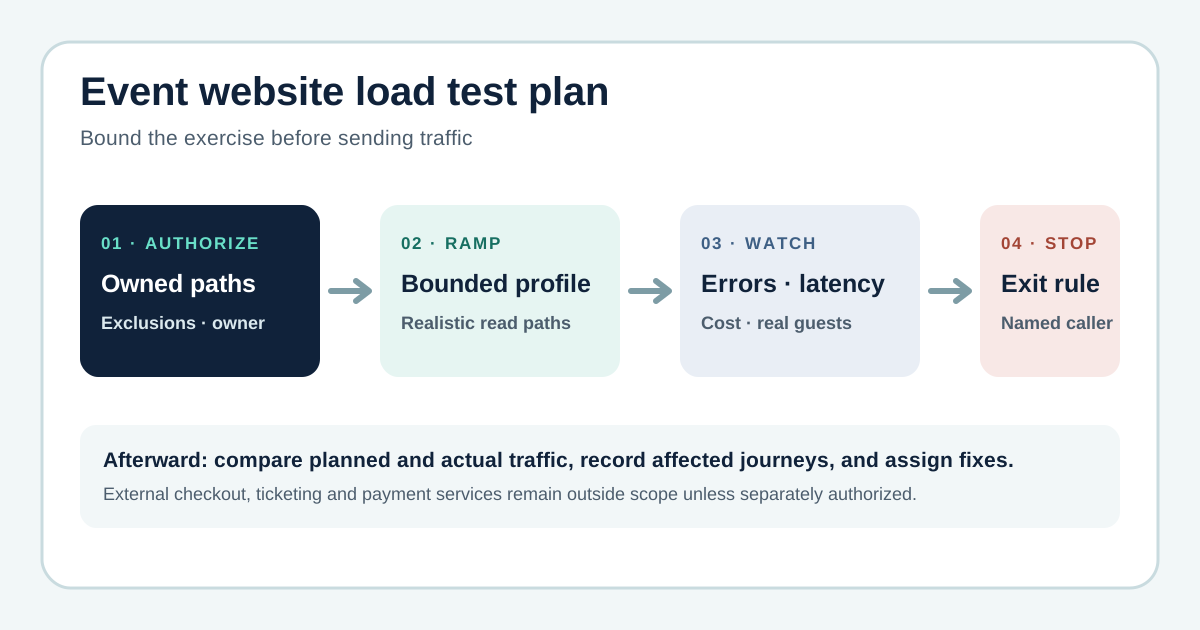
Write the exact decision the exercise should support: for example, can the public event page and owned registration entry point remain usable during the expected on-sale pattern? State which environment and release are under test, what a representative visitor does and what is deliberately excluded. Browser-level checks reveal rendering and interaction symptoms; protocol traffic helps isolate application capacity. Neither substitutes for the other, and a small browser sample is not a full-scale traffic test. Grafana’s guide makes this distinction central.[1]
Use a bounded traffic shape, not a headline concurrency number
Derive the test profile from your forecast and observed traffic: a baseline, gradual ramp, expected on-sale shape and recovery. Document the length and cap of each phase and what the observer must confirm before moving on. Use synthetic records if an approved registration path is included and distinguish test traffic from real guests in logs. Do not invent a “safe” requests-per-second figure from another site. Keep a way to stop manually, even if your tool also supports automatic thresholds.
Watch guest impact and stop on agreed signals
Choose event-specific stop conditions for guest-facing errors, failed registration steps, sustained latency, provider throttling, quota alerts, unexpected charges and a real customer incident. Put the responsible observer and communication channel beside each condition. Grafana k6 documents abort-on-failure thresholds, but implementation and evaluation timing depend on the test setup; a human stop path still matters. On a trigger, end traffic, notify the incident owner and preserve timestamps rather than immediately retrying harder.[4]
Compare evidence with the launch decision
Record actual traffic, request failures and latency by journey, plus backend, CDN and database symptoms. Note the gap between a synthetic script and an actual visitor using a browser or hosted checkout. Assign each fix an owner, due date and authorized retest; decide whether to proceed, change the launch plan or test again. A successful run at one profile is evidence for that profile, not a guarantee for every on-sale spike.
Sources and further reading
- How to load test a website: A comprehensive guideGrafana Labs · Accessed
- Load testing applicationsAmazon Web Services Prescriptive Guidance · Accessed
- Scans and penetration testing policyCloudflare · Accessed
- ThresholdsGrafana k6 documentation · Accessed