How to create an XML sitemap for an event website
An XML sitemap is a machine-readable list of URLs you want search engines to discover. For an event site, the hard part is rarely typing XML; it is deciding whether the overview, program, venue and ticket-information pages are public, current and preferred versions. Google’s sitemap guidance says the file helps discovery, but does not guarantee crawling, indexing or a ranking. Start with a page inventory, then let the website or CMS generate the file where possible.
Boletolibre editorial team
Published
Inventory the public pages you want found
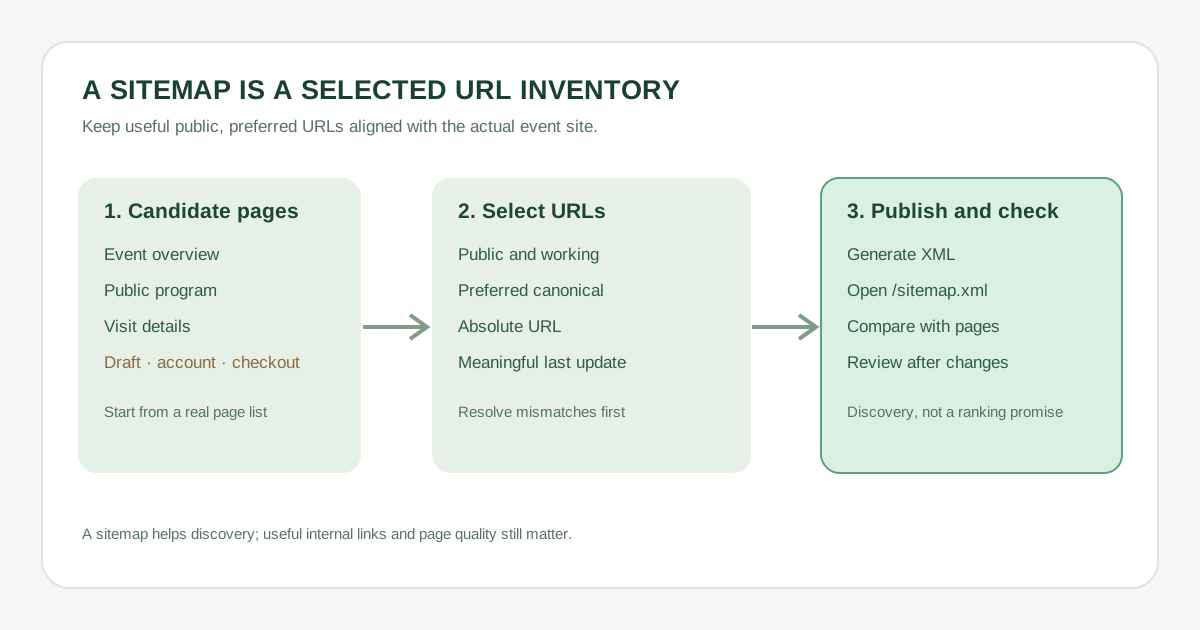
List each event URL and its purpose. A published event overview, schedule, venue/access guide, ticket-information page or public FAQ may belong. A private account, draft, checkout session, thank-you page, campaign tracking variant or retired redirect generally does not belong in the organizer’s public sitemap. A page can be publicly reachable yet still be the wrong URL to list if a cleaner canonical version represents the same content.
| Candidate | Typical decision | Check before inclusion |
|---|---|---|
| Event overview | Include | Published, current, preferred URL |
| Program or venue details | Include if useful and public | Real content and stable URL |
| Ticket information | Include public explanatory page | Do not confuse it with private checkout |
| Campaign parameter or print duplicate | Omit variant | List preferred canonical URL |
| Draft, account, confirmation | Omit | Keep private or out of discovery workflow |
A sitemap is not an access-control tool. Decide separately whether a page should be public and indexable; listing or omitting it alone does not set those permissions. Google advises including the URLs you want shown in Search, using complete absolute URLs.[2]
Generate a small, valid XML file
The basic format is a UTF-8 XML document with a <urlset> element containing one <url> per page. Each entry needs a <loc> holding the full absolute URL. The optional <lastmod> should reflect a real, significant update to that page—such as a changed program, location or ticket terms—not an automatic daily date. Google ignores <priority> and <changefreq>. The downloadable example uses example.org as an illustrative domain; replace every example URL and date before using it.
Download the illustrative two-URL XML sitemap
Download the editable event URL inventory (CSV)
If your CMS or framework already generates a sitemap, configure its selection rules rather than maintaining a second, conflicting file. For a small site, a manual file can be practical; larger or frequently changing sites benefit from generation tied to published content. XML can also describe localized alternates if the site supports them.[2]
Publish and make it discoverable
- Place the file at a stable public URL such as /sitemap.xml, or use the location your platform generates. Open that URL directly and confirm it returns XML, not a sign-in page or error.
- Check every listed address uses the preferred host and HTTPS URL, serves the intended public page, and agrees with canonical tags and internal links.
- Expose the sitemap through your platform’s standard mechanism and, if you use Google Search Console, submit its URL there. Submission is a hint, not an indexing guarantee.
- Keep normal navigation and contextual links to important event pages. Google notes that properly linked sites may be discovered without a sitemap; the file supplements those links.
Do not add checkout URLs hosted by an external provider to the organizer site’s sitemap; you do not control that provider’s URL inventory.[1]
Review after meaningful event changes
When the schedule, venue, date or ticket information changes, verify the public page, its URL and the sitemap entry. Update <lastmod> only for significant changes that can be verified on the page. Remove obsolete variants and confirm new edition pages are linked and listed if they should be discoverable.
| Review item | Record |
|---|---|
| Sitemap URL loads as XML | ____ |
| Expected public URLs present | ____ |
| Private/duplicate URLs absent | ____ |
| Canonical and internal links agree | ____ |
| Last significant update / owner | ____ |
Use Search Console or your own checks to investigate errors, but allow for discovery and indexing decisions outside your control. A tidy sitemap is a maintained inventory, not a promise that every page will appear in search results.[1][2]
Sources and further reading
- Learn about sitemapsGoogle Search Central · Accessed
- Build and submit a sitemapGoogle Search Central · Accessed