Incomplete event registration follow-up: drafts vs missing details
“Incomplete registration” can describe two different people: someone who started a form but never submitted it, or someone whose registration exists but still lacks a required attendee detail. If you send both the same “finish your registration” message, you may wrongly imply that a place, payment or ticket already exists. Check the record before you contact anyone.
Boletolibre editorial team
Published
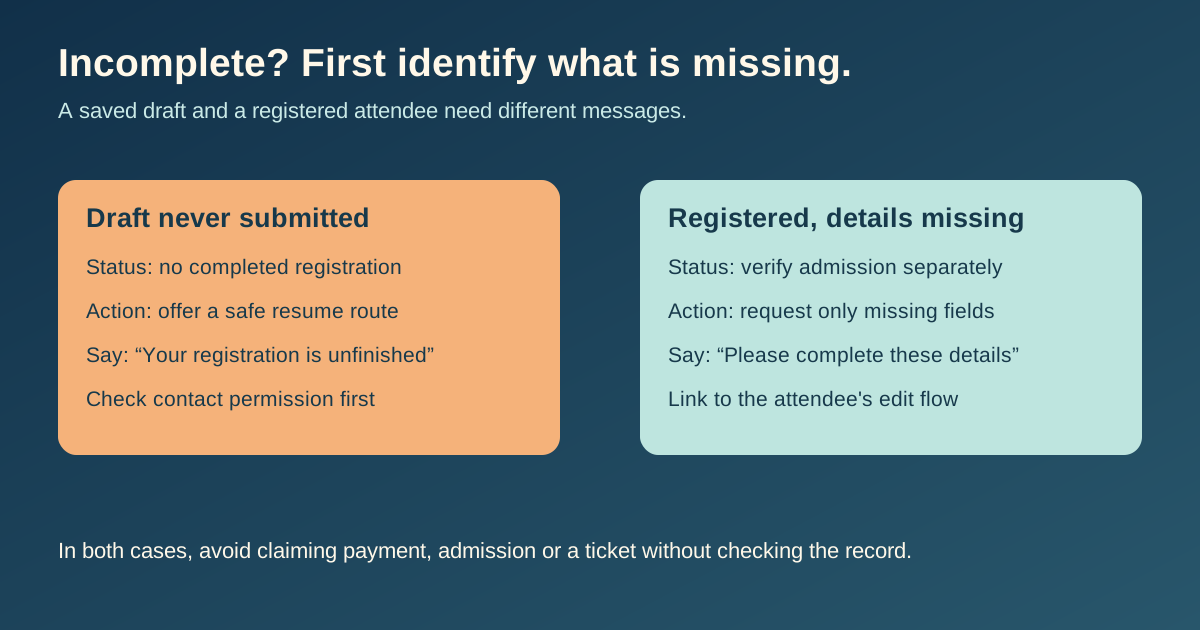
Classify the record before writing
The leading search result describes Swapcard's abandoned-registration list for people who started but did not finish the form. A separate Planning Center example sends reminders to people already registered who still owe extra attendee information. Their product features are different, but the underlying editorial lesson is the same: the word “incomplete” is too vague to drive a message by itself.[1][2]
| Record state | What to verify | Appropriate request |
|---|---|---|
| Draft or abandoned form | Was anything submitted? Is a resume path available? | Invite completion without calling them registered |
| Submitted registration with missing detail | Which exact field remains? Is admission already confirmed? | Ask only for the missing detail, with an edit route |
| Payment pending | Did the payment provider confirm or fail? | Use the payment-specific message, not a generic missing-field reminder |
| Ticket issued | Does the ticket record exist? | Avoid another 'complete registration' message |
Do not assume the first email address typed in an abandoned draft is an approved contact route. Check your platform's collection and messaging rules before reaching out. Do not paste missing personal details into a public or shareable URL.
For an abandoned form, offer a clear way back
If a saved draft exists and you may contact the person, say that the registration was not completed. Link to the platform's intended resume flow, state whether the event has a real deadline, and make it easy to ask for help. Check whether the link still works and whether a place is actually held; never promise a reservation merely because a draft was saved. Swapcard describes a product-specific completion email for this state; the organizer should adapt its own system's current capabilities rather than assume that feature exists everywhere.[1]
For a registered attendee, request only the missing details
When a registration already exists, the follow-up should acknowledge that actual state and identify only the missing item. An attendee might need to provide accessibility needs, a participant name or a consent choice, but avoid asking for information you cannot justify for the event. Planning Center's example sends a reminder with a link to complete outstanding attendee information; it is a useful pattern, not a universal platform behavior.[2]
The admission sentence must reflect the actual record: “confirmed,” “pending review,” or another accurate state. Keep payment and ticket status separate. If the missing field changes admission eligibility, say what remains undecided rather than sending a false confirmation.
Track resolution and stop duplicate reminders
Use a short internal sheet to record record state, the missing item, admission and payment status, approved contact path, owner, send date and resolved date. Recheck the record immediately before sending; a person may have completed it since the reminder was queued. Once resolved, suppress the old reminder and send the appropriate confirmation through the normal workflow.
Download the incomplete registration follow-up review sheet (CSV)
- Verify the resume or edit link opens the right person's flow without exposing another attendee's details.
- Confirm the deadline and time zone against the event page.
- Keep a way for the attendee to correct a mistaken status or reach support.
Sources and further reading
- Using the Abandoned Registration featureSwapcard Organizer Studio Help Center · Accessed
- New: Send reminders for incomplete attendee informationPlanning Center · Accessed