Lost your event ticket? How to recover it safely
A lost email, misplaced printout and lost access to a ticket account are different problems. Start with the seller or organizer that actually issued the ticket. A box office may be able to help, but a replacement or reprint is never guaranteed across events and platforms.
Boletolibre editorial team
Published
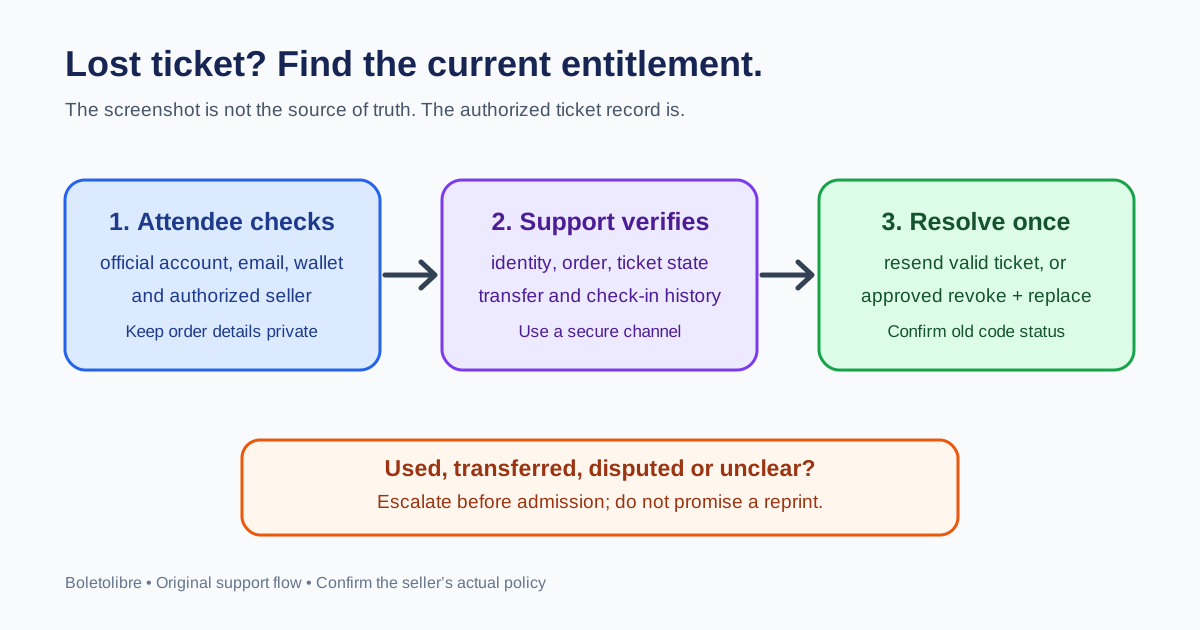
First, find the original ticket or order
Search the official ticket account, purchase email (including spam and archived mail), and wallet or app used at checkout. Check the event date and seller name so you do not follow a lookalike support link. If the ticket was transferred, ask the current recipient to check their account. Keep the original order confirmation: it can help support find the record, but it is not itself proof of a valid admission right.
- Use only the seller’s official support channel or the organizer’s published contact route.
- Have the order reference, event name, purchaser email and ticket type ready.
- Do not post a barcode, full payment-card number or identity document in a public chat.
What to ask the authorized seller
Explain whether the ticket is missing from your account, the delivery email never arrived, a phone is unavailable, or a paper ticket is lost. Ask whether they can restore access, resend the current valid ticket, or issue a replacement under the event’s rules. Ticketmaster’s own lost-ticket help asks customers to contact Fan Support with order information or the purchase card available; another seller may use a different process. An old popular forum tip about box-office reprints explicitly warns that reissue is not guaranteed.[1][2]
| Situation | Useful question |
|---|---|
| Ticket exists but email is lost | Can you resend the existing valid ticket to the verified destination? |
| Phone or account is unavailable | What official account-recovery or box-office path applies? |
| Paper ticket is missing | Can the original code be voided and a replacement issued under this event’s policy? |
| Someone else may hold the code | Can support review transfer and use history before admission? |
Organizer support: verify before resending or replacing
Use a private support channel to verify the requester with the minimum order information your provider requires. In the authoritative ticket system, inspect payment/order state, current entitlement, delivery address, transfer or resale status and prior check-in. A resend delivers the same still-valid entitlement; a reissue creates a different one and should happen only when the system and policy support revoking the old admission right. Never create a second valid code just to solve a delivery problem.
- Active and unused: restore account access or resend via the provider’s official flow.
- Transferred, used, disputed or unclear: pause and escalate; do not promise entry.
- Approved replacement: confirm the old code is invalid, the new entitlement is valid and gate staff see the current state.
- Record the agent, approver, action and attendee instructions in the private support record.
At the gate, keep one clear admission decision
Tell the guest which desk to visit and what private order details to have ready. A gate attendant should not accept a screenshot of an unverified order or bypass a used-ticket alert. The lead checks current system state and applies the event’s re-entry and exception policy. If the system is offline, use the preapproved offline process and reconcile later; do not improvise a new ticket. The repeated-scan guide explains the related gate conflict.
Sources and further reading
- What should I do if my tickets were lost, stolen or damaged?Ticketmaster Help · Accessed
- YSK that if you ever lose your ticket to a concertReddit / r/YouShouldKnow discussion · Accessed