How to optimize an event poster image for your website
A print-ready poster can be several times larger than the space it fills on a phone. Uploading that same file to an event page may slow the page while still making the date or venue impossible to read. Jimdo’s image guide covers source quality, format, resizing, consistent crop, filenames and alt text. For an event, add one more rule: the poster supports the page; the event facts and ticket action must also exist as accessible page content.
Boletolibre editorial team
Published
Start from a master, then define where the poster appears
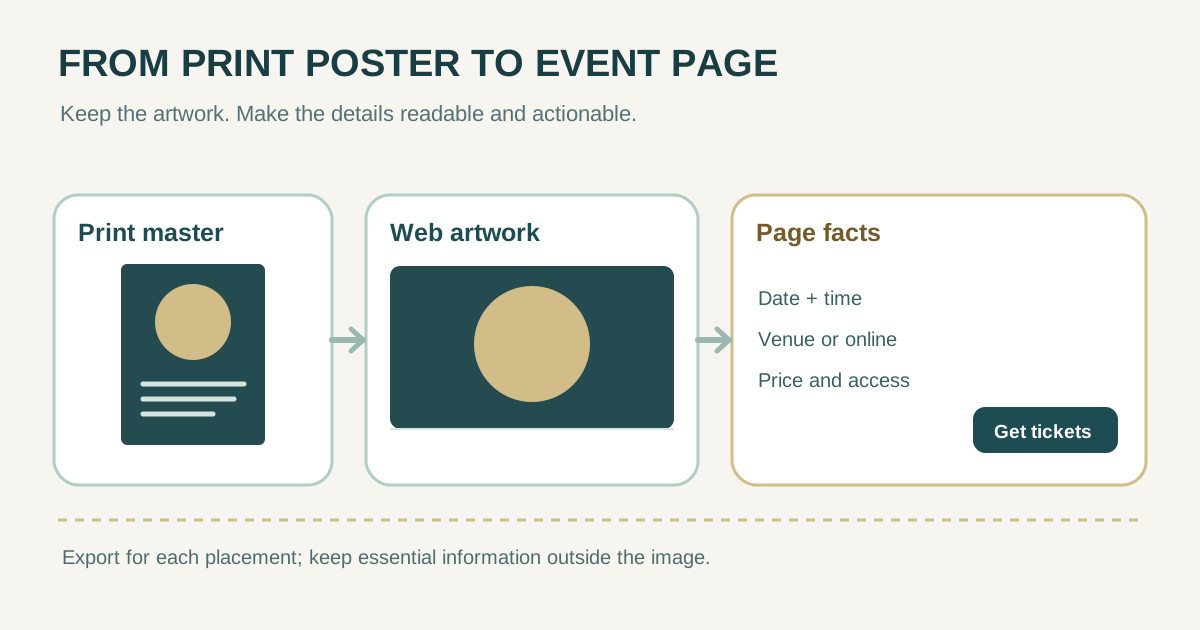
Keep the high-resolution design master for print. Make a separate web export rather than overwriting it. Inspect the actual page: a narrow card, a wide hero, a mobile event detail and a social preview may need different aspect ratios or crops. A single tall print poster can shrink its lettering to unreadable size in a wide hero. Choose the focal point, and decide whether the website needs the entire poster or only its artwork.
| Placement | Design decision | Review at |
|---|---|---|
| Event card | Crop for recognition; title can live beside the image | Small phone and desktop grid |
| Event detail hero | Use artwork with enough empty space for page text | Narrow and wide viewport |
| Full poster download | Offer the complete approved artwork separately | Zoomed view and download |
| Social preview | Export for the destination’s preview shape | Actual link preview |
Jimdo’s leading guide recommends starting with a quality source and keeping image presentation consistent. Its example dimensions are specific to that site, not universal event-poster targets.[1]
Choose format by the visual, not by a blanket rule
Photographic artwork often compresses well as a modern lossy image such as WebP or AVIF, with a compatible fallback when needed. Flat graphics and type need inspection at the final size; PNG or a carefully prepared SVG may retain crisp edges, though file size and platform support vary. Do not convert a heavily compressed original and expect lost detail to return. The web.dev format guide distinguishes raster and vector use and explains lossy tradeoffs.[2]
| Artwork | Candidate export | What to inspect |
|---|---|---|
| Photo-led poster | WebP or AVIF, with fallback as needed | Faces, gradients, fine print and color |
| Flat illustration with text | PNG, WebP lossless or trusted SVG | Letter edges, transparency and browser support |
| Mixed photo and lettering | Compare at least two formats | Small text, color bands and file bytes |
Pixel dimensions and delivered bytes affect web loading. A print file’s DPI metadata does not by itself determine how wide the browser renders an image. Measure the image’s displayed CSS width and supply appropriate pixel candidates for that layout and its higher-density screens; do not use a fixed “perfect” width or kilobyte limit for every design.[3]
Resize and compress in a repeatable pass
- Record the original pixel dimensions and file size, then determine the maximum displayed size of each placement.
- Export a smaller web candidate without stretching or distorting the artwork. Preserve aspect ratio unless you deliberately create a different crop.
- If your site supports responsive image candidates, supply multiple widths with the correct sizes information so a phone does not download the desktop-sized version.
- Compare a higher-quality and smaller candidate at actual display size on a phone and desktop. Keep the smallest that still preserves the intended visual.
- Preview the delivered page, not only the source file. Confirm the hero appears promptly, is not visibly soft and does not shift surrounding content.
Responsive-image markup lets the browser choose among candidates based on the rendered size and screen density. Specifying intrinsic dimensions helps reserve layout space; avoid deferring an above-the-fold event hero as if it were a below-the-fold image.[3]
| Export log | Example field to complete |
|---|---|
| Placement and crop | Event hero / wide artwork |
| Source dimensions and bytes | ________ |
| Candidate A dimensions / bytes / format | ________ |
| Candidate B dimensions / bytes / format | ________ |
| Phone legibility / chosen file | ________ |
Do not trap the date, venue and ticket action inside pixels
Event posters often contain the only visible date, venue, price or accessibility detail. A visitor using a screen reader, translation feature, small phone or slow connection needs those facts in ordinary page text and an actual link or button. W3C advises using styled text instead of images of text where possible; when a poster image contains important words, its alternative must convey equivalent information. Repeating the approved event facts in the page itself is often more useful than forcing a very long alt attribute.[5]
- Put event name, date with timezone where relevant, venue or online location, price or price range, and a clear ticket or registration link in the page content.
- If the poster is decorative beside identical text, use appropriate decorative alternative text; if it adds information, describe that information in context.
- Check that the crop does not cut off a sponsor credit, age rule or other approved statement that is not repeated elsewhere.
- For six-language pages, localize the page facts and image alternative. Do not assume English text baked into a poster is translated by the site.
Google Search Central recommends relevant images near relevant text, short descriptive filenames and useful alt text without keyword stuffing. Use a name such as `autumn-jazz-festival-poster.webp` only if it accurately identifies the image; it is a small clue, not a ranking shortcut.[4]
Use this before-and-after publish check
| Check | Before | Ready to publish when |
|---|---|---|
| Visual size | Print master uploaded intact | Web candidate matches actual placement |
| File transfer | Phone downloads oversized hero | Responsive or suitably sized file is served |
| Legibility | Poster lettering too small on phone | Important text is readable or present as page text |
| Search and accessibility | Generic filename or missing text alternative | Accurate name/alt and page context |
| Conversion | Ticket URL embedded only in artwork | Visible, working ticket or registration link |
Compare the final live-page preview on a narrow phone and a desktop, including a slower connection if possible. Keep the print master and chosen web export in the asset register so a later date correction can be made from the source instead of recompressing an already degraded image. This is a quality workflow, not a claim that any one format or byte count guarantees search ranking.
Sources and further reading
- How to Optimize Images for Better Web Design & SEOJimdo · Accessed
- Choose the right image formatweb.dev · Accessed
- Responsive imagesweb.dev · Accessed
- Image SEO best practicesGoogle Search Central · Accessed
- Images of TextW3C Web Accessibility Initiative · Accessed