How to find and remove unused JavaScript from event pages
A script may look unused when the event page first loads yet become essential when someone opens the ticket selector, changes language or submits registration. The useful question is not “how much code is red in one screenshot?” It is “which code is sent on this route before the visitor needs it, and can we remove or defer it without losing a task?” This guide focuses on the site’s own route and component bundles; use the separate embed guide for external widgets.
Boletolibre editorial team
Published
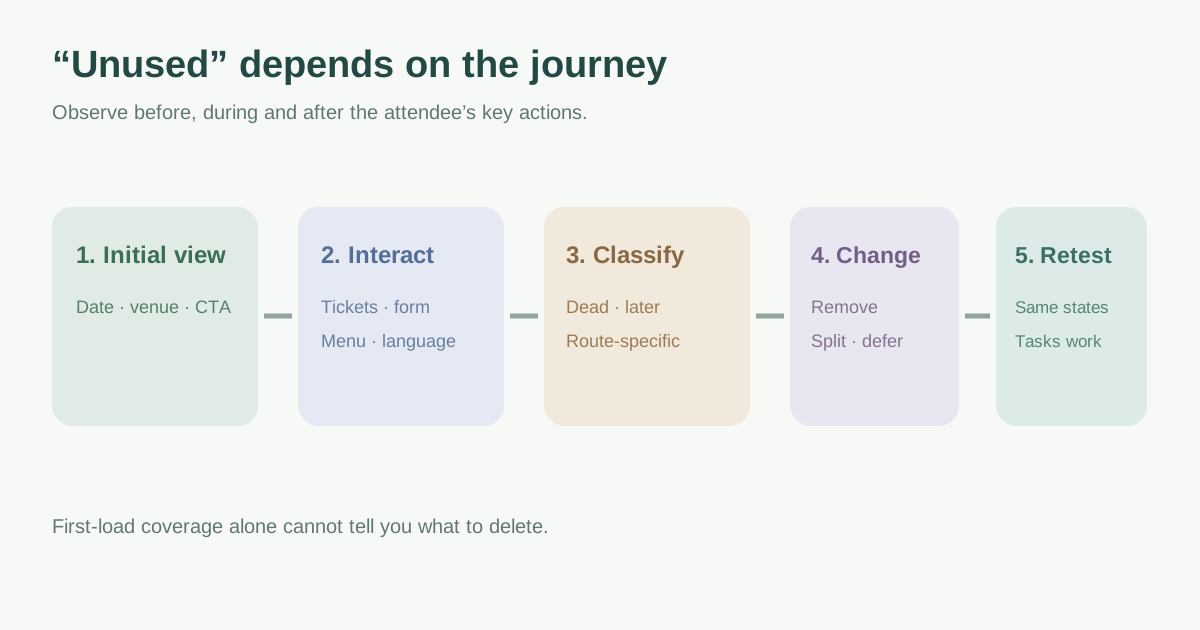
Measure the real event journey, not only the first screen
Start with representative pages: event landing, venue details, registration and ticket handoff. Capture the URL, device and network conditions, then note the Lighthouse “Remove unused JavaScript” opportunities. Chrome explains that even asynchronous unused bytes still consume bandwidth, while render-blocking JavaScript adds processing before the page can render.[1]
Use DevTools Coverage to record the initial load, then keep recording while opening menus, choosing a ticket tier, switching language and walking through a safe registration test. Coverage shows which bytes ran during the observed session; it cannot prove that an unvisited state is dead code. Include keyboard and mobile-specific states where they differ.[2]
| Page state | Action to observe |
|---|---|
| Initial event view | Hero, date/venue, primary CTA render |
| Ticket choice | Tier selector, price and availability appear |
| Registration | Fields, validation and safe submit path work |
| Navigation/locales | Menu, language switch and modal states work |
Classify the bytes before proposing removal
Separate first-party application bundles from vendor scripts. For each large file, identify which component or route imports it, the owner and the visitor task it supports. Code used only after a deliberate interaction may be a candidate for loading later; code from an abandoned experiment or duplicated library may be removable. A checkout or form validator used late in the journey is not “unused” simply because an initial-load audit did not execute it.
| Finding | Likely next step |
|---|---|
| Dead feature or duplicate import | Remove with the owning team after confirming no route depends on it |
| Later interaction on same page | Consider a deliberate lazy boundary and loading state |
| Code needed by only one route | Keep it off unrelated event pages through route/component splitting |
| Third-party widget | Use the separate embed audit and vendor-supported integration path |
Make one scoped change and retain a safe fallback
Ask a developer to remove a truly unused import, split a route-specific component or defer optional interaction code using the framework’s supported pattern. web.dev explains that code splitting reduces initial JavaScript sent to the browser; loading work later still has a cost, so show a usable control or loading state at the moment it is needed. Do not blindly move ticket or registration code behind a delay that makes the primary action feel broken.[3]
Record the pre-change bundle or resource, affected routes, expected task and rollback commit. If a vendor script is involved, check its integration rules and use the separate third-party embed workflow. Avoid claiming a particular SEO ranking gain from one byte reduction.
Compare the same journey and check for regressions
Repeat the observation under comparable conditions after the change. Record script bytes or execution work alongside whether event details, ticket tiers, form validation, confirmations and language controls still behave correctly. A reduction on the landing page is not a win if the first ticket click causes a long wait or a failed checkout. Assign an owner to investigate any regressions before keeping the change.[1][2]
Use the downloadable record to separate evidence, proposed action, owner and attendee-path outcome. The guide does not require one universal byte budget; your baseline and visitor journey determine which change matters.
Download the unused JavaScript investigation and release record (Markdown, English)
Sources and further reading
- Remove unused JavaScriptChrome Lighthouse · Accessed
- Coverage: Find unused JavaScript and CSSChrome DevTools · Accessed
- Reduce JavaScript payloads with code splittingweb.dev · Accessed