Reverse DNS for email: find the PTR owner and verify the sending IP
A domain's website DNS panel is often the wrong place to repair reverse DNS for outgoing mail. This guide starts with the IP that actually connected to a recipient, then splits the PTR and hostname work between their real owners. The downloadable sheet records the handoff and the retest; it does not promise inbox placement.
Boletolibre editorial team
Published
Start with the IP that sent the message
Download the editable PTR owner and verification sheet (Markdown, English)
Find the public outbound SMTP IP in your sending platform's delivery data, if available, or in the SMTP peer address recorded by a trusted receiving system for a representative test message. Do not rely on an unverified earlier Received header, the website IP, the visible From domain, or a random IP in a provider's published range. Record the sending product, mail stream, region and test time. A provider-managed pool may use more than one address, so repeat this for each observed route.[1][4][3]
Build a small route inventory before treating one test as the whole system. Separate transactional and marketing streams, regions, and any dedicated versus shared pool that your platform exposes. Send a representative message from each path you actually use and record the connecting IPv4 or IPv6 address and where that observation came from. A pooled address is evidence for that message, not proof that all future messages use it; ask the provider which other outbound addresses can carry the same stream.[1][4][3]
Test the round trip before requesting a change
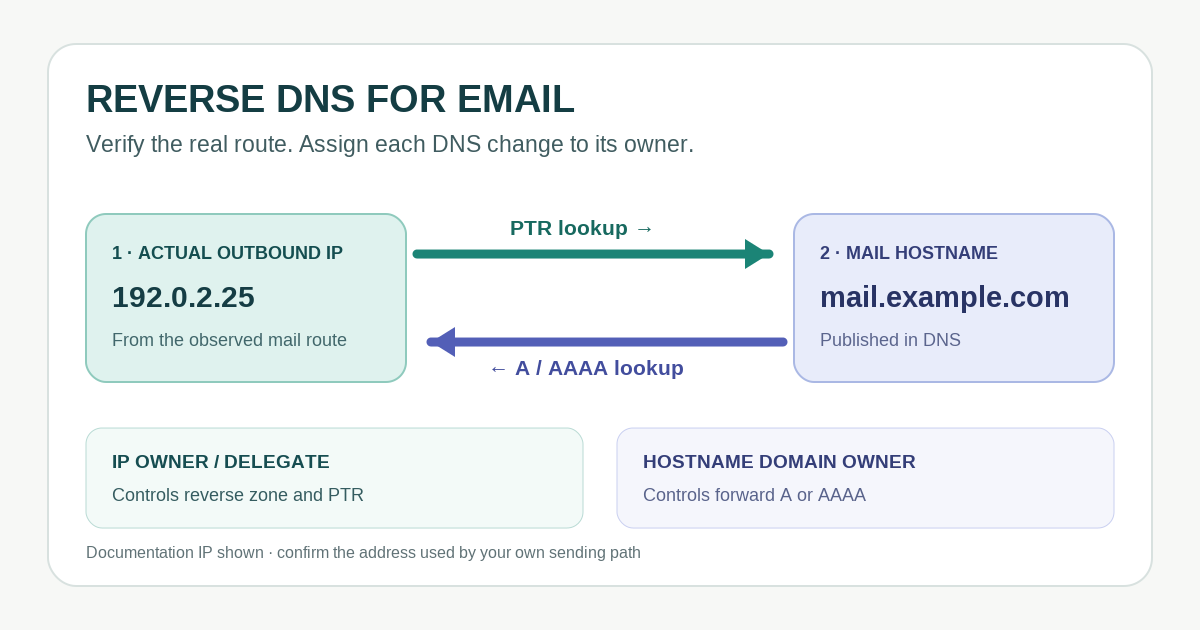
Query PTR for that IP. Then query the returned hostname's A record for IPv4 or AAAA record for IPv6. The original sending IP must appear in the forward answers. A PTR hostname alone is incomplete; a lookup timeout is not proof that the record is absent. Google's Gmail sender guidelines require valid forward and reverse DNS for sending IPs and a matching forward address.[1][3]
Classify the result before opening a ticket. An absent PTR answer, a PTR hostname whose A or AAAA answers omit the original IP, and a DNS timeout or server failure are different findings. Preserve the response status and time, and repeat an unclear result from another resolver or later before calling it missing. If several PTR hostnames are returned, check each forward answer instead of assuming the first is authoritative. The reverse-forward match checks this IP route; it does not establish the visible From identity.[1][3]
Assign the reverse and forward DNS owners
The reverse zone follows the IP allocation, so the IP owner or its delegated DNS operator normally controls the PTR. The operator of the hostname's domain controls its forward A or AAAA record. If an email service owns a shared sending IP, ask it to confirm its existing reverse-DNS arrangement before proposing a custom hostname. Cloudflare's reverse-zone guidance likewise directs customers who do not own the IP prefix to its owner.[2][4]
Make the owner split explicit in the work record: sender or email administrator supplies route evidence; IP provider or delegated reverse-zone operator confirms and publishes the PTR; hostname-domain DNS administrator prepares its A or AAAA record. Sometimes the provider owns both zones. If the IP belongs to a shared pool, a custom PTR may be unavailable or inappropriate. Ask the provider to document its managed hostname and forward match before requesting any change to a domain you control.[2][4]
Write a request the IP provider can act on
Send the provider the observed IP, current PTR answer, proposed fully qualified hostname if custom PTR is supported, the matching A or AAAA answer, and the mail stream affected. Ask who can publish the PTR and whether a shared or managed route allows a change. Coordinate the forward record with its DNS owner. Do not change a web A record or a mail MX record to solve this issue.[2][1]
A useful ticket states the observed route, IP version and address, lookup commands or response summaries with times, current failure category, and the exact outcome requested. For a supported custom name, ask the forward-DNS owner to publish its matching A or AAAA answer first, then have the reverse-zone owner schedule the PTR update. Record the ticket number, owner, planned window and fallback contact. If custom PTR is unsupported, close that branch with the provider's documented managed setup rather than inventing a self-service DNS fix.[2][1]
Retest the same route and separate the other checks
After the change, repeat PTR and forward lookups, then send a fresh message through the same route and confirm the observed outbound IP. Save timestamps and DNS answers in the sheet. PTR is infrastructure evidence, separate from SPF, DKIM, DMARC, receiver policy and actual delivery. A passing round trip cannot guarantee inbox placement.[1][3]
Close the case only against the affected route: after the provider's change and any DNS cache interval, capture fresh PTR and forward answers, then send a new message through the same product, stream and region. If the message uses a different IP, add that address to the inventory and test it separately; it does not validate the original fix. Mark the DNS check pass only when the observed IP has a hostname and that name resolves back to it. Keep timeout, missing answer and forward mismatch as separate unresolved outcomes.[1][3]
Sources and further reading
- Email sender guidelinesGoogle · Accessed
- Reverse zones and PTR recordsCloudflare · Accessed
- RFC 8601: Message Authentication StatusIETF / RFC Editor · Accessed
- Dedicated IP addresses for Amazon SESAmazon Web Services · Accessed