Secure event website backups: an access and recovery checklist
A backup of an event website can contain more than public pages: registration records, uploaded documents, media and configuration may travel with it. A copy that anyone on the team can browse or delete is a different risk from a copy that cannot be restored. Use this checklist to review both questions before the next launch, and record the evidence without putting secrets in the worksheet.
Boletolibre editorial team
Published
Download the backup security review worksheet
Download the editable backup security review (Markdown)
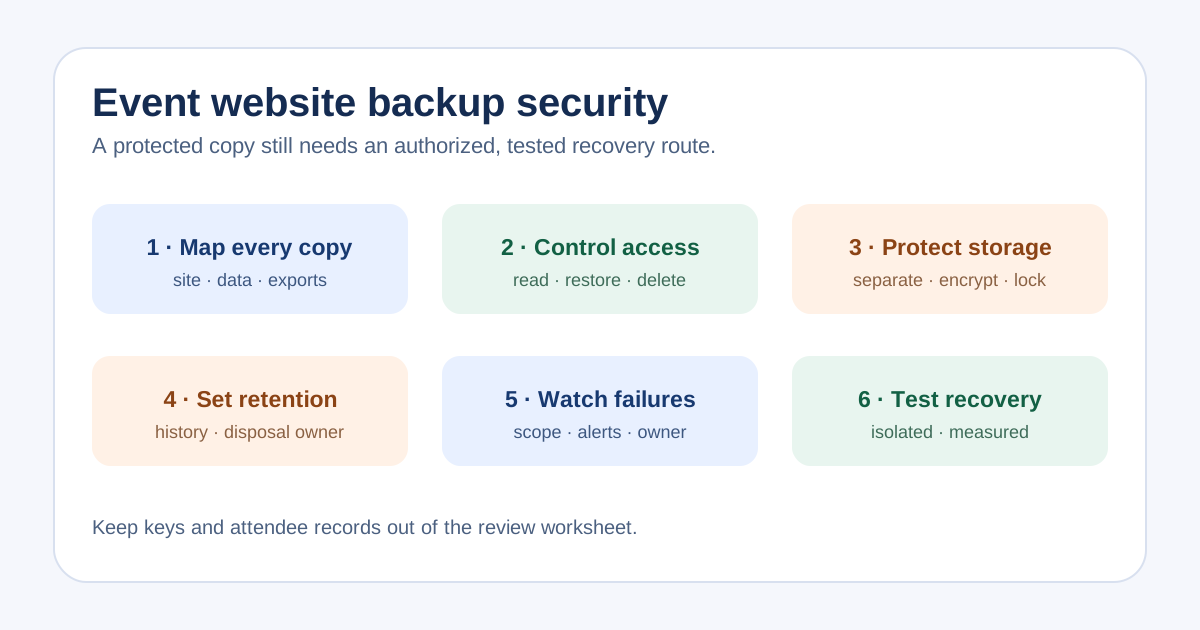
The editable worksheet separates the original system, backup location, copy owner, access roles, deletion controls, encryption and key custodian, retention decision, last restore evidence and open action. Make one row for each actual copy, including exports downloaded by staff. Record account references, never passwords, recovery codes, encryption keys or attendee rows.
This is an organizer handoff and review record. A checked box does not prove that a provider setting is active. Ask the person with access to show the current configuration or a dated export of it, then name who will resolve any gap.
Identify each copy and its data
List the event site, registration database, uploaded photos or documents, published media, configuration and DNS records. Mark which parts are in the hosting backup and which live with a separate ticketing, payment, email or file provider. A copy of a landing page is not evidence that orders or attendee information can be restored.
Treat every exported attendee list as another copy with its own storage location and deletion owner. The team that can access a live dashboard may not be the same team that can retrieve or delete a backup. Note the exact boundary instead of calling everything 'the website backup'.
Limit access and deletion power
For each store, name who may create, read, restore, change retention and delete backups. Give routine editors no more access than their task requires and review shared or former-contractor access after a role change. Check the authentication method on backup consoles and the route for regaining access if one administrator or device is lost.
Keep deletion or retention-bypass power separate from everyday content work where the provider permits it. Confirm the actual permissions in the provider account; a worksheet cannot enforce them. CISA advises protected, offline or otherwise separated copies because accessible backups can be attacked along with production systems.[1]
Protect storage without losing the recovery path
Confirm whether copies are encrypted in storage and during transfer, and who can recover the keys or credentials during an incident. Do not place a key in this worksheet or rely on one person's laptop as the only recovery path. Review whether at least one copy is isolated from the production account or otherwise protected against routine deletion.
If the provider offers write-once or retention-lock controls, verify the mode and the scope before relying on them. AWS explains that S3 Object Lock protects specific object versions; a delete marker can still become the current version, and governance-mode protection can be bypassed by specially permitted users. A lock is one control, not proof that a complete, readable backup exists.[2]
Choose retention and monitor failures
Choose the recovery history based on the event's change rate, incident scenarios and approved retention obligations. Longer retention may preserve older recovery points but also keeps personal data longer; ask the privacy and finance owners to resolve that tradeoff. Record who can approve deletion and how a departed supplier's copy is retired.
Check that the job covers the intended files and data, and that failed jobs are noticed by a named person. Avoid a universal daily or quarterly promise: frequency must follow the data window the organizer can tolerate and the provider's real behavior. Keep the last successful backup time distinct from the last successful restore test.
Prove recovery safely
Run a restore rehearsal in an isolated environment using the site's approved procedure. Check representative pages, images, forms and configuration, then confirm that test messages and payment actions cannot reach real attendees. Where a separate provider owns ticketing or checkout, verify that provider's recovery boundary without assuming the site backup includes its data.
Write down the backup point used, start and finish times, missing items, access or key problems, and the owner and due date for a retest. CISA recommends testing the availability and integrity of backups; the measured exercise is stronger evidence than a green backup-job status. Link to the separate restore-test plan for the detailed drill.[1]
Sources and further reading
- #StopRansomware GuideCISA · Accessed
- Locking objects with Object LockAmazon Web Services · Accessed