Public website page showing 403? Find the rule that refused it
HTTP 403 means the server understood a request but refused to fulfill it. The number alone does not tell you whether a CDN, firewall, web server, application or intended private-page rule made that decision. If a page is supposed to be public, capture one real failing request before editing access settings.
Boletolibre editorial team
Published
1. Confirm which page should be public
Write down the exact public URL and expected audience. A private registration, account or admin route may correctly reject an anonymous visitor; a public event or information page should not. A 403 differs from a 404 missing-resource response, but a server may intentionally use 404 to conceal a forbidden resource. Do not infer the source of a 403 from its status alone.[1]
A 401 response asks for authentication credentials, while 403 means the request was understood but refused; the refusal may be unrelated to credentials. If an anonymous public page should not require sign-in, investigate the access policy rather than telling visitors to log in.[1]
Check whether the whole site, one path, or only one visitor/network is affected. If only a linked file fails, record that file URL separately. This scope determines which owner—site editor, host, CDN or application developer—needs the evidence.
Copy the public link rather than retyping it. Compare scheme, hostname, path case, trailing slash and query string with the failing address. CloudFront can return 403 if an alternate domain name is missing from the distribution, and an S3-backed origin can return 403 for a wrong or nonexistent object path. Establish that the request reached the intended host and resource before touching file permissions.[4]
Separate the main document from its dependencies. A page shell may load while its PDF, image, form endpoint or script returns 403. A redirect can also move the request to a different host or protected path. Record which request actually failed and its final URL; a page-visibility fix cannot repair an unrelated protected file.[7]
2. Capture one reproducible request
- Open the exact URL as an anonymous visitor. Record the time and timezone, full path, request method, response status, response page text, relevant response headers and any request or ray ID.
- Repeat once from a different browser or network if feasible; record success and failure without assuming an IP block.
- Note the last relevant change: deploy, page visibility edit, firewall rule, CDN configuration or host move. Keep the previous setting so it can be restored.
In Chrome, open DevTools → Network before reproducing the failure. If redirects are involved, enable Preserve log, then reload the public URL. Select the failing document or resource and record its request URL, method, status, response text, relevant response headers and any available request ID. The Network panel can filter by status code and resource type; use it to avoid mistaking a blocked image for a blocked page. A sanitized written record is usually easier to share than a full browser export.[7]
Choose a genuinely comparable working request: same public audience, similar route and the same environment. Compare its hostname, path, method, status and log trail with the failed one. If you try another browser or network, change one condition at a time and record it. This comparison helps an operator isolate a rule match without guessing that every visitor is blocked.
Share only the minimum diagnostics with the responsible operator. Remove cookies, authorization headers, tokens and personal data before sending a browser export. An access log records processed requests, while an error log may explain a server-side denial; the exact fields depend on the host.[6]
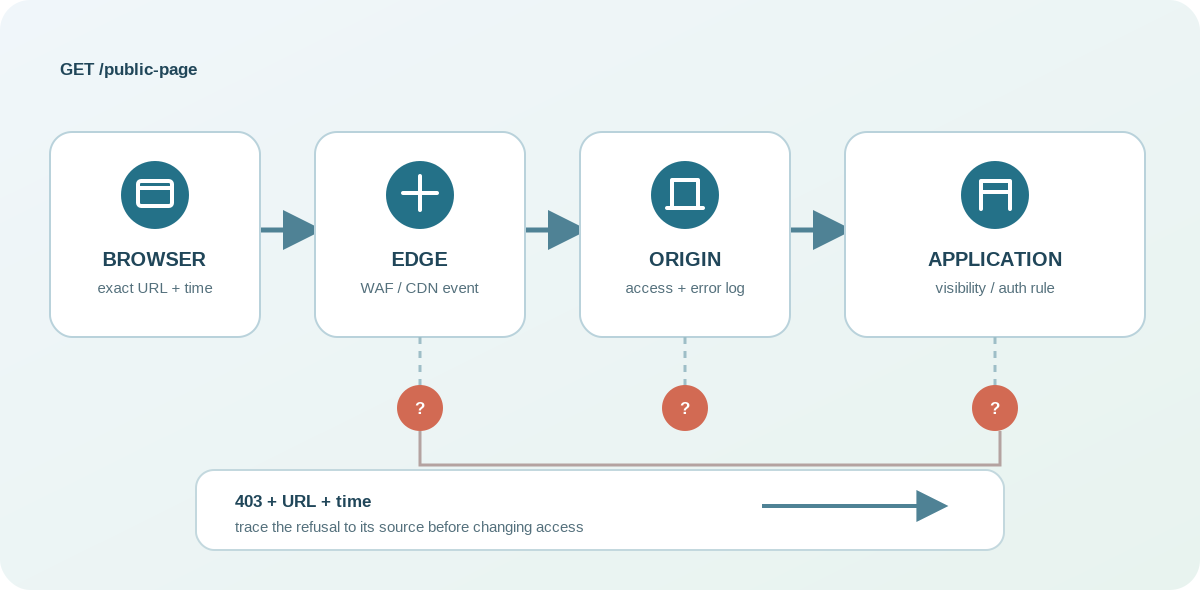
3. Identify the layer that returned the 403
| Evidence | Where to look | What it can mean |
|---|---|---|
| Branded edge error or edge request ID | CDN/WAF event for that exact time and path | A security rule or edge access policy acted |
| Origin access/error log contains the failed request | Web server or application log | Origin rule, path permission or application authorization |
| Edge logs show an origin 403 | Origin log and upstream service | CDN relayed a denial; edge was not necessarily the blocker |
| One path fails after publish | Page visibility, route and deployed file | Private setting, missing index or wrong route |
| Only some visitors fail | Rule match by IP, country, header or session | Compare successful and denied event records |
For Cloudflare, a branded 403 can indicate an edge security action, while an unbranded 403 is generally from the origin; review Security Events for a matching action and rule. CloudFront documents several distinct 403 sources, including WAF, origin denial, object access and signed-content settings. The page appearance is a clue; matched events and logs are stronger evidence.[2][3][4]
Cloudflare Security Events covers requests flagged or acted on by its security products; it is not a complete request log. Cloudflare can also return an early unstyled 403 that is not logged. No matching event does not prove the origin made the decision. Check response details and origin logs, then ask the CDN owner for edge diagnostics if the source remains unclear.[3][2]
Work from a matching request, not from the error page alone. An edge event with the same time, path and request ID can identify a security action; an origin access entry for that request shows it reached the host. If the origin never saw it, investigate edge routing, WAF or hostname configuration. If the origin logged a 403, inspect its error log and application authorization decision. Log availability varies, so mark the layer unknown until evidence supports it.[3][4][6]
4. Make the smallest confirmed correction
If a public page was accidentally marked private, restore only that page’s intended visibility. If a rule blocks legitimate requests, identify its ID and predicate, then narrow the exception to the verified public path or adjust the false-positive condition with the rule owner. Preserve protection for admin, checkout and private routes. Apache access control can combine multiple requirements, so review the actual rule chain rather than applying a blanket allow.[5][3]
| Confirmed cause | Narrow correction | Guardrail |
|---|---|---|
| Page mistakenly private or unpublished | Confirm its intended audience, then publish that page or change only its visibility. | Retest an intentionally private sibling anonymously. |
| Cloudflare security rule matches legitimate page traffic | Use the matched Security Event and rule owner to tune its condition or a scoped exception. | Keep other paths and security features protected. |
| AWS WAF at CloudFront or the origin denies the request | Inspect the matching web ACL action and rule, then adjust the verified false positive. | Do not disable the entire WAF to fix one path. |
| S3-backed origin lacks the requested object or authorized read path | Correct the object key or publish the missing file; repair the intended origin access path if needed. | Do not make the whole bucket public. |
| Signed-content or geographic policy covers a public page | Have the owner correct only the behavior or policy that should be public. | Preserve restrictions on private assets and intended regions. |
| Apache access rule denies the path | Use access and error logs to identify the relevant directory, location or rule before editing it. | Avoid a blanket allow on the site root. |
If the origin denies a static page or asset, verify the deployed path, index file, ownership and access policy appropriate to that host. On a CDN backed by object storage, a missing object can also surface as Access Denied; check existence and the origin’s authorized read path before changing bucket or file permissions.[4]
Do not rely on a refresh or one successful administrator session. Retest the same public URL anonymously, confirm its expected content loads, and check that any previously matched denying event is absent on that retest. If the original refusal was unlogged, verify the response and origin evidence instead.
Change one verified cause at a time. Record the previous value, the exact rule or page setting, who approved the public audience and how to roll back. A path-scoped exception may be appropriate when a WAF rule is a false positive, but it still needs a check that neighboring protected routes remain denied. Re-running the same anonymous request after each change preserves a clear link between cause and result.[3]
For an Apache-hosted site, the access log can confirm the status and request path while the error log may contain the authorization reason. Requirements can be combined across configuration sections and modules; a single visible `Require` line is not necessarily the whole policy. If you cannot inspect the active configuration and logs, escalate the evidence instead of replacing `.htaccess` or granting universal access. This also avoids confusing a web-server denial with a CMS visibility setting.[5][6]
5. Retest and hand off with evidence
Define success before changing a setting: the exact anonymous public URL must return the expected page or intentional redirect, with its important assets and form entry working. Check the response body, not only the status badge; a friendly error template can still be unusable. Keep the same method, path and visitor context during the first retest. A successful editor session does not establish that visitors can reach the page.[7]
- Retest the exact failing URL from the original context and one independent context.
- Check the homepage, one neighboring public page and any affected registration entry; confirm intentionally private paths remain private.
- Watch the relevant access and security events after the change, especially during the next traffic peak.
If you cannot see the rule or origin log, send the host or CDN owner the sanitized request record, expected public behavior, exact time, URL, response ID and the working comparison. Ask which layer returned the 403 and which rule or permission matched. This is more actionable than requesting a general firewall shutdown.[6][3]
Close the incident with a short change record: failing and working request, confirmed layer, matched event or log, exact setting changed, previous value, owner, time and retest outcome. If a separate host or CDN team owns the rule, provide this record and ask for the matched decision. If no layer can be confirmed, label the cause unknown and keep collecting evidence; do not turn a guess into a permanent security exception.
6. Apply the method to two illustrative cases
Illustrative case A: an editor can open `/program`, but an anonymous visitor receives 403. The Network panel shows the document request itself failing, not an embedded image. The CDN has no matching Security Event, while the origin access log shows the same path and time with 403. That evidence points past the edge. The site owner finds the page marked private, confirms it should be public and changes only that page. Anonymous retesting succeeds; a private account page still denies access. The absence of a Security Event alone would not have justified the change.[3]
Illustrative case B: the public page loads, but its linked PDF returns 403 through CloudFront after a deployment. The PDF request has a different path from the page document. The operator checks the object key and discovers the file was not deployed. CloudFront documents that a nonexistent S3 object can yield 403. Publishing the missing file through the existing authorized origin path resolves the link; opening the storage bucket to everyone would not be a justified response. These cases show why the failing request, not the visible page alone, drives the fix.[4]
Sources and further reading
- RFC 9110, section 15.5.4: 403 ForbiddenIETF / RFC Editor · Accessed
- Error 403Cloudflare · Accessed
- Security EventsCloudflare · Accessed
- HTTP 403 status code (Permission Denied)Amazon CloudFront · Accessed
- Access ControlApache HTTP Server · Accessed
- Log FilesApache HTTP Server · Accessed
- Network features referenceChrome for Developers · Accessed