What is DNS? How visitors find your event website
DNS, the Domain Name System, helps computers find services using names people can remember. For an event website, it helps turn a name such as tickets.example.com into addressing information, such as an IP address, needed to reach the server. It is part of getting there, not the event page itself.
Boletolibre editorial team
Published
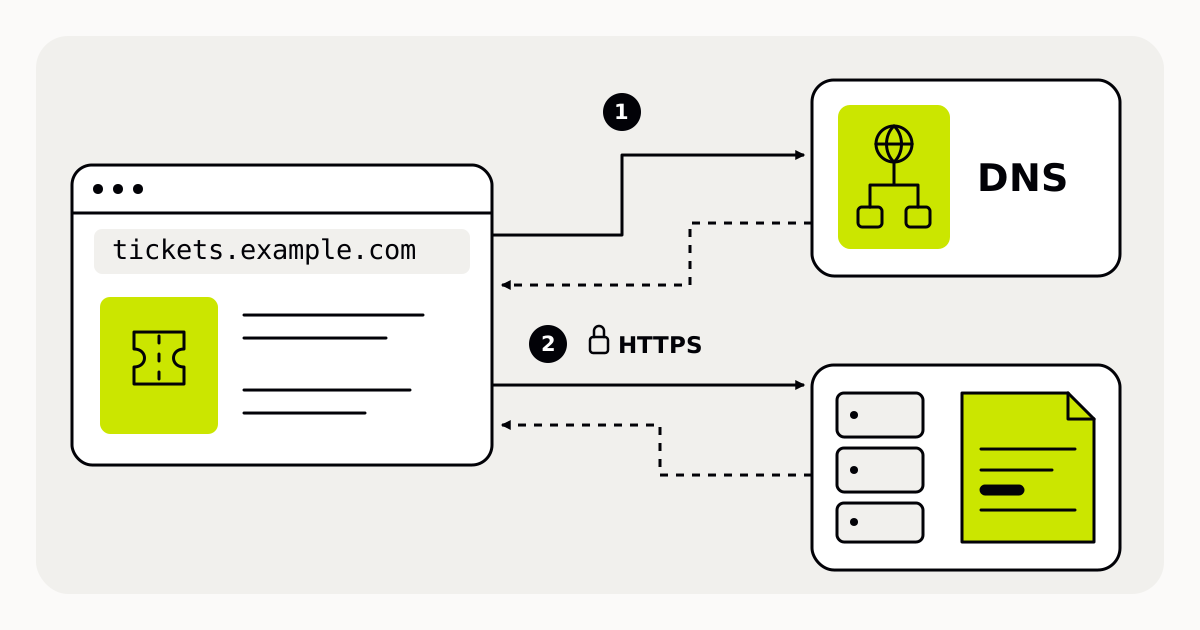
From a name to a page
Imagine a visitor following an event link on a poster. Their browser needs to find the service associated with the hostname before it can request the page. DNS provides a distributed naming system rather than one worldwide address book stored on a single computer.[1]
- The visitor opens https://tickets.example.com/summer, an illustrative address.
- The device checks whether it already has usable DNS information for tickets.example.com.
- If necessary, a DNS lookup obtains addressing information for that name.
- The browser can then contact the web service and request the page.
DNS, registration and hosting do different jobs
Registering a domain gives you the right to use its name for a registration period. DNS records associate names with resources. Web hosting supplies the content visitors receive. These jobs can involve different providers, even when a single company bundles them into one plan.[2]
For your event, that means changing a page title is usually a website task, not a DNS task. Replacing a website provider may require a DNS change, but it does not automatically require a new public name. Ask the new provider which settings are actually needed; do not copy a destination from an unrelated tutorial.
HTTPS is another part of the connection. Modern HTTPS uses TLS to protect data in transit and authenticate the server. A DNS change alone does not establish a working HTTPS configuration for the name you want visitors to use.[3]
Why two visitors can see different results
Previously obtained DNS answers may be cached for a time. After an update, some devices or DNS services can still use earlier information until it is refreshed. Seeing the new page on your own computer does not prove every visitor has received the same DNS answer.[2]
Avoid promising a universal switch-over time. Follow your DNS and hosting providers’ guidance, record when the change was made, and leave time to check before a ticket-sale announcement. Repeatedly changing several settings makes it harder to identify what caused a problem.
A useful check before sharing the link
- Identify who manages the domain registration, DNS settings and website.
- Use the exact hostname and destination supplied for your own setup.
- Open the full event link on another device or network.
- Check that the expected page loads over HTTPS and that its next-step links lead to the intended destination.
If the name cannot be found, investigate DNS. If the wrong page loads, also check the website’s domain configuration. If there is a certificate warning, investigate HTTPS rather than assuming the event page itself is missing. These are diagnostic starting points, not proof of a single cause.
Sources and further reading
- DNS: the naming systemMDN Web Docs · Accessed
- Domain names and DNS lookupsMDN Web Docs · Accessed
- TLS and HTTPS connectionsMDN Web Docs · Accessed