Event website handover checklist and editable template
A website handover is complete when the next owner can operate the site, respond to an attendee problem and explain what remains open. A folder of design files or a list of passwords is not enough. The leading search result provides a generic creative-project checklist; an event website needs additional attention to domain and DNS, ticketing, live event details, support and the next sales deadline.
Boletolibre editorial team
Published
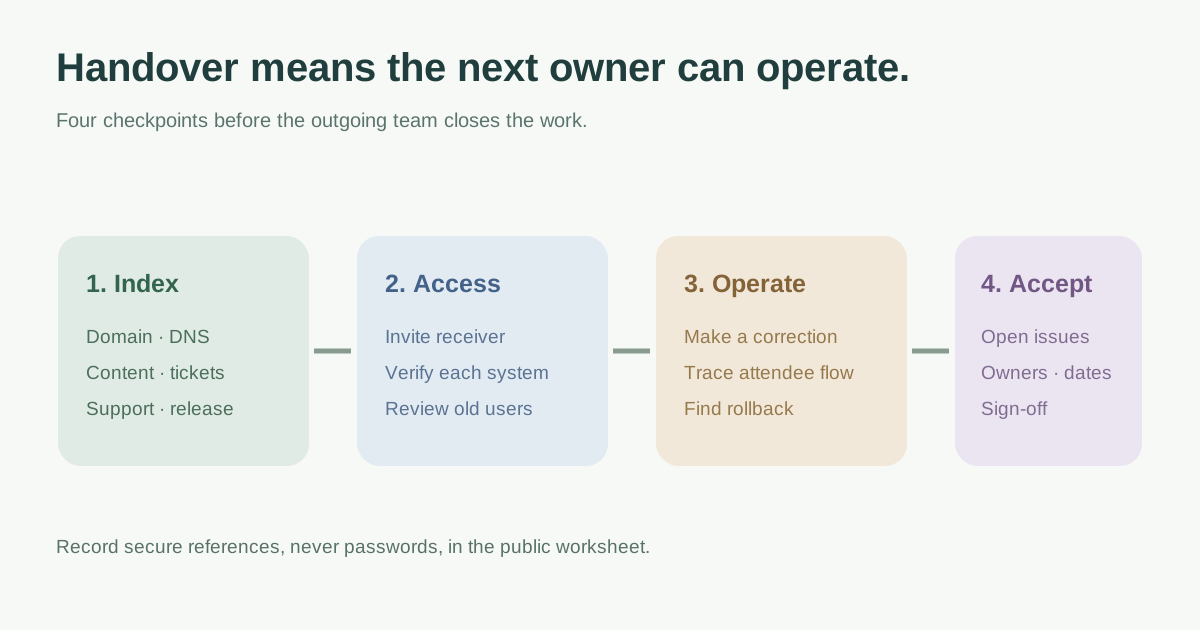
Assemble one handover index
Start with a single index that points to the repository or site builder, live domains, hosting account, DNS provider, registrar, content library, analytics, Search Console, email service, forms, registration/ticketing provider and payment/support systems. Name the organization or account that controls each service and the person who maintains it. Domain registration and DNS can live in different accounts; a handover that lists only the domain registrar may still leave routing outside the receiving team’s control.[3]
| Area | Receiver needs |
|---|---|
| Public site | Canonical URLs, stage/live environments and current status |
| Content | Page map, language versions, approval owner and source files |
| Attendee flows | Registration, checkout, confirmation, refund/support boundaries |
| Operations | Monitoring, backup/restore procedure, release/rollback notes |
| Commercial | Vendor contacts, renewal dates and billing owner |
Transfer access through the service, then verify it
Inventory accounts and roles before changing them. Invite the receiving owner with appropriate service-level access and multi-factor authentication where available; verify they can reach the live site, logs, DNS zone, registrar, ticketing and Search Console. Store recovery material in the organization’s approved secure system, not in the public worksheet or an email thread. Do not transfer control by merely sharing one person’s password.
Only after the receiving owner verifies access, review departing users and integration tokens. Google recommends auditing Search Console permissions and removing old verification tokens when ownership changes. Record who performs each revocation and when; do not revoke the only working owner before acceptance.[2]
Demonstrate the routine event-site tasks
Walk the receiver through changing the event date or venue, updating six language versions where used, publishing a correction, checking a registration or ticket link, responding to an attendee support issue, and finding the current deployment state. Have them perform at least one supervised change in the appropriate environment and explain the rollback route. A handover call without a successful receiver action leaves an important gap.
Keep platform boundaries explicit: a website edit may not change inventory, ticket terms or payment settings in an external provider. Document which system is the source of truth and who can approve cross-system changes.
List unfinished work and acceptance conditions
Put defects, stale pages, access gaps, missing source files, expiring vendor contracts and upcoming event deadlines in a visible issue list. Each item needs severity, owner, due date and workaround. Separate accepted known limitations from blockers that must be resolved before sign-off. The receiving team should acknowledge the package, validate critical access and attendee flows, and know the support contact for a failed launch or on-sale.
Download the editable event website handover worksheet (Markdown, English)
Sources and further reading
- Creative Agency Project Handover ChecklistNotion Marketplace · Accessed
- Search Console user and permissions managementGoogle Search Central · Accessed
- Transferring a domain to a different AWS accountAmazon Route 53 · Accessed