Approval-based event registration workflow and decision template
Some events accept every registration immediately. Others ask people to apply for limited workshops, hosted programs or invite-only sessions. In the latter case, “form submitted,” “approved,” and “has a valid ticket” must be separate states. The leading Google result is a Jotform approval-workflow template, so this guide supplies a usable review and communication worksheet rather than another generic registration-form overview.
Boletolibre editorial team
Published
Decide whether an application is actually needed
Use an approval gate only when a documented event requirement needs a human decision, such as a limited program with stated eligibility or a separate invitation review. Define the criterion, evidence needed, decision owner, capacity source and appeal or question route before opening the form. If there is no real review decision, ordinary registration or a transparent waitlist may be simpler. Do not ask for sensitive details merely to make an application look selective; have the relevant team review criteria and collection rules for the event and location.
The first organic result, Jotform’s professional event approval template, combines a submitted form, assigned reviewer and outcome routing. Its product-specific automations illustrate the state transitions, but the decision rules and communications remain the organizer’s responsibility.[1]
Map receipt, review, decision and ticket issuance separately
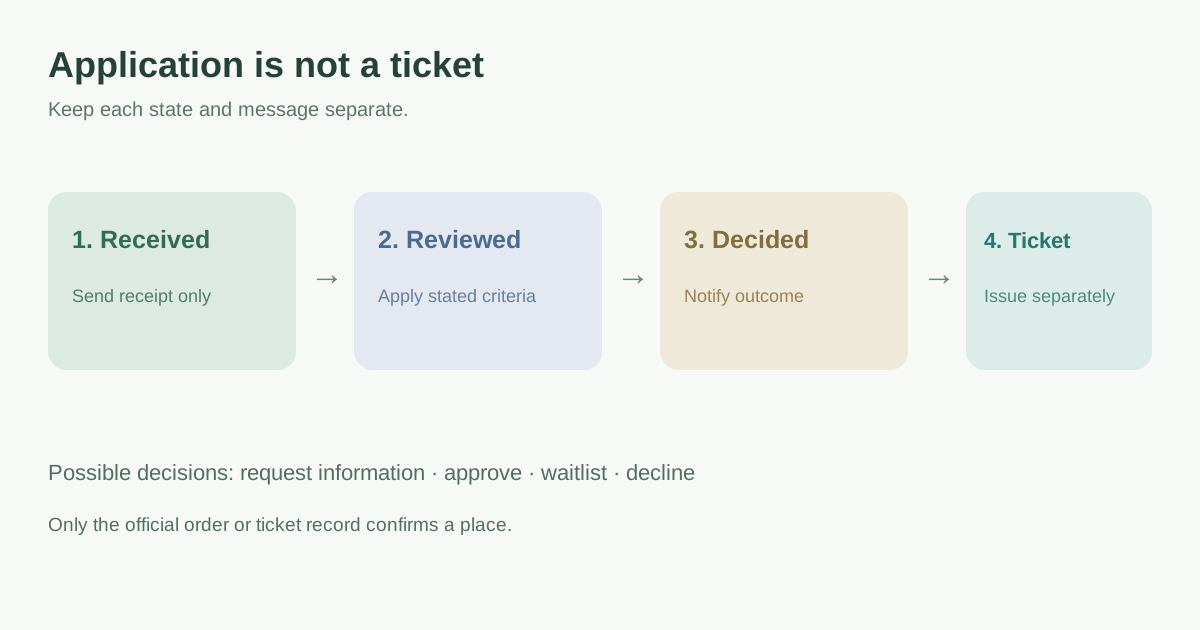
On submission, send a receipt that says the application was received and gives a reference and expected update channel. Assign an owner to check completeness and evaluate the published criteria. Record a decision with a reviewer and date; use explicit outcomes such as more information needed, approved, declined or waitlisted. Notify the applicant of the actual result. If an approved applicant must still claim or pay for a place, give a deadline and explain when a ticket is finally confirmed. A receipt must never look like an admission pass.
| State | What the applicant should hear | Internal next step |
|---|---|---|
| Received | We received your application; this is not a confirmed place. | Assign review owner |
| More information needed | Tell us the missing item by the stated date and secure channel. | Pause decision; log request |
| Approved | You are approved; follow the stated claim or payment step if required. | Reserve or issue according to policy |
| Waitlisted | You have not yet been offered a place; explain update route. | Track available places and order policy |
| Declined | State the outcome and a question route without exposing others’ details. | Close record under retention policy |
| Ticket confirmed | Provide the official ticket or order confirmation. | Check actual issued record |
Jotform documents configurable approval outcomes, assigned approvers, reminders and escalation, and it tracks in-progress, approved, denied, error and canceled workflow states. Those are platform states, not a guarantee that a ticket has been issued or a payment completed.[2][3]
Give reviewers a consistent, auditable decision card
The editable template records the criteria version, evidence actually needed, reviewer, conflict or escalation flag, capacity checked, outcome, rationale tied to the criteria, applicant notice and ticket-status check. Keep free-form notes proportionate and access-limited. Make a second reviewer or escalation path available where the organizer’s policy requires one; do not auto-reject on missing data if a clarification path was promised. Set a realistic service target and an owner for overdue requests, rather than inventing a universal approval time.
In Jotform, approval elements can request more information, reassign tasks and escalate; the completion rule matters when several approvers participate. If you use another system, confirm its actual notification and access behavior rather than assuming those controls exist.[2]
Draft each applicant message before launch
Prepare receipt, request-for-information, approval, waitlist and decline messages before inviting applications. Each should identify the application reference, the real outcome, next action, deadline if applicable, support route and whether the applicant currently has a place. Avoid “You’re in” until the underlying ticket or order is issued. A decision email is not evidence that payment succeeded. Jotform’s general approval-flow guide treats applicant notification as a separate branch after a review decision; test the equivalent branch in the platform you use.[4]
Walk a safe sample application through every branch, including an unanswered information request, reviewer absence, capacity changing mid-review and a failed ticket-claim or payment step. Check what the applicant actually sees, not only the reviewer dashboard. Use the worksheet to record who may change a decision and how a correction reaches the applicant.
Download the application decision and message worksheet (Markdown, English)
Sources and further reading
- Professional Event Registration Approval Workflow TemplateJotform · Accessed
- How to Set Up Approval Element in Jotform WorkflowsJotform Help · Accessed
- How to Track Approval Process in Jotform InboxJotform Help · Accessed
- A General Approach on Building an Approval Process WorkflowJotform Help · Accessed