Compare event website builders by the work your team must do
An attractive event page is only the start. After launch, someone must correct a speaker name, change a room, approve new access information and keep the registration destination accurate. Compare builders by rehearsing those ordinary changes with your real team. The most useful choice is the one that lets the right people make and verify them reliably for your event.
Boletolibre editorial team
Published
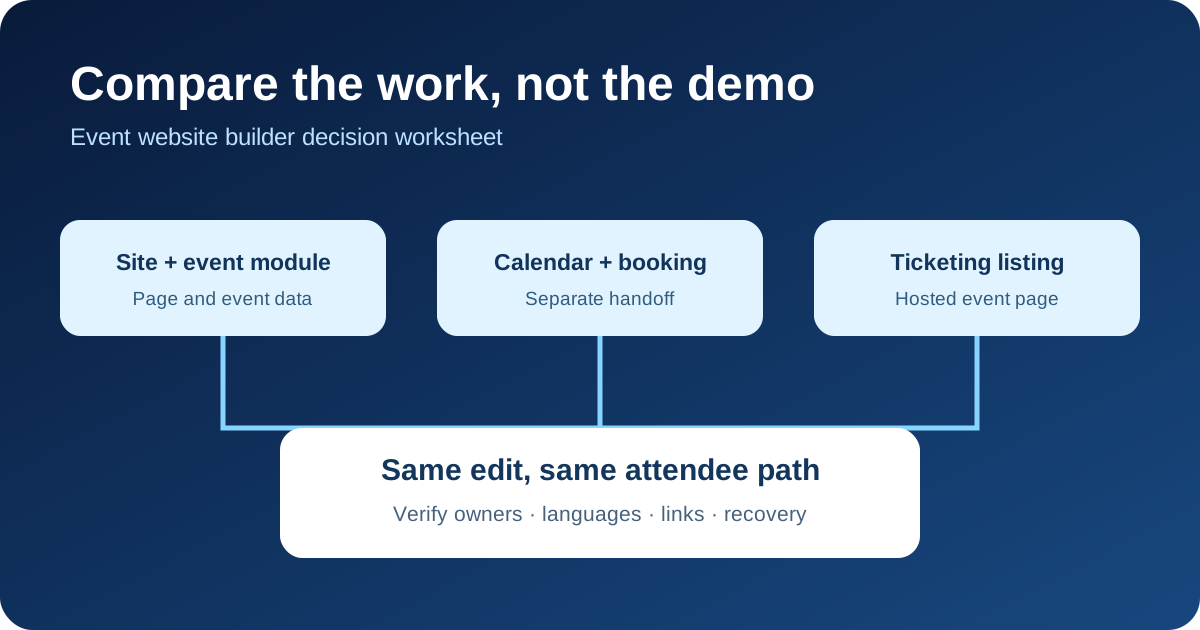
Download the comparison worksheet
Download the editable comparison worksheet
Copy the worksheet and list your candidate platforms, event format, public URL, editor roles and ticket destination. For each candidate, record what you actually observed in a trial account or vendor demonstration, the documentation URL, an unresolved question and the person who will decide. Leave a capability unverified when you have only a sales claim. Compare the total work of keeping an event accurate, not a feature count.
Compare three publishing models
A general website builder with an event module can keep pages and event details in one site: Wix Events documents a dedicated events page with RSVP and ticket routes. A calendar-page model can publish dates and descriptions while booking remains separate: Squarespace says its calendar pages do not themselves support booking. A ticketing-platform listing can combine an event description with ticket setup: Eventbrite documents a preview and publish flow. These are examples of different workflows, not a ranking; inspect the current plan and configuration of each candidate.[1][2][3]
Run one realistic content-change trial
Use the same scenario everywhere: a speaker changes, one session moves room and the accessibility contact changes. Ask an editor to update the agenda, event landing page, email draft and any app or ticket listing that repeats those facts. Record where a single edit propagates and where someone must copy it. Time the handoffs only as observations for your team; do not assume that a faster demo will remain faster in production. Reopen the public page on a phone and inspect the final text, date, time zone and links.
Follow the attendee path to registration
Start from search or a shared link, read the event page, select registration or tickets, and reach the confirmation or payment boundary in a safe test flow. Note which system owns each screen, whether the event name and price still match, and where analytics or support context stops. If Boletolibre.com is your public event page, include its exact URL in this walk-through and follow the actual registration link rather than assuming the two pages share data. A builder decision that ignores the checkout handoff can hide the most important attendee problem.
Check approvals, languages and recovery
Try a draft, review and correction before purchase. Ask who can edit a published page, who approves a change and whether a previous version can be recovered; verify those controls in your selected product and plan. For multilingual events, change one date or access instruction and inspect every locale, not just the default page. Record who owns the source of truth and which channel must be corrected after a postponement. Export or copy a sample of the content so the team understands its future handover route.
Make a decision with evidence
Write down the event requirements that are essential, the capabilities demonstrated, the exceptions and the remaining supplier questions. Name the operator who will maintain the site and the backup person who can correct a public error. Compare quoted platform, payment, integration and support costs on the same event scope, but avoid choosing from an advertised starting price alone. Choose the simplest workflow that meets the real registration, publishing and accessibility needs you observed; repeat the trial when a product or plan changes.
Sources and further reading
- Wix Events: Adding Wix Events to Your SiteWix Help Center · Accessed
- Calendar pagesSquarespace Help Center · Accessed
- Create an eventEventbrite Help Center · Accessed