Event financial scenario model: compare ticket, sponsor and cost assumptions
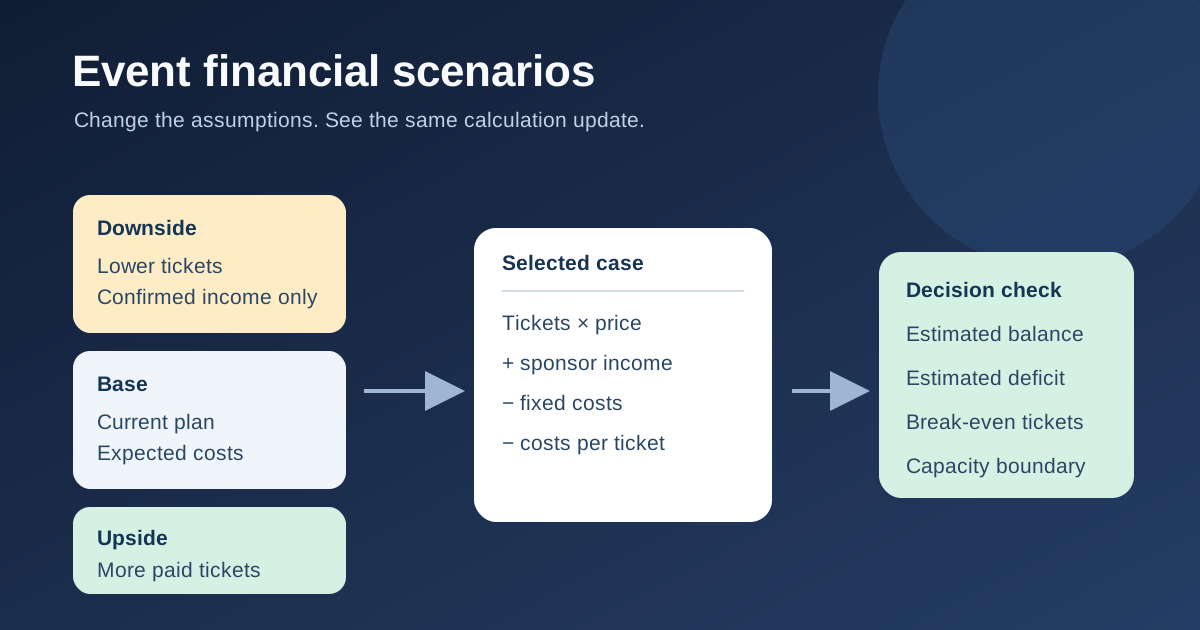
A single event budget can conceal how much depends on ticket sales or an unsigned sponsor. This editable model keeps three sets of assumptions—downside, base and upside—while one calculation updates when you switch the selected case. Use it to ask which commitments remain affordable if sales differ from the plan. It is a planning estimate, not a guarantee of profit or cash available on a particular date.
Boletolibre editorial team
Published
Download and choose a case
Download the editable event scenario model (XLSX)
Download the workbook and replace the amber illustrative inputs in each case. Select Downside, Base or Upside in cell C4. The active column and results then recalculate from that case. Use one currency throughout. The figures in the download are examples, not suggested prices, sponsor targets or risk percentages.
Write the source and date of each real assumption in your working budget: ticket capacity from the venue, price from the approved ticket plan, signed sponsor amounts separately from prospects, supplier costs from quotes or contracts, and fee amounts from your actual checkout setup. The workbook shows one case at a time, so switch C4 when discussing another outcome.
Change the drivers that really vary
Paid tickets, ticket price, sponsor income, other income, committed fixed costs, other fixed costs, cost per attendee, fee per ticket and usable ticket capacity are separate inputs. A venue deposit already committed should not disappear in the downside case. Catering may vary with final headcount if the supplier agreement allows it; otherwise keep that amount fixed. Include only income you can reasonably support in each case.
NumFOCUS recommends a range of conservative and optimistic event budgets. This workbook adds a base case and separates per-ticket costs from fixed commitments. Microsoft describes what-if analysis as changing input values to see how formulas respond. Neither source supplies universal downside percentages or assures that a low-sales case will break even.[1][2]
Read the balance and break-even count
The model calculates gross ticket income as paid tickets multiplied by ticket price. It adds sponsor and other income, then subtracts fixed costs and paid-ticket-linked costs. Estimated balance is total income minus total costs. Funding shortfall is the amount below zero. The break-even ticket count divides fixed costs less non-ticket income by the contribution from one additional paid ticket, rounding up; it is unavailable when that contribution is zero or negative.
In the illustrative inputs, the base case has 100 paid tickets at 40, sponsor income of 2,000, fixed costs of 4,500 and per-ticket costs of 15. That produces 6,000 of income, 6,000 of costs and a zero estimated balance. The downside example produces a 2,000 shortfall; this is precisely why a scenario is useful. Replace every example before making a real commitment.
Check capacity and choose a response
The decision row warns when planned tickets exceed usable capacity or when the calculated break-even ticket count is above that capacity. A mathematically positive result is not permission to sell more admissions than the approved plan allows. If the downside case shows a gap, identify a named decision: reduce an uncommitted expense, secure confirmed funding, change the offer only after approval, or accept and fund the risk. Record the owner and decision date outside the sheet.
Do not make an optimistic case by counting unsigned sponsors as cash or removing contractually owed costs. Test a realistic late supplier increase or refund exposure when it is material. If unit contribution is nonpositive, more ticket sales alone do not solve the model; revisit the price and cost structure.
Keep scenario, budget and cash timing distinct
Update the case inputs when sales pace, usable capacity, sponsor status or supplier commitments change. Reconcile totals with the approved event budget so income and fees are counted once. The model treats revenue and cost totals for a scenario; it does not show when a ticketing platform pays out or a vendor deposit falls due. Use a separate cash-flow forecast for that timing question.
Check taxes, refunds, complimentary admissions, mixed ticket tiers and payment-processing terms with the actual contracts and your finance adviser. A single average ticket price can hide tier mix, and a single per-ticket fee may not match a processor’s rate. Expand the model only when the additional detail changes a decision.
Sources and further reading
- Creating a Projected Budget for Your EventNumFOCUS Events · Accessed
- Introduction to What-If AnalysisMicrosoft Support · Accessed