Event media credential application template and review workflow
A media credential request is an application for defined access, not a ticket automatically issued by a form. The leading Google result offers a long press-pass form; established events also publish their own distinct evidence rules. This original worksheet helps you choose only the questions your event needs and connect every decision to a clear applicant response and door record.
Boletolibre editorial team
Published
Publish the scope before opening applications
Download the editable media-credential review kit (Markdown, English)
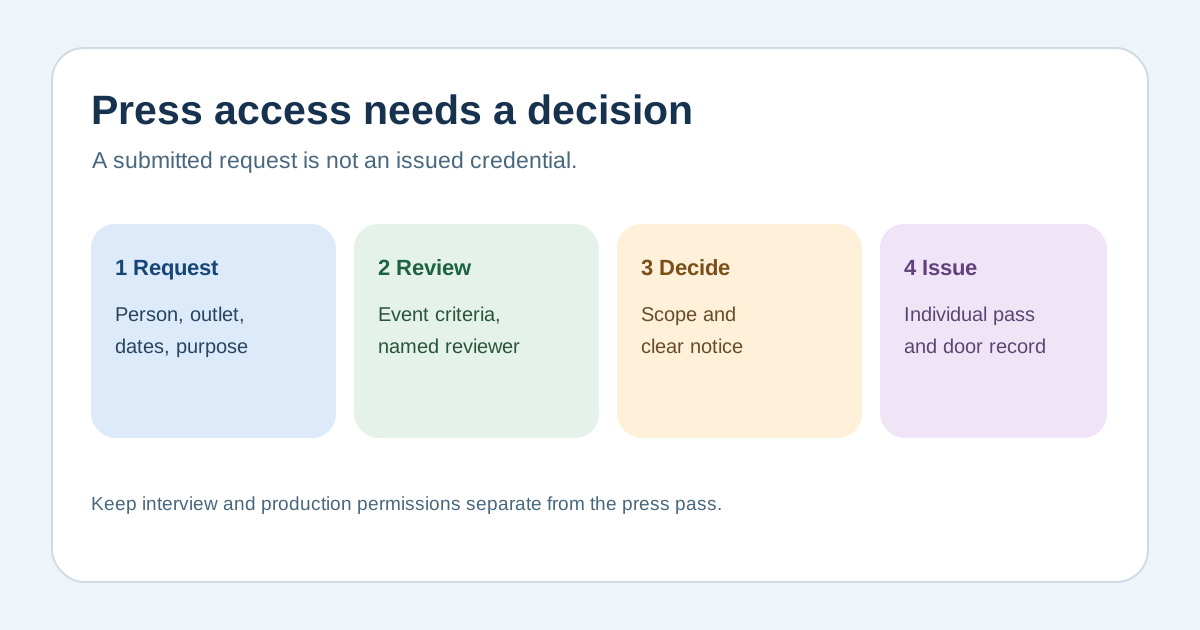
Define which dates, locations and working areas a credential might cover, when requests close, who reviews them and when applicants can expect a decision. State your event’s own outlet, freelancer, creator and crew criteria after local review. A press card, assignment letter, portfolio link or estimated reach may be useful in one program and inappropriate in another. Do not copy another organization’s eligibility thresholds or imply that submitting the form grants access.[1][2][3][4]
Keep the application short and conditional
Start with applicant name, contact, outlet or commissioning organization, media role, requested dates and type of coverage. Ask for interview, photo position, vehicle or crew details only where those requests are actually available; make each additional person identifiable if individual credentials are needed. Explain why any work sample or document is requested, who can view it and how long it is kept under your approved policy. Use clear labels, instructions and errors, and provide an accessible contact route if the form fails.[1][2][3][4]
Review consistently and record the decision
Use a reviewer-owned log with application ID, submitted evidence, criteria applied, decision, reason category, permitted zones or dates, and decision date. Separate verification of the applicant from allocation of scarce interview or camera positions. Route production requests to the relevant owner instead of granting them automatically with a press badge. Have a second reviewer handle ambiguous cases and follow your event’s escalation policy; avoid unsupported promises about appeal rights.[1][2][3][4]
Issue and check the credential
Send a receipt on submission that says review is pending. Later send an explicit approval, rejection or request for missing information; an approval should list dates, collection or digital issuance method, accessible entry point, allowed areas and a support contact. Coordinate the individual name and access rights with the credential desk and check-in roster. Rehearse changed personnel, lost badge, separate crew arrival and an unapproved applicant at the gate. Apply filming and safety rules actually approved for this venue rather than copying another event’s terms.[1][2][3][4]
Sources and further reading
- Event Media Accreditation Request Form TemplateFileIt · Accessed
- Requirements for First Time/Temporary PassUnited Nations · Accessed
- Press accreditationFestival de Cannes · Accessed
- Forms TutorialW3C Web Accessibility Initiative · Accessed