Event cost per registration calculator: actual marketing spend
Cost per registration is useful only when the spending period, confirmed-person count and attribution rule describe the same event. This editable calculator starts with actual promotion costs and deduplicated people, then blocks the overall ratios until channel counts match your registration export. It separates the cost of acquiring a confirmed person from the cost per person who arrived.
Boletolibre editorial team
Published
Download the cost-per-registration calculator
Download the editable Excel calculator
Enter an event or edition, reporting period, currency and one attribution rule. The yellow cells are inputs. Enter zero for a channel you did not use; leave a cell empty only when its value is still unknown. The workbook shows “missing” for incomplete inputs, “n.a.” for a zero denominator and “reconcile” when channel counts do not match the source totals.
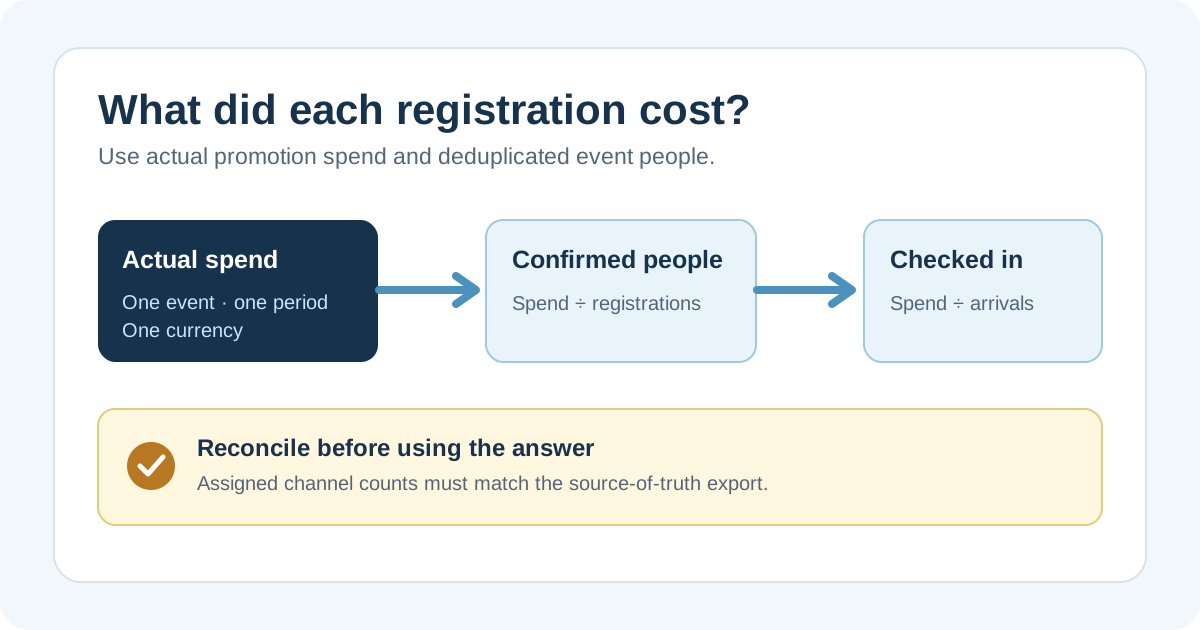
Choose one numerator and two different denominators
The numerator is actual promotion spend for the selected event and period. Include paid media and other promotional costs only when you can allocate them consistently; do not mix in the entire venue, catering or ticketing budget. The first denominator is deduplicated confirmed people, not orders or tickets sold. The second is people who checked in. A group order may contain several attendees, while a refund or duplicate record may need a defined treatment before counting. Document those choices beside the export.
Assign each person once
Use one rule for channel attribution, such as the source saved with a confirmed registration. Do not add the same person to email and paid social because both touched the journey. Keep direct or organic and unknown or unattributed rows visible. Enter actual spend for each channel, including an explicit zero when no promotional spend was allocated. A zero for organic means zero allocated promotion spend in this model, not that staff time or the event was free.
Reconcile against the registration and check-in records
Enter authoritative confirmed and checked-in totals from the systems your team uses. The assigned channel totals should equal those totals; a positive difference means possible double counting, while a negative difference means someone is missing from the allocation. Investigate both before using the overall rate. If your event page is on Boletolibre.com, save its exact URL in the evidence note and compare the counts with your actual confirmation and door records; do not treat page visits as registrations. Keep personal attendee data out of this shared workbook.
Read the two rates without inventing ROI
For example, 600 in actual promotion spend, 30 confirmed people and 24 check-ins produce 20 per confirmed person and 25 per arrival in the same currency. Neither number is a profit margin or return on investment. Compare editions only when the period, spend allocation, person-level deduplication and attribution rule are comparable. Review channel rates alongside sample size and the unknown bucket; a small channel can swing sharply after one registration.