Event social media content calendar template: plan each post
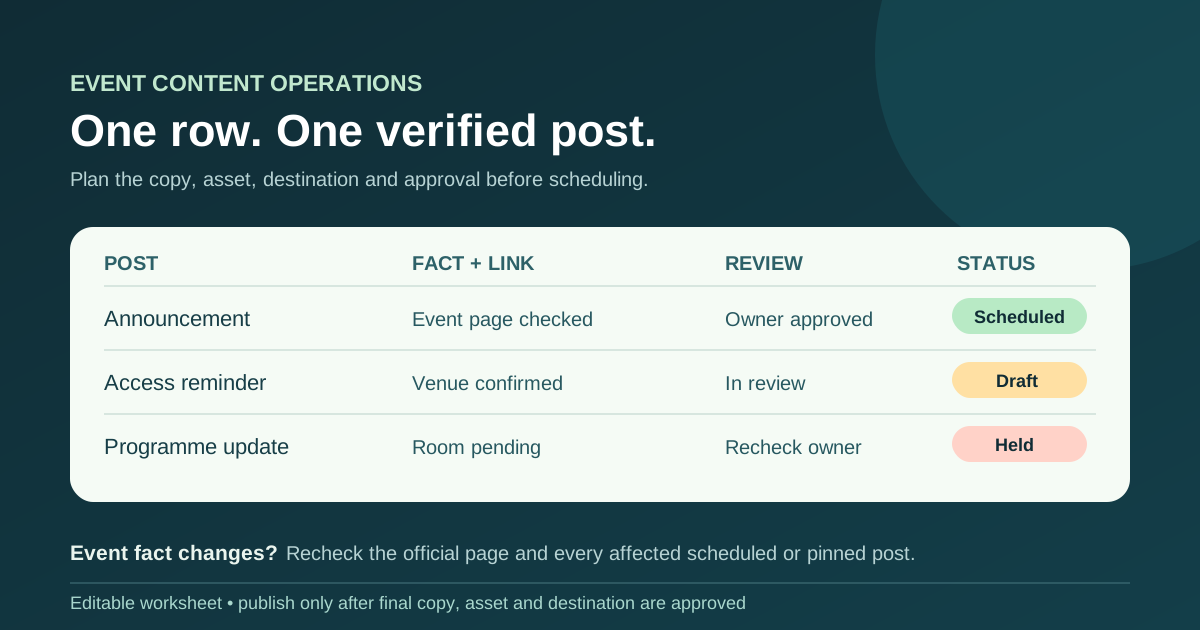
A campaign timeline can say ‘announce the event’, but it cannot tell a scheduler which caption, image and link are approved today. Use this post-level calendar to turn each message into a reviewable publishing decision. The included worksheet follows individual posts from draft to published URL, with a hold path when an event fact changes.
Boletolibre editorial team
Published
Download the editable post calendar
Download the event social media content calendar (Markdown)
Copy the worksheet for one event edition and state the event time zone at the top. Keep one row per planned post, including platform and format, planned local publish time, audience question, copy file, asset, destination, fact owner, reviewer, status and eventual post URL. It opens in any text editor and the table can be pasted into a shared document or spreadsheet. The example rows are prompts to replace, not a required posting frequency.
Keep this sheet separate from a broad marketing launch calendar. A launch plan tracks campaign milestones and channels; this sheet holds the final details a person or scheduler needs for one post. Link to a more detailed copy draft when a caption will not fit comfortably in the row.
Choose posts from real attendee questions
Begin with a confirmed event page and the questions your audience must answer: What is this event? When and where is it? How do I register? How do I arrive? What has changed? A post earns a row when it has a useful purpose and a verified destination. You may need an announcement, a programme explanation, an access reminder or a recap; you do not need every format on every platform.
- Announcement: state the event edition, confirmed date and one clear action.
- Programme or speaker: use approved names, sessions and times; link to the current programme.
- Practical information: point to current arrival and accessibility details, with a contact for unanswered questions.
- Follow-up: share only approved resources, images and recordings at a real destination.
Set the platform and format after deciding whom the post serves. A short video may need captions; an image may need a platform-supported description and readable text. W3C’s images guidance is a useful starting point for judging what an image communicates, but check the actual publishing platform’s accessibility fields before posting.[1]
Complete the row before scheduling
Draft the exact caption and call to action. Add the actual asset file, its usage approval, and the final destination URL. Open that URL on a phone and confirm the event name, edition, date, time zone, venue and ticket status match the post. When the destination is a Boletolibre.com event page, check that published page and the ticket path a visitor actually sees; do not assume a draft or preview reflects the public page.
If you append campaign parameters to the URL, use a consistent naming convention and check the resulting link. Google Analytics documents custom campaign URLs, but a campaign-tagged visit alone does not establish that a registration or sale occurred. Do not put private attendee details, unpublished credentials or unsupported sales claims into the shared calendar.[2]
Use a clear approval and publication state
Give every row a draft owner and a named final reviewer. The reviewer should inspect the actual copy, artwork, fact source and destination, not only the topic label. Record Draft, In review, Approved, Scheduled, Published or Held. Approval is for a particular version of the post; if the file or event facts change, recheck before it goes live.
A scheduled item is not a published item. After it appears, record the live post URL and actual date. If a platform rejects an upload or the link is wrong, mark the row Held with an owner and next check rather than claiming it was distributed. Keep pinned and partner-shared copies in view when they may outlive the original schedule.
Recheck the calendar when the event changes
A new venue, start time, room, price, capacity or registration deadline can make several queued posts inaccurate at once. Update the authoritative event page first, identify every affected scheduled or pinned row, and assign a person to correct or hold it. The worksheet includes a change log for the source of the change, affected rows, page owner, direct attendee channel and re-review deadline.
Social posts are a discovery and amplification channel, not a dependable service alert to every registered person. When a change directly affects attendees, use the approved attendee communication channels as well as the public page. Safety or emergency instructions belong to the venue’s approved plan. After the event, retain the post URLs and notes that explain what was published, held or corrected; use those observations to improve the next calendar rather than treating impressions alone as success.
Sources and further reading
- Images TutorialW3C Web Accessibility Initiative · Accessed
- URL builders: collect campaign data with custom URLsGoogle Analytics Help · Accessed