“How did you hear about this event?” question: a practical source-review template
A campaign link tells you how one observed visit reached a page. It does not necessarily tell you what first prompted a person to register. An optional “How did you hear about this event?” question can add the attendee’s account, but its answer is a different kind of evidence. Use the question only when someone will review the result and change a real promotion decision.
Boletolibre editorial team
Published
Ask one question that a registrant can answer
Download the editable source-question and review sheet (Markdown, English)
Use “How did you hear about this event?” as the main label. Add “Select the main way you found out; optional” if that instruction matches your form. Do not ask “Which ad converted you?”: a person may remember a friend or a speaker although the final visit came through an ad. Decide before launch whether you want first awareness or the most recent prompt, and keep that wording stable for the event edition.
Record who owns the answer and what decision it will inform. If no promotion owner will review the responses, remove the field. The general event-registration question bank includes this as one optional example; this worksheet develops the wording, answer code and reporting method for that specific question.
Choose options from your actual promotion plan
Start with sources you actually used: your own email, a partner or speaker, a friend or colleague, paid social, organic social, search, printed material, or a venue. Use short attendee-facing labels rather than UTM codes. Include “I do not remember” and an optional “Other” answer so the form does not force a false choice. A single-select field is useful if you want one main source; use multiple choice only if you will report multiple influences separately.
Give each display label a stable internal category in the worksheet. If you change options mid-campaign, note the date and preserve the old mapping. “Instagram” alone may mean a paid ad, an organizer post or a friend’s share; ask for that distinction only if the attendee can reasonably know it. Avoid an open text box for names of friends or unnecessary personal details.
Place the field without blocking registration
Keep the field optional and clearly label it as such. W3C WAI advises form authors to indicate required and optional inputs in instructions the user can access. Check the field with a keyboard and screen reader, including “Other” if it reveals a text input. Put it after the information needed to issue the ticket or registration, and make sure skipping it never blocks payment or confirmation.[3]
Check every registration path: mobile, group bookings, complimentary admissions and a hosted checkout if you use one. An organizer page on Boletolibre.com may lead to a separate registration form; confirm that the destination can collect the answer before you promise it on the public page. Do not imply Boletolibre.com collects this field without verifying the actual form configuration.
Compare reported and tracked sources carefully
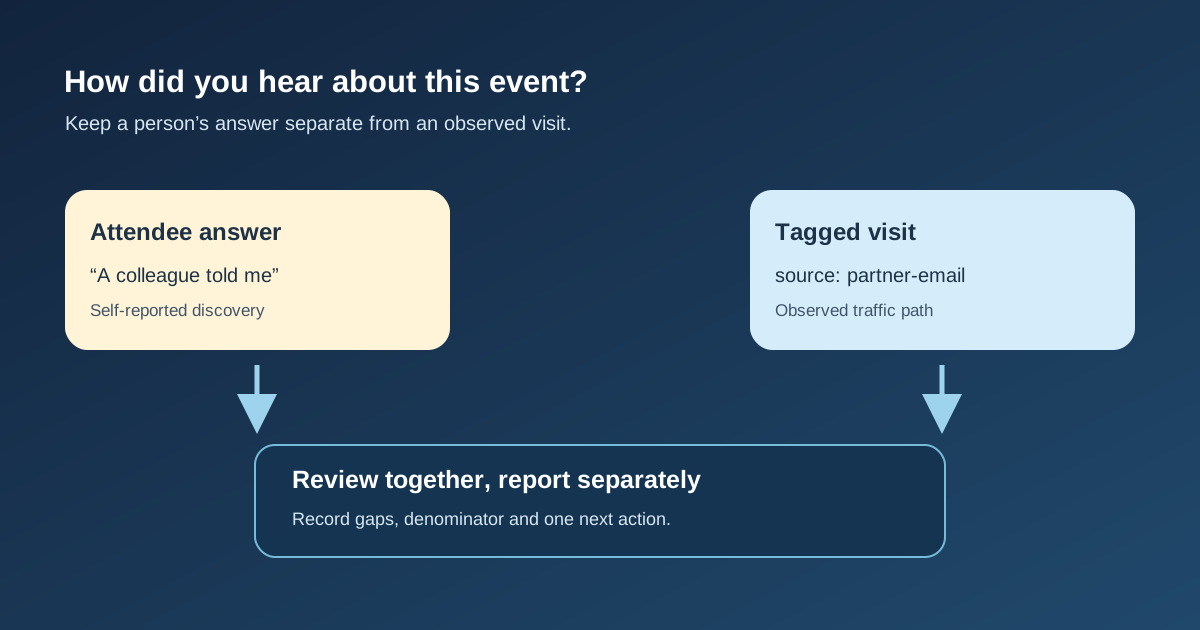
Keep two columns, not one invented “true source.” The form answer is self-reported awareness. A tagged landing visit is observed web traffic. Google Analytics says its manual campaign report is populated by UTM-tagged click URLs; its direct/none category can include visits lacking a clear referral and links whose tags were lost. Neither report can automatically prove what first made the attendee interested.[1][2]
Compare only a defined population and period: for example, confirmed registrations for one event edition, with answer rate shown beside the distribution. Label blank, unknown and untracked records. If registration occurs on another provider or device, first verify whether your analytics and registration data can be linked appropriately; do not join people by guesswork. Report aggregate patterns without exposing a person’s answer beside their contact details.
Turn the findings into one decision
Review a small table of “reported source,” “tracked source,” “known gap” and “next action.” If many registrants select a partner while tagged partner visits are low, check partner links and their publication route; the answers alone do not establish a causal return. If tagged social visits are high but few registrants name social, inspect whether the reports count visits, registrations or people before changing spend.
Save the question version, export date, denominator and unresolved gaps with the next event plan. Choose one action you can test, such as updating a partner link, clarifying an answer label or removing an unused field. A difference between the two sources is a prompt to investigate, not a reason to rewrite the attendee’s answer.
Sources and further reading
- [GA4] Manual reportGoogle Analytics Help · Accessed
- [GA4] Understand (direct) / (none) trafficGoogle Analytics Help · Accessed
- Form InstructionsW3C Web Accessibility Initiative · Accessed