Printed vs digital event tickets: choose a clear entry policy
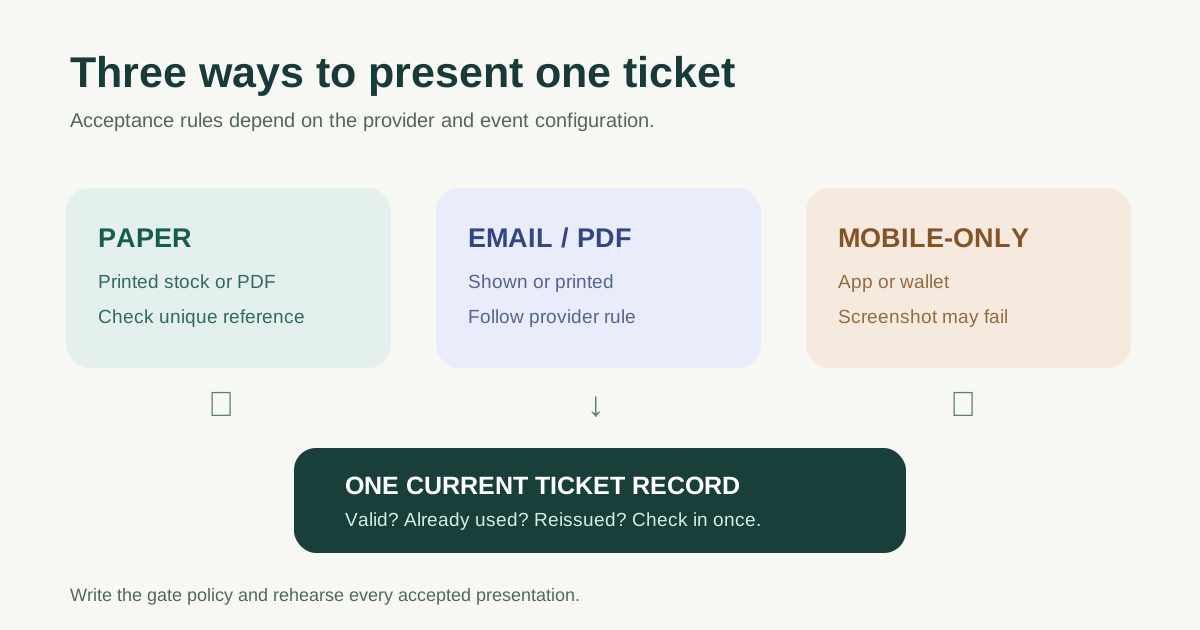
“Digital ticket” can mean an emailed PDF that may be printed, a QR code shown in an app, or a mobile-only credential that cannot be replaced by a screenshot. “Printed ticket” can mean a preprinted numbered stock ticket or a paper copy of the same digital credential. Before choosing a format, define which underlying ticket record is valid and what staff will accept at the gate. The leading comparison for this search lists general pros and cons; the practical decision is how each accepted presentation is checked against one entitlement.
Boletolibre editorial team
Published
Separate delivery format from validation rule
A paper ticket is not automatically untrackable, and a code on a phone is not automatically secure. Validation depends on whether the ticket has a unique identifier, whether the scanner or list checks the current ticket status, and how repeat presentation is handled. Eventbrite says its tickets normally have QR codes and its Organizer app can detect a previously used ticket. It also documents name-based check-in and print-on-demand options. Those are capabilities of that product and configuration, not a claim about every paper or mobile ticket.[2][3]
| Presentation | What the attendee needs | What the gate must verify |
|---|---|---|
| Preprinted physical ticket | Original item or a reissue process | Unique ticket identity, sale or allocation status, prior admission |
| Printable PDF / email ticket | Access to email or a paper copy | Code or reference against current ticket record |
| Mobile app or wallet ticket | Compatible device and access to credential | Current in-app/wallet credential and provider acceptance rules |
| Name lookup fallback | Identity details that match order | Authorized lookup and documented exception decision |
Tell buyers exactly what will be accepted
Do not call an event “mobile ticketed” and then leave guests guessing whether a PDF, screenshot, printout or wallet pass works. Some systems use dynamic or mobile-only credentials. Ticketmaster’s Mobile Entry help says screenshots are not accepted and recommends adding tickets to a wallet for offline access. That is a Ticketmaster rule for its Mobile Entry product; another event’s PDF QR code may be printable and scannable. Publish the actual rule for your chosen provider, venue and ticket type.[4]
Offer an accessible help path for a guest whose phone is unavailable, whose email is inaccessible or who bought through an offline channel. A fallback is not a promise of automatic admission: staff need a way to verify the order and invalidate or reconcile any duplicate credential. Tell the guest where to seek help before they reach the queue.
Download the ticket-format acceptance worksheet
The editable worksheet names each ticket type, delivery route, accepted presentation, scanner or lookup method, internet/offline assumption, reissue owner and duplicate-handling rule. Use one row per genuinely different policy. For example, a mobile-only ticket and a printable PDF cannot share an ambiguous “show your ticket” instruction.
Download the event ticket acceptance worksheet (Markdown)
If you support multiple formats, keep them tied to one source of truth for admission. Otherwise a replacement paper ticket and the original phone credential could both appear valid to different doors. A lost or damaged item should trigger a controlled reissue or verified lookup, not a second untracked entitlement.
Rehearse the gate with real device and paper conditions
Before sales open, create sample tickets for every offered format and test the actual scanner, staff account and venue entry area. Check a dim screen, cracked screen, folded printout, dead-phone help request, duplicate scan, resold or reissued ticket, and an offline or delayed-sync condition if the provider supports it. Decide when staff must stop and escalate rather than letting a long queue turn a payment screenshot into an admission decision.
Do not assume digital is always faster, cheaper or better for the environment, or that paper works in every outage. Speed depends on the scanner, queue and exception volume; printing has fulfillment and tracking work, while digital requires compatible access. Measure the event’s actual constraints and write one plain-language entry policy.
Sources and further reading
- Printed Event Tickets vs. Digital Tickets – Which Is Right for You?Eventgroove · Accessed
- Prevent attendees from sharing ticketsEventbrite Help Center · Accessed
- Setting up equipment for your eventEventbrite Help Center · Accessed
- How do I use Mobile Entry tickets?Ticketmaster Help · Accessed